214328 42 Revision A
4.1.3 Hydraulic Link with Optional Self-Alignment Kit
The following connection procedure applies to M150, M155, M155E4, M200, and M205 windrowers with a
hydraulic center-link and optional self-alignment kit installed.
WARNING
To avoid bodily injury or death from unexpected startup of machine, always stop engine and remove key
before making adjustments to machine.
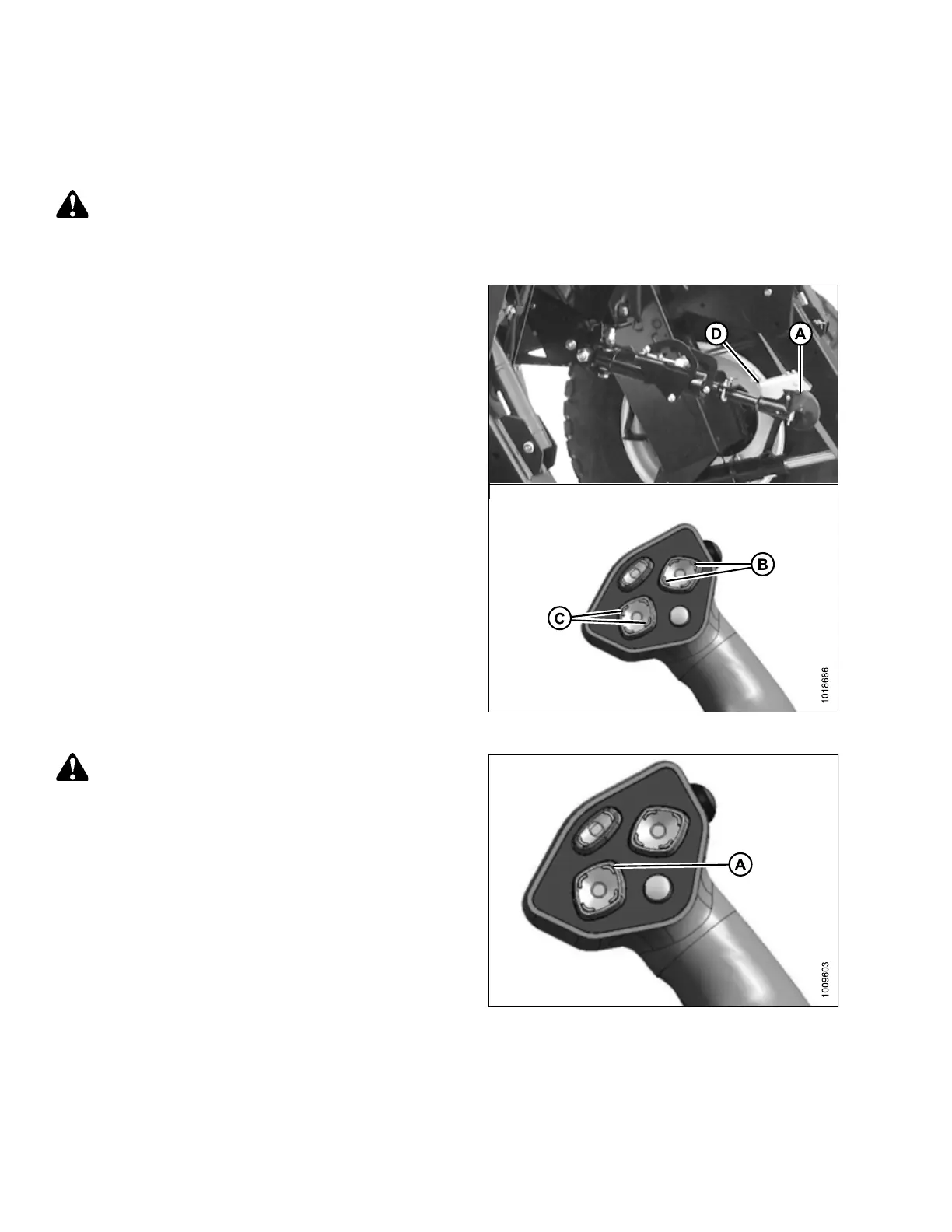
Figure 4.19: Hydraulic Center-Link
1. Adjust position of center-link hook (A) with reel position
switches (B), and header tilt switches (C) on GSL until
hook (A) is above header attachment pin.
IMPORTANT:
Hook release (D) must be down to enable self-locking
mechanism. If release is open (up), manually push it
down after hook (A) engages header pin.
2. Lower center-link hook (A) onto header with REEL
DOWN switch on GSL until it locks into position (hook
release [D] is down).
3. Check that center-link is locked onto header by
pressing REEL UP switch on the GSL.
Figure 4.20: GSL
CAUTION
Check to be sure all bystanders have cleared the area.
4. Start engine.
5. Raise header fully with HEADER UP switch (A) on
the GSL.
6. Stop engine and remove key.
7. Engage safety props on both lift cylinders.
ATTACHING HEADER TO WINDROWER



 To Next Page