214328 70 Revision A
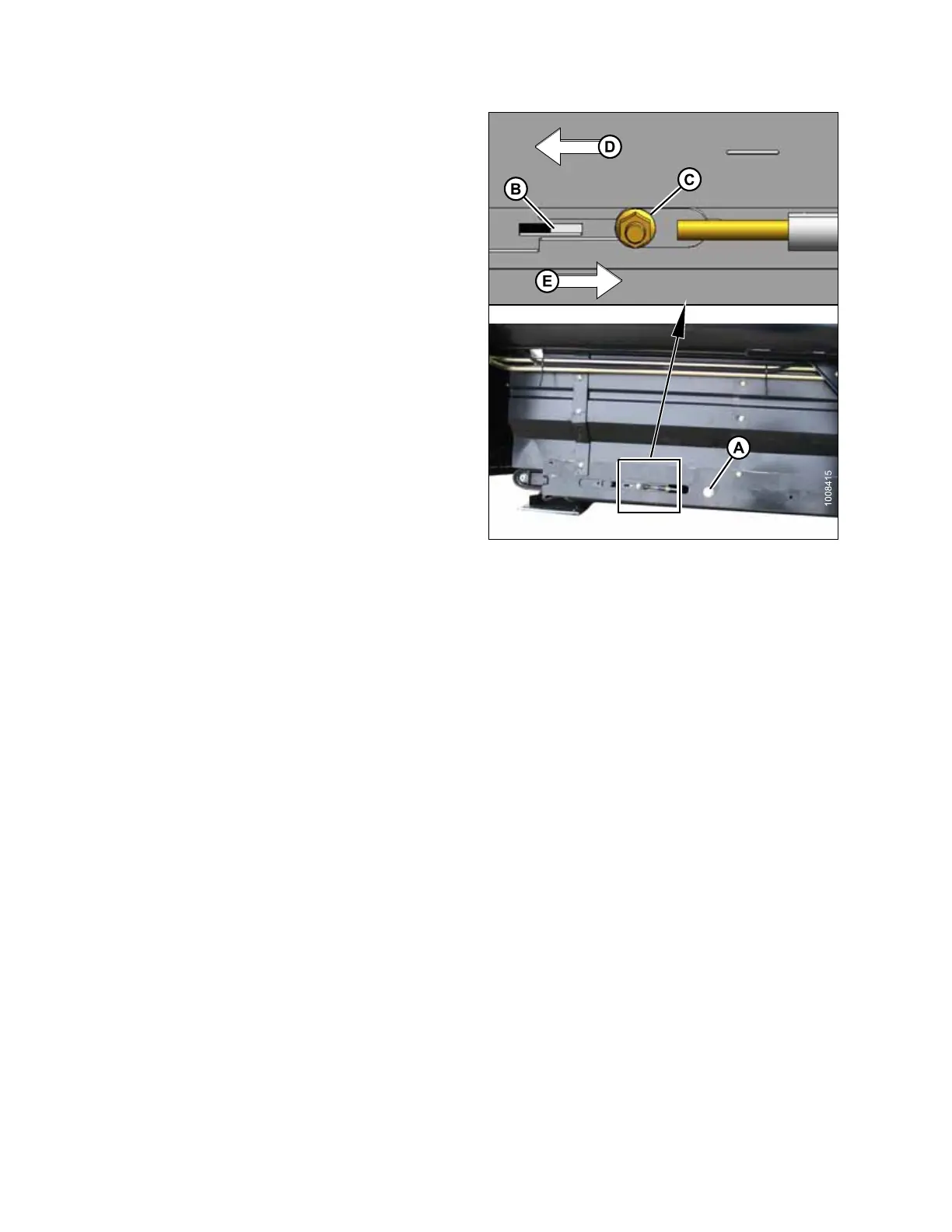
Figure 5.37: Tension Adjuster (Left Shown –
Right Opposite)
IMPORTANT:
Do NOT adjust nut (C). This nut is used for draper
alignment only.
5. If draper is too tight, turn adjuster bolt (A)
counterclockwise to loosen draper. The white indicator
bar (B) will move outboard in direction of arrow (D) to
indicate that draper is loosening. Loosen until bar is
about halfway in window.
6. If draper is too loose, turn adjuster bolt (A) clockwise to
tighten draper. The white indicator bar (B) will move
inboard in direction of arrow (E) to indicate that draper
is tightening. Tighten until bar is about halfway in
window.
IMPORTANT:
• To avoid premature failure of draper, draper rollers,
and/or tightener components, operate ONLY with the
white bar visible.
• To prevent draper from scooping dirt, ensure draper
is tight enough that it does NOT sag below point
where cutterbar contacts the ground.
PERFORMING PREDELIVERY CHECKS



 To Next Page