HEADER – GENERAL
Form 169017 77 Issue – June 2008
6.4.2.3 Float Options
For draper headers without the deck shift option,
auger headers, and rotary headers, the float can
be pre-programmed for three types of
windrowing conditions. For example;
• Position 1 – Border
• Position 2 – Normal
• Position 3 – Rocky
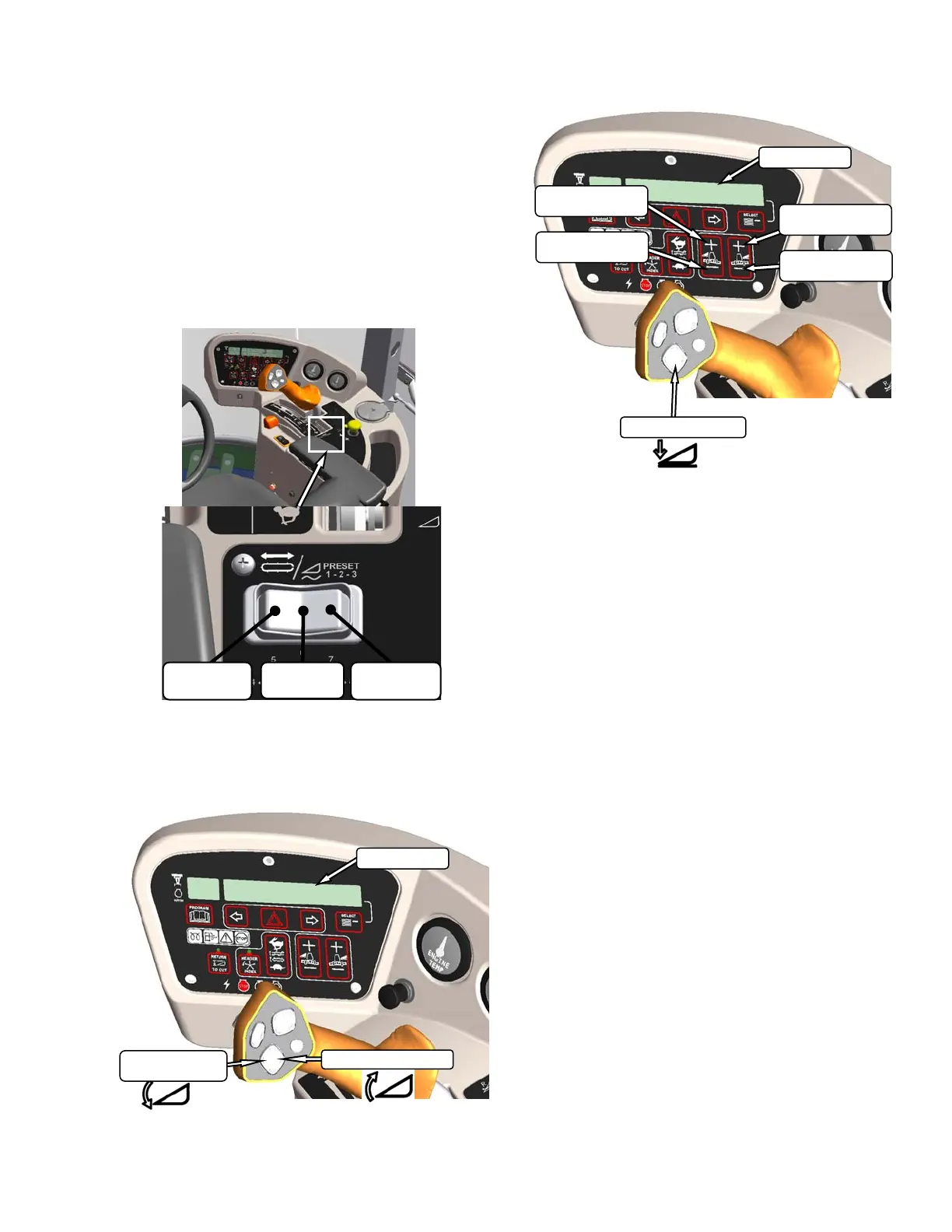
Set float pre-sets as follows:
a. Engage header.
b. Push float preset switch to position 1.
c. Using HEADER TILT SWITCHES, set center
link to mid-range position (05.0 on DISPLAY).
d. Using HEADER DOWN switch, lower header
fully with lift cylinders fully retracted.
e. Using left float switch, push
+ to increase float,
or
– to decrease float on left side of header.
DISPLAY will indicate selected float for left side,
for example (8.0 L FLOAT R XX.X).
f. Repeat for right side float with right switch.
DISPLAY will indicate float for both sides, for
example (8.0 L FLOAT R 3.0).
g. Select a second preset with the float preset
switch.
h. Repeat steps e. and f. to set the float.
i. Select a third preset with the float preset switch.
j. Repeat steps e. and f. to set the float.
k. Operate windrower.
FLOAT
PRESET 2
FLOAT
PRESET 3
FLOAT
PRESET 1
DISPLAY
HEADER TILT UP
HEADER
TILT DOWN
DISPLAY
INCREASE
FLOAT RIGHT
DECREASE
FLOAT RIGHT
INCREASE
FLOAT LEFT
DECREASE
FLOAT LEFT
HEADER DOWN



 To Next Page