HEADER OPERATION – D SERIES
Form 169017 93 Issue – June 2008
6.5.6 Deck Shift (Optional)
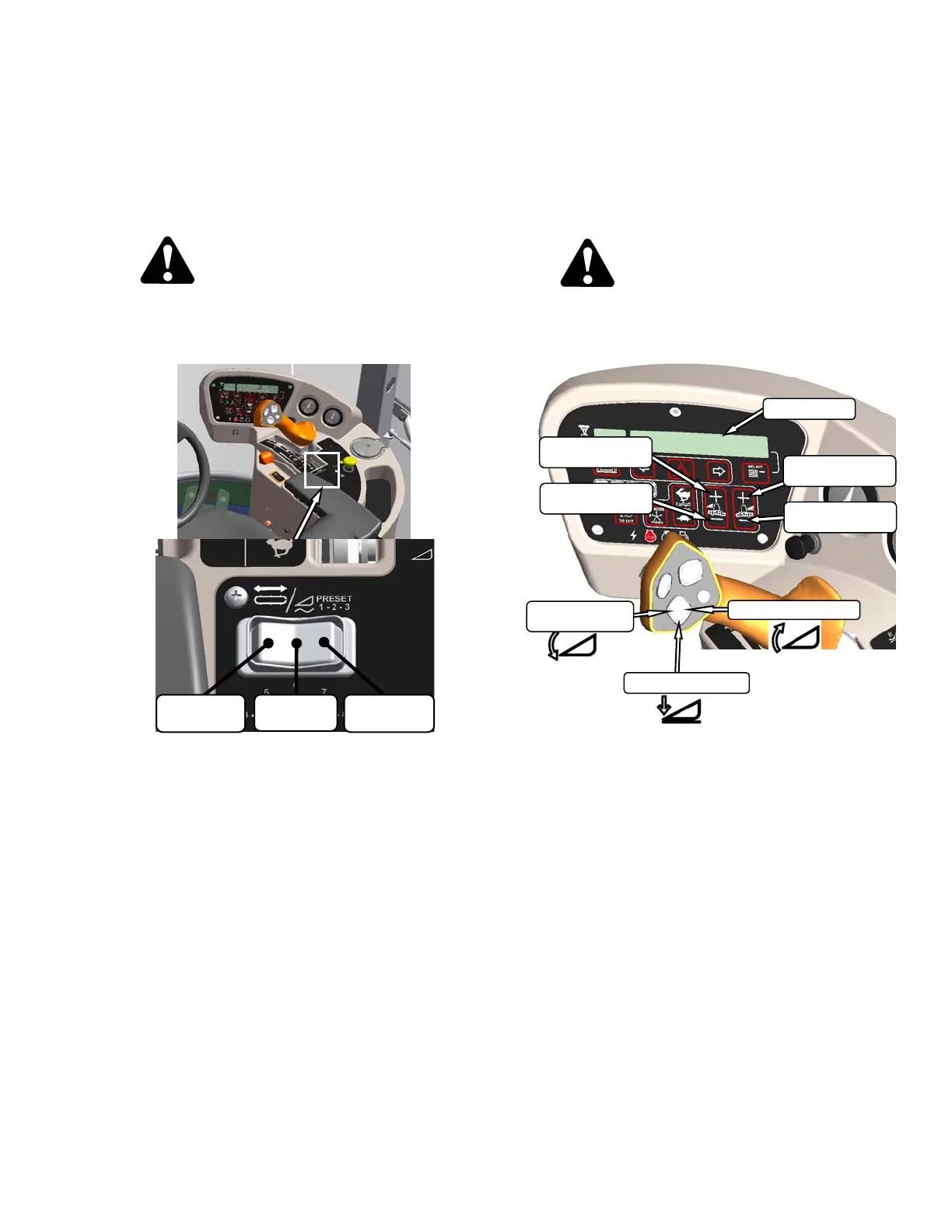
The hydraulic deck shift option allows the
operator to control deck position and draper
rotation from the operator’s station. It enables
crop delivery from left side, center, or right side
of the header. Shift decks as follows:
CAUTION
Check to be sure all bystanders have cleared
the area.
a. Engage header.
b. Push switch to desired delivery position.
Deck(s) will move, and direction of drapers will
change accordingly.
c. Operate windrower.
6.5.6.1 Float Options With Deck Shift
For draper headers equipped with the deck shift
option, the header float can be set for each
position of the decks. The float is then
maintained when the decks are shifted.
Program the float as follows:
CAUTION
Check to be sure all bystanders have cleared
the area.
a. Engage header.
b. Using HEADER TILT SWITCHES, set center
link to mid-range position (05.0 on DISPLAY).
c. Push deck shift switch to desired delivery
position. See opposite.
d. Using HEADER DOWN switch, lower header
fully with lift cylinders fully retracted.
e. Using left float switch, push
+ to increase float,
or
– to decrease float on left side of header.
DISPLAY will indicate selected float for left side,
for example (8.0 L FLOAT R XX.X).
f. Repeat for right side float with right switch.
DISPLAY will indicate float for both sides, for
example (8.0 L FLOAT R 3.0).
g. Select a second deck position with the deck shift
switch.
h. Repeat steps e. and f. to set the float.
i. Select a third position if desired with the deck
shift switch.
j. Repeat steps e. and f. to set the float.
CENTER
DELIVERY
RIGHT SIDE
DELIVERY
LEFT SIDE
DELIVERY
DISPLAY
INCREASE
FLOAT RIGHT
HEADER TILT UP
HEADER DOWN
HEADER
TILT DOWN
DECREASE
FLOAT RIGHT
INCREASE
FLOAT LEFT
DECREASE
FLOAT LEFT



 To Next Page