Making measurements - a tutorial Chapter 4
Mastersizer 2000 Page 4-25
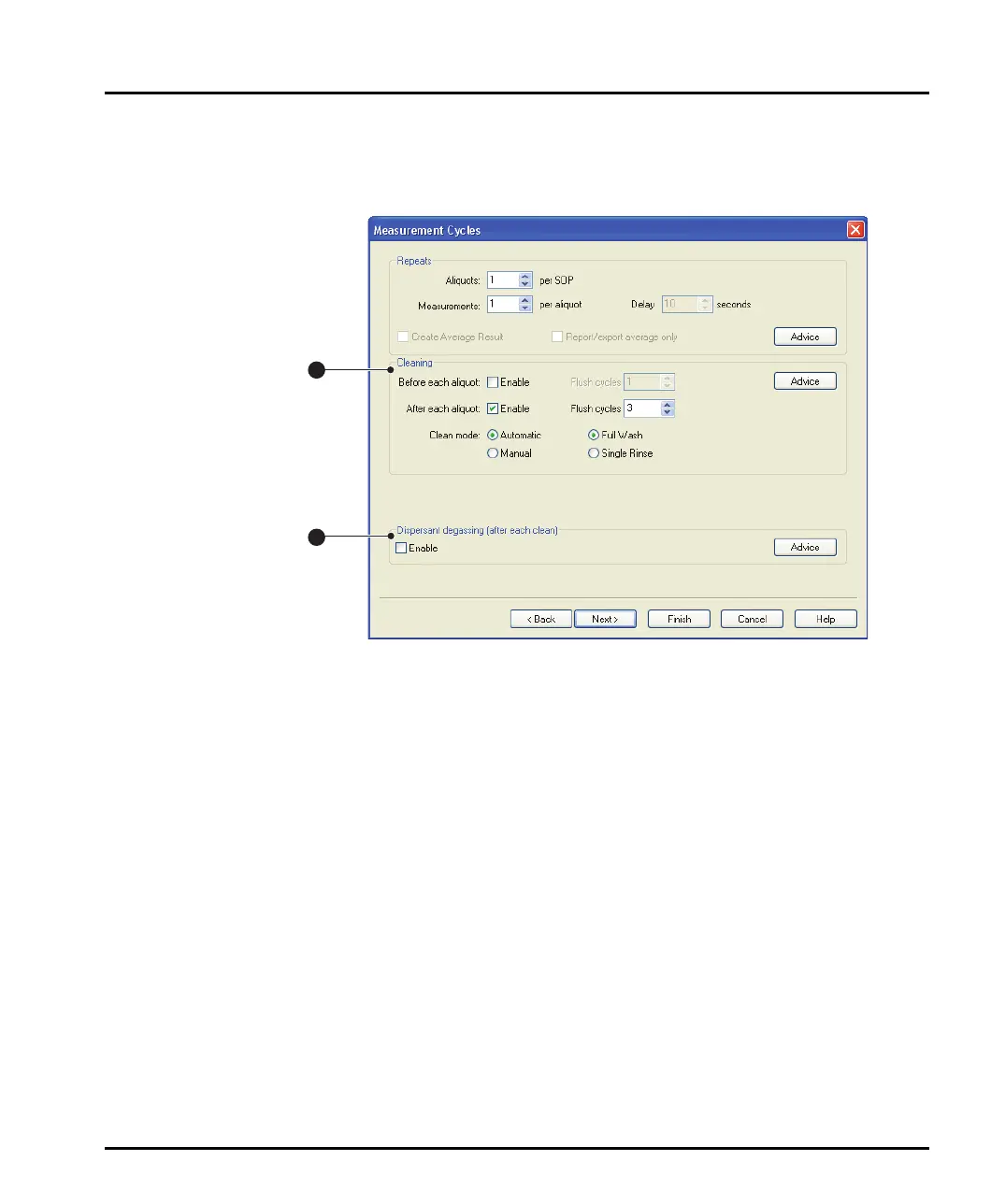
Measurement Cycles dialogue
Use the Measurement Cycles dialogue to set up repeat measurements and set up
tank cleaning and dispersant degassing. This diagram shows the features:
ill 7760
Cleaning
It is possible to set up the SOP so that the tank and cell are cleaned together:
Before each aliquot.
After each aliquot.
Before and after each aliquot (select both check boxes).
Selecting the relevant Enable box causes a clean sequence to be performed.
If the sample/dispersant used is not normally removed with a single flush, enter a
number in the Flush cycles box to run the flush sequence that number of times.
The user can set the Clean mode to either Automatic or Manual. Manual ena-
bles the user to clean the system easily using a beaker and a bottle of clean solvent.
A series of prompts guides the user through the cleaning cycle.
Dispersant degassing
Selecting the Enable check box causes a degassing routine to be performed each
time the tank is cleaned. The degassing routine uses ultrasonic action to help
remove dissolved gases from the dispersant.
1
2
MAN0384-1.0 Mastersizer 2000.book Page 25 Tuesday, March 20, 2007 8:56 AM



 To Next Page