Chapter 7 Handling measurement files
Page 7-6 MAN 0384
Exporting results
There are several ways to export information from the Malvern application to other
applications. These are:
One or more records can be selected in the Results tab and “Dragged and
dropped” directly into another application (provided that the application sup-
ports tab separated formats e.g. Excel).
A table or graph can be dragged and dropped into another application by select-
ing the item, then dragging while holding the Ctrl key.
A table or graph can also be copied by selecting the item then selecting Edit-
Copy Table or Edit-Copy Graph. The item can then be pasted into another
application.
Any of the parameters from one or more records can be exported as a text file.
This file can then be loaded into a word processor or spreadsheet. A template is
used to specify which parameters are exported. Use the Configure-Data
export templates command to create and modify templates.
A measurement file can be attached to an email. Use the command File-Send,
which opens the computer’s default mail program, and attach the file.
Exporting results
To export a record:
1. Select one or more records from a measurement file.
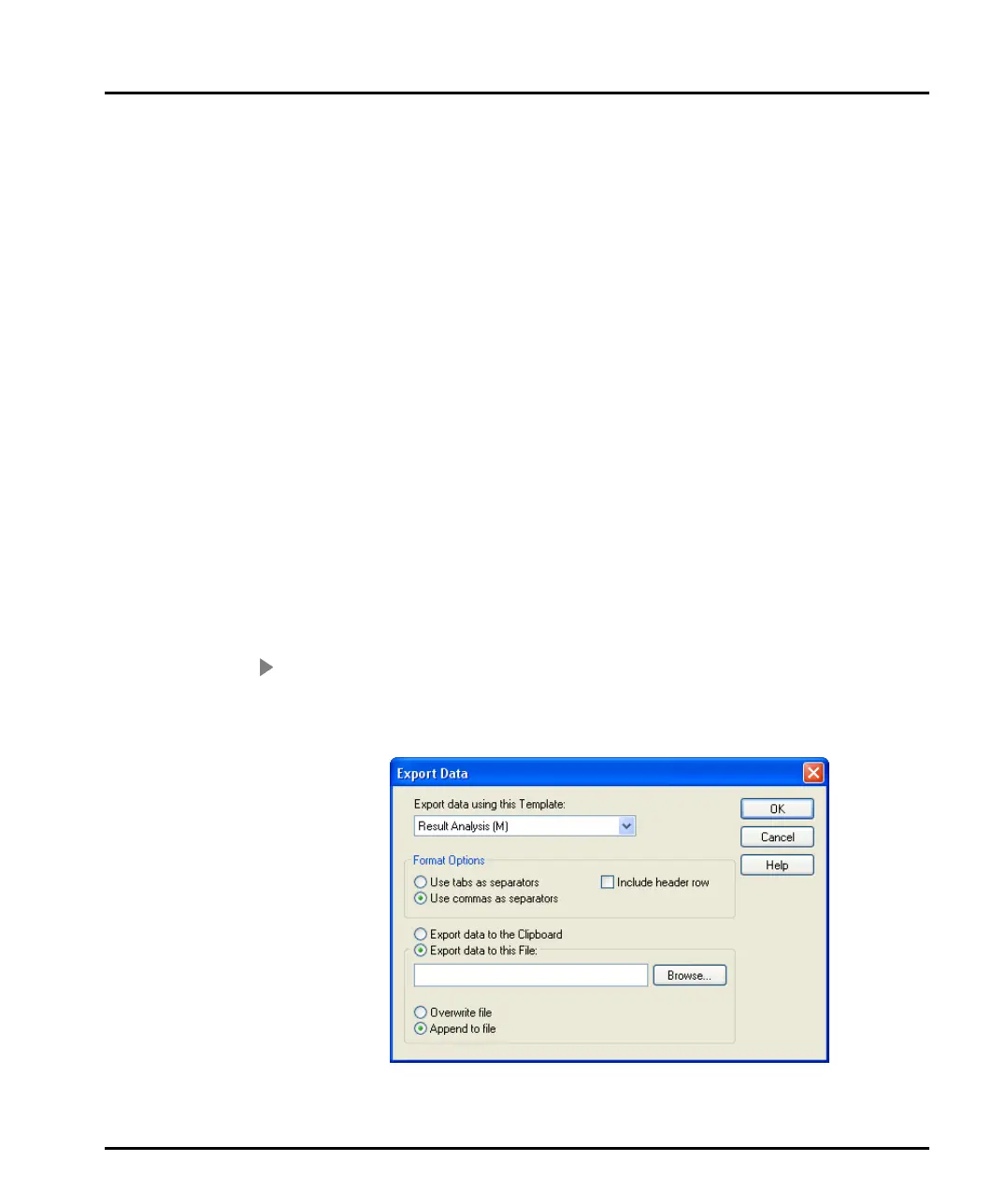
2. Select File-Export data. This dialogue will appear:
3. Select a template from the Export data using this Template list box.
MAN0384-1.0 Mastersizer 2000.book Page 6 Tuesday, March 20, 2007 8:56 AM



 To Next Page