Chapter 7 Handling measurement files
Page 7-4 MAN 0384
ill 7756
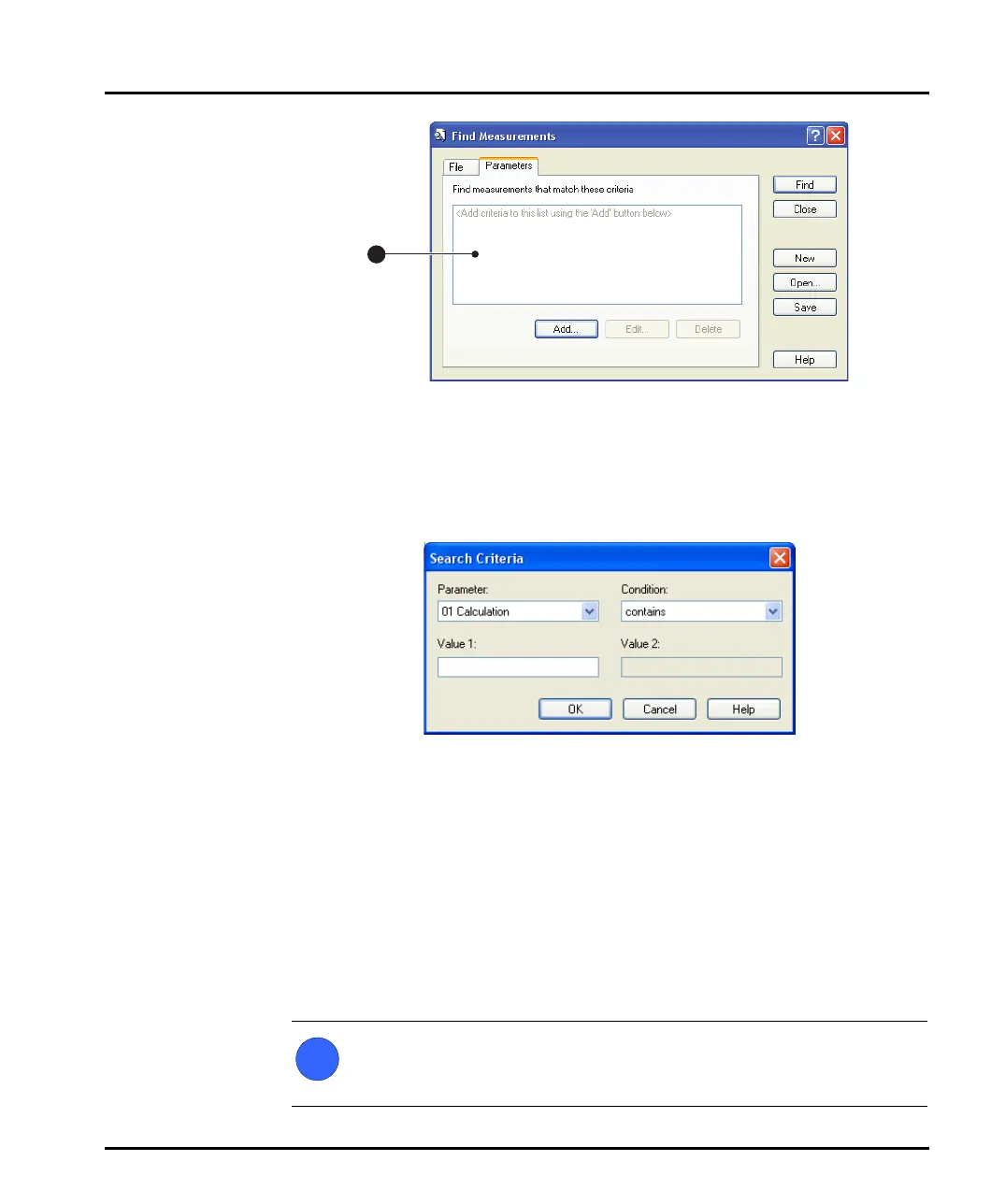
The main list box displays all the search criteria that have been set (when
starting a new search this will be blank). To add search criteria to the list, select
the Add button. More than one criterion can be specified. When the search is
initiated all records that match all search criteria are displayed.
4. Selecting the Add button displays this dialogue:
The Parameter list box lists all parameters available in the measurement file.
Select one and use the Condition and Value list boxes to set the conditions of
the search. Select OK to add the search criterion to the list box in the previous
dialogue.
A single search criterion can be altered or deleted by selecting the Edit and
Delete buttons in the Find Measurements dialogue.
5. Start the search by pressing the Find button. Once the search is completed, all
records found will be displayed in a window similar to the normal Records
tab, except that all the headers for the fields of the records will change to reflect
the parameters set in the search criteria.
Note
If a large number of records are found in the search, it may take some time
to display the search results as all measurement files must first be loaded.
1
MAN0384-1.0 Mastersizer 2000.book Page 4 Tuesday, March 20, 2007 8:56 AM



 To Next Page