DESKTOP PRINTER SERVICE MANUAL
4
SERVICE NOTES
QUALIFIED SERVICE PERSONNEL
Markforged products contain high voltage and other hazards. Do not remove any panels or protective guards
without appropriate technical training and experience necessary to minimize the risks to yourself and others. If
you do not feel comfortable accessing service areas of your Markforged product, please contact your VAR.
FUSE LOCATIONS
LOCATION MFG VOLTS AMPS SPEED
Power entry module Bel Fuse 5ET5-R 250VAC 5A Time delay
Note: Only the specified fuses may be used as replacements. Third-party substitutes are not
permitted.
NOTE ON FIBER CAPABILITY
This Service Manual covers all models of Markforged Desktop Series printers. If your printer model is not
Service Manual may not apply. Such sections will be marked with
the icon to the left.
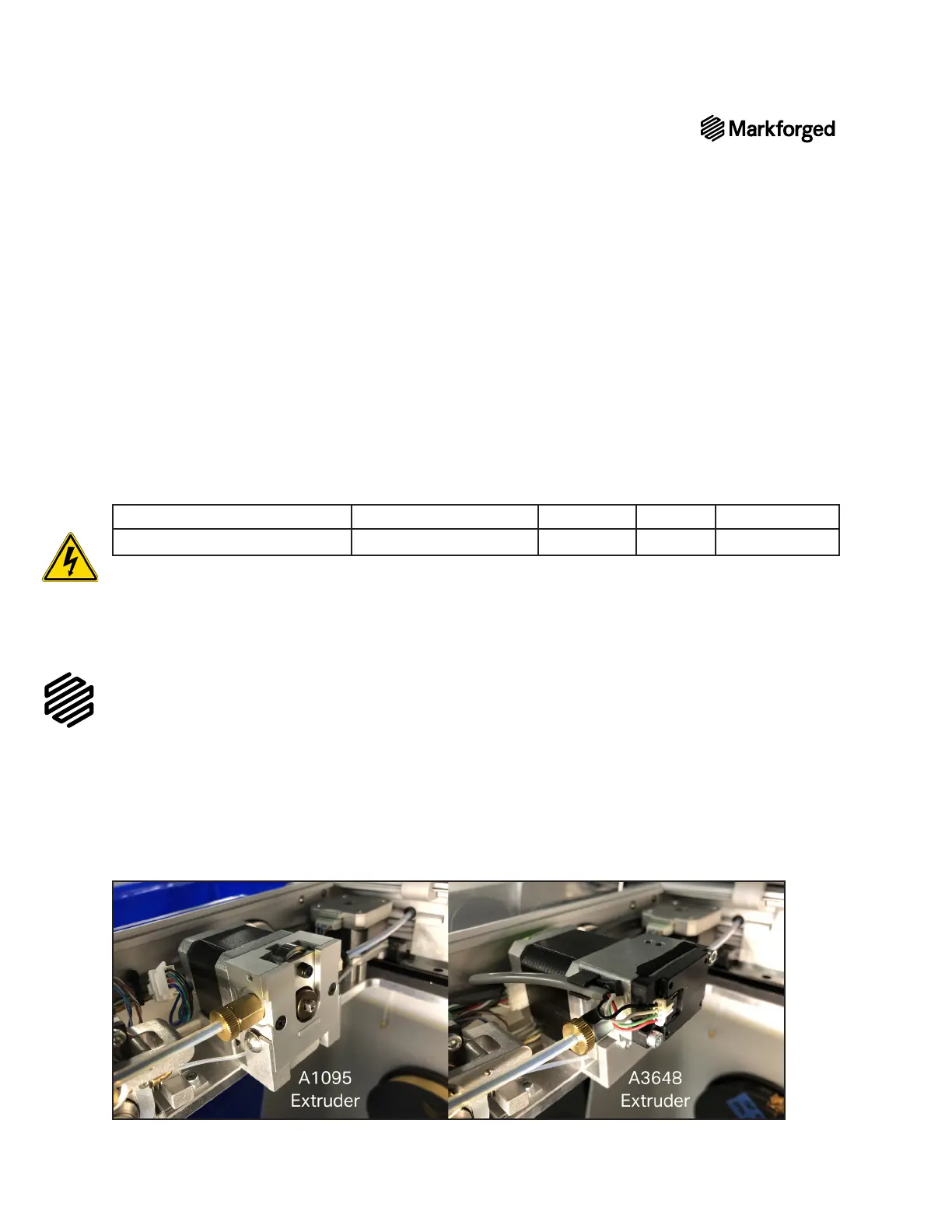
A1095 AND A3648 EXTRUDERS
The photos in the User Guide and Service Manual depict both the original A1095 (below left) and the updated
A3648 extruders (below right). All Gen 2 printers come equipped with the A3648 extruder and all Gen 1 printers
come equipped with the A1095 extruder (see Note on Hardware Differences
procedures are noted in the text.
SERVICE MANUAL



 To Next Page