37
DESKTOP PRINTER SERVICE MANUAL
REPLACING THE TOUCHSCREEN
QService Notes (p.4).
It may be necessary to replace the printer touchscreen if it becomes damaged or experiences a failure.
Note: Take care not to discard any hardware you remove during this procedure, as you will need it
during the reinstallation.
Tools
● 2mm hex key
● Phillips #1 screwdriver
● Painter’s tape (or similar tape that will not leave residue on the printer)
TOUCHSCREEN REMOVAL
1. Unloading Plastic and Unloading
Fiber, if applicable, in the User Guide.
2.
3.
4. Disconnect the feed tube from the plastic extruder. Remove it from the printer and set it aside.
5.
6. Tape the lid and visor of the printer closed to prevent them from accidentally opening.
7. Carefully turn the printer upside down so that the bottom faces up and the back plate faces toward you.
8.
9.
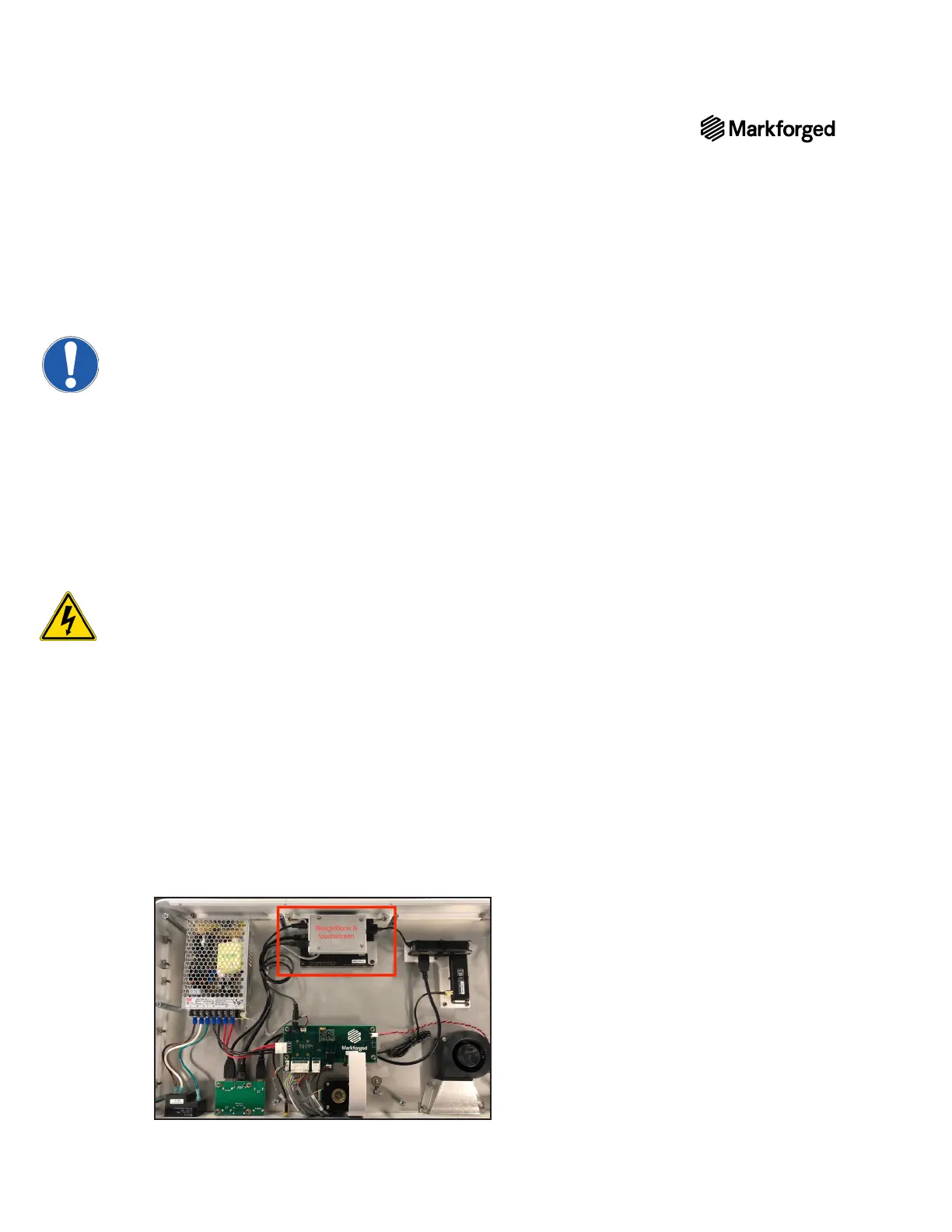
10. The touchscreen and BeagleBone are located at the center of the front face of the printer, furthest away
from you. The motherboard is located near the rear face of the printer, closest to you.
Note: The metal cover over the BeagleBone may be black, silver, or orange; the color has no
bearing on these instructions.



 To Next Page