3-31 Masterflex REGLO Digital Pump Drive with Advanced Connectivity
Section 3: Operation
Masterflex
ANALOG INPUT MODE
!
CAUTION: Power must be turned o before connecting the external analog control cable to
prevent damage to the drive.
e REGLO Digital Pump Drive can be controlled and monitored through the pump drive’s DB-25 female
connection port. See www.masterex.com for more information.
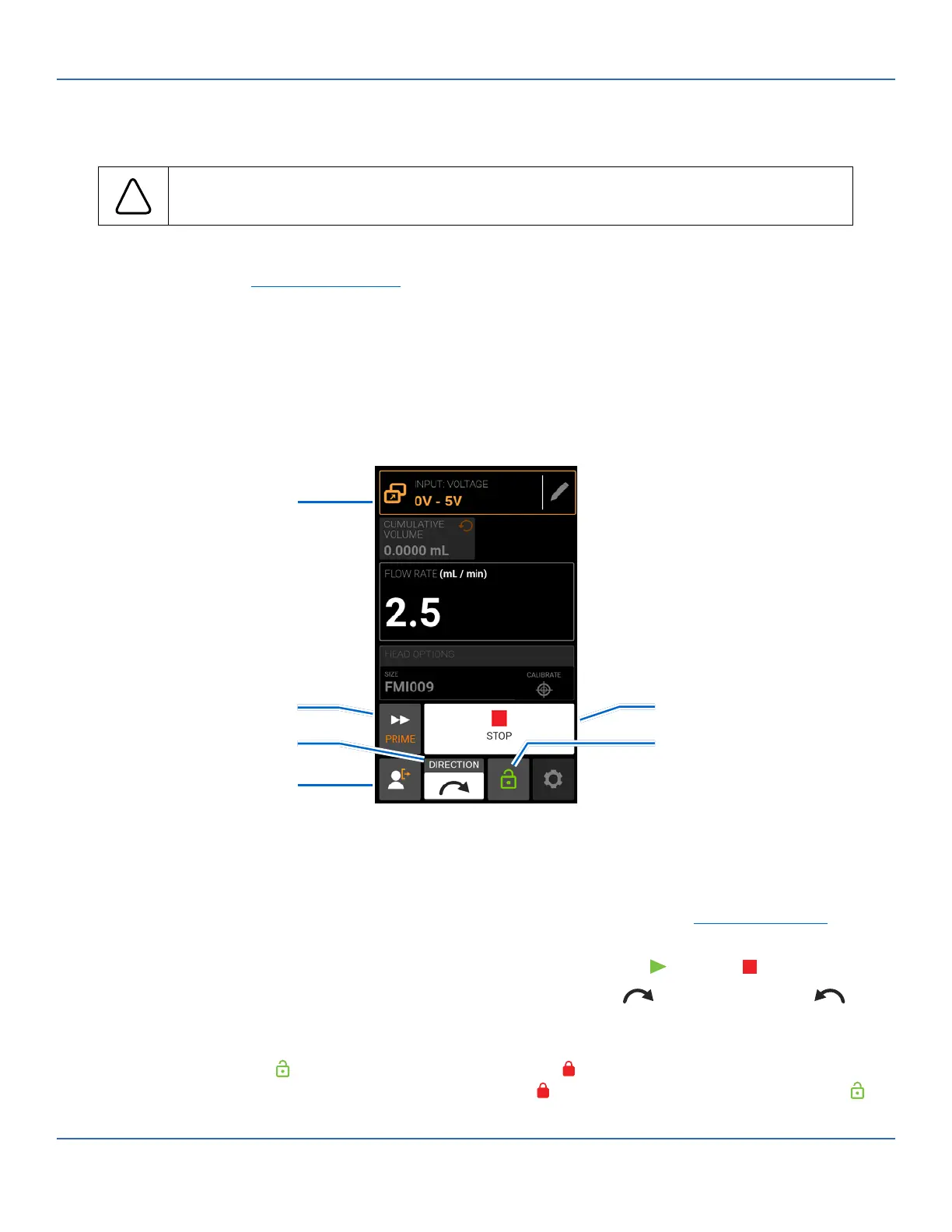
Analog Input Mode Run Screen
e Analog Input Mode Run Screen will be displayed on the pump drive’s touchscreen during analog input
operation. e screen displays the currently selected operation dispense settings from an external remote
control device. e Analog Input Mode Run Screen is accessed by selecting ANALOG INPUT from the
Mode Selection Screen.
A. MODE NAME BANNER: Displays the Mode Name as well as the currently selected input type
(ANALOG CURRENT or ANALOG VOLTAGE). Tap the Mode Name Banner to return to the Mode
Selection Screen.
B. PRIME: Press and hold to prime the pump drive (for further information see "Priming the Pump" on
page 3-11).
C. START/STOP: During operation, the display will change from START to STOP .
D. FLOW DIRECTION: Tap DIRECTION to select either clockwise or counterclockwise ow
direction. NOTE: Flow Direction is unavailable on single direction gear pumps and will be grayed out.
E. SCREEN LOCK: Locking the screen disables all touchscreen functions. To lock the screen: Press and
hold UNLOCKED until the icon changes to LOCKED and a red border appears around the
screen. To unlock the screen: Press and hold LOCKED until the icon changes to UNLOCKED .
C. Start/Stop
E. Screen Lock
A. Mode Name Banner
B. Prime
D. Flow Direction
F. Logout



 To Next Page