3-34 Masterflex REGLO Digital Pump Drive with Advanced Connectivity
Section 3: Operation
Masterflex
MASTERFLEXLIVE™
e REGLO Digital Pump Drive can be controlled and monitored through the MasterexLive™ website
using an Ethernet or Wi-Fi connection. MasterexLive™ can be accessed from any suitable digital device
connected to the internet, such as a laptop, tablet, smartphone or desktop computer. See www.masterex.com
for more information.
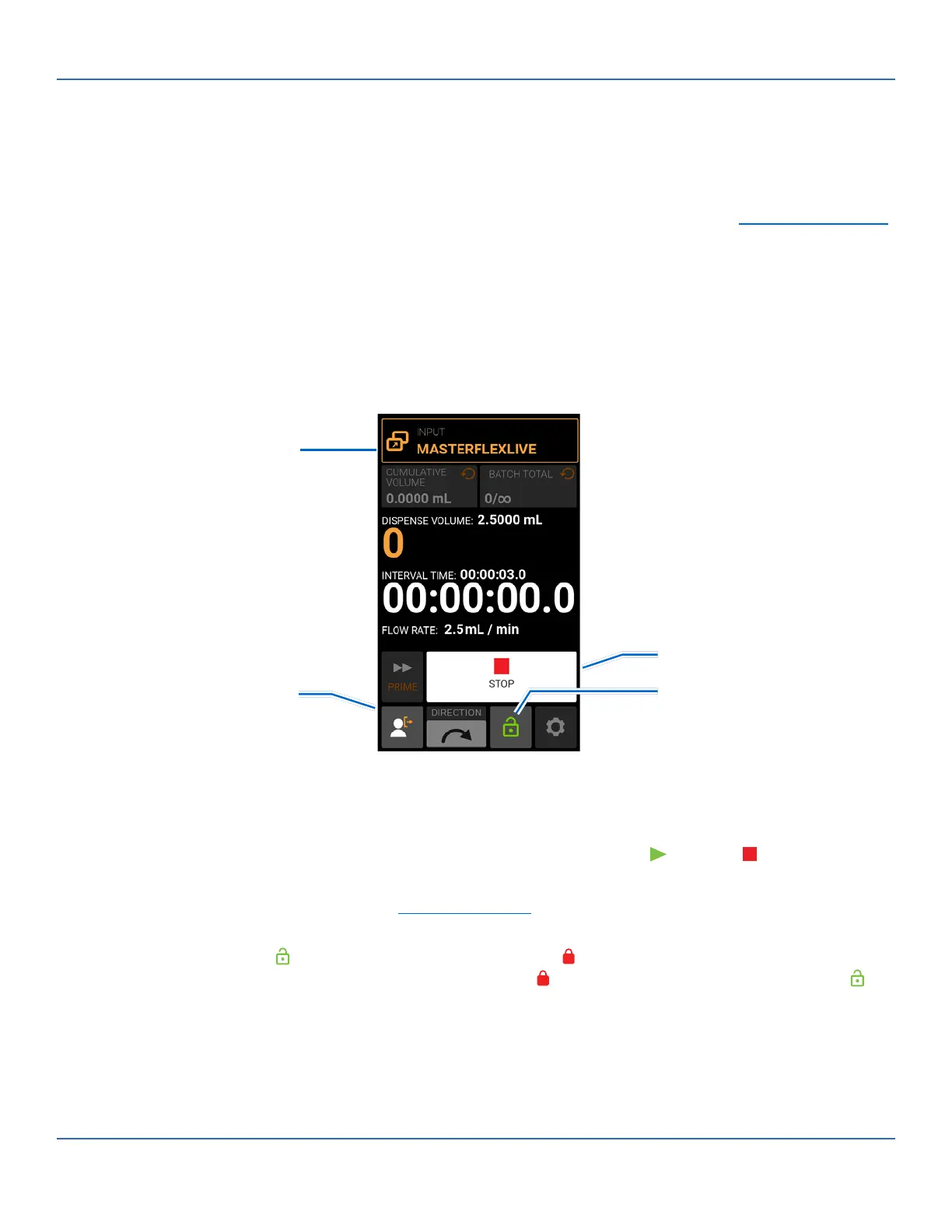
MasterflexLive™ Run Screen
e MasterexLive™ Run Screen is only displayed on the pump drive touchscreen while the pump drive is
being operated through the MasterexLive™ website. e screen displays the currently selected operation
dispense settings (Continuous, Time or Volume).
A. MODE NAME BANNER: Displays the Mode Name as well as the currently selected input type. Tap the
Mode Name Banner to return to the Mode Selection Screen.
B. START/STOP: During operation, the display will change from START to STOP .
C. LOGOUT: Tap to log out a user. NOTE: is option is only available if Manage User is enabled in
Settings (for further information see "User Management" on page 3-9).
D. SCREEN LOCK: Locking the screen disables all touchscreen functions. To lock the screen: Press and
hold UNLOCKED until the icon changes to LOCKED and a red border appears around the
screen. To unlock the screen: Press and hold LOCKED until the icon changes to UNLOCKED .
General Preparation:
• Conrm the correct transfer tubing is securely attached to the pump head.
• Conrm all uids and containers are ready.
• Switch the drive on using the power switch located at the rear of the drive. NOTE: If Manage User
B. Stop
D. Screen Lock
A. Mode Name Banner
C. Logout



 To Next Page