3-50 Masterflex REGLO Digital Pump Drive with Advanced Connectivity
Section 4: Service & Maintenance
Masterflex
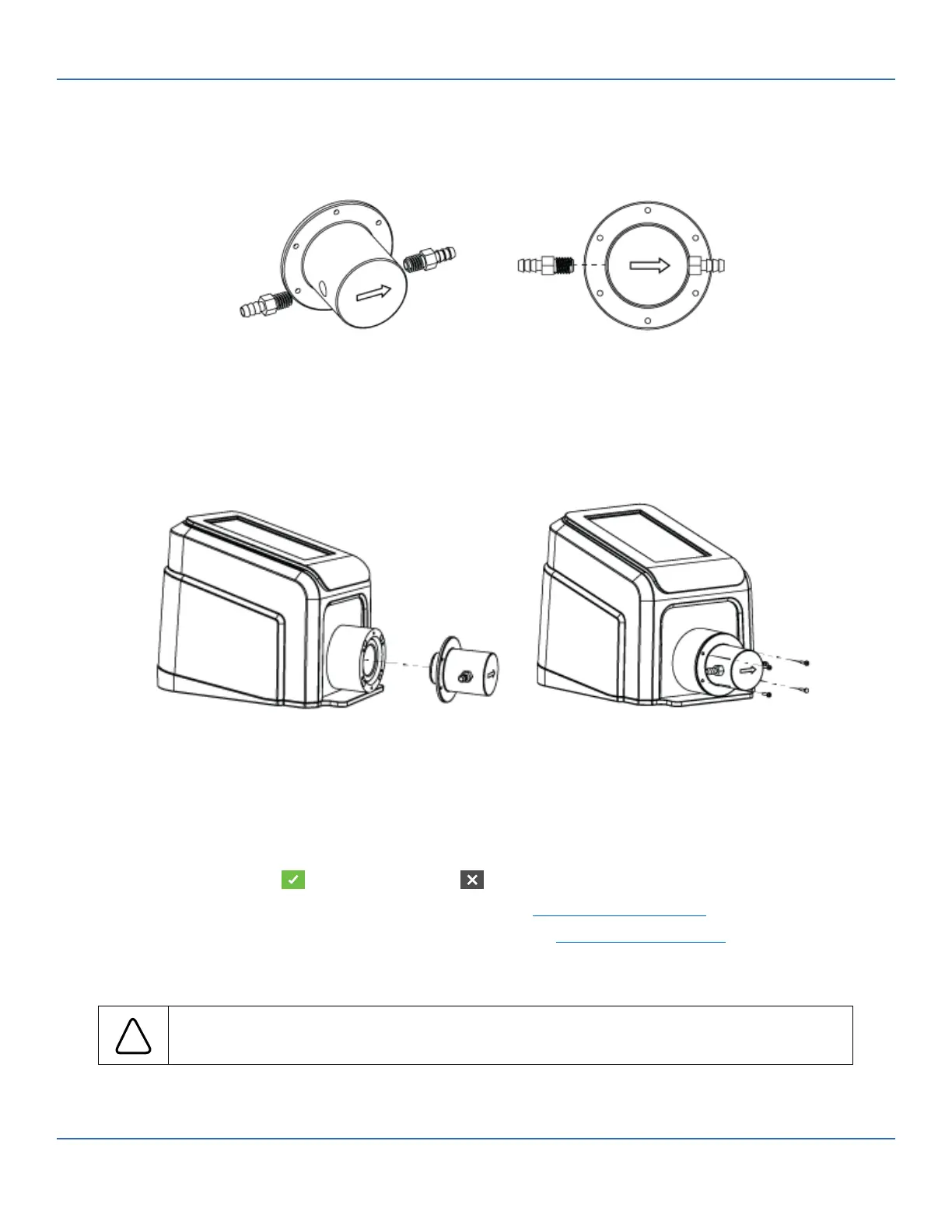
1. Screw the two tubing adapters into the pump head. NOTE: Before screwing the two tubing adapters into
the pump head it is recommended that PTFE tape be wrapped around the thread of the adapter to help
protect the thread and ensure optimum sealing.
2. Screw the pump head to the xing case of the drive.
NOTE:
• e face of the pump head with the engraved model number must be oriented toward the user. e
engraved arrow indicates the ow direction.
• Gear pumps can only pump in one direction. An arrow engraved on the front of the pump head
indicates the correct ow direction.
3. Plug in the supplied desktop power supply.
4. Switch on the drive.
5. Navigate to the Continuous, Time or Volume Mode screens.
6. Tap HEAD OPTIONS. e Head Options Screen will be displayed.
a. Select the desired pump head size from the list of available options.
b. Tap CONFIRM to save or CANCEL to discard changes and return to the previous screen.
7. Prime the new pump head (for further information see "Priming the Gear Pump" on page 3-11).
8. Calibrate the new pump head (for further information see "Gear Pump Calibration" on page 3-12).
e new pump head is now ready for operation.
!
CAUTION: Fill the pump head with liquid before pump operation. Avoid dry running the
pump head.



 To Next Page