150 CONTENTS
Note
Flat-field correction can also be used as a destructive watermark and works for all f-stops.
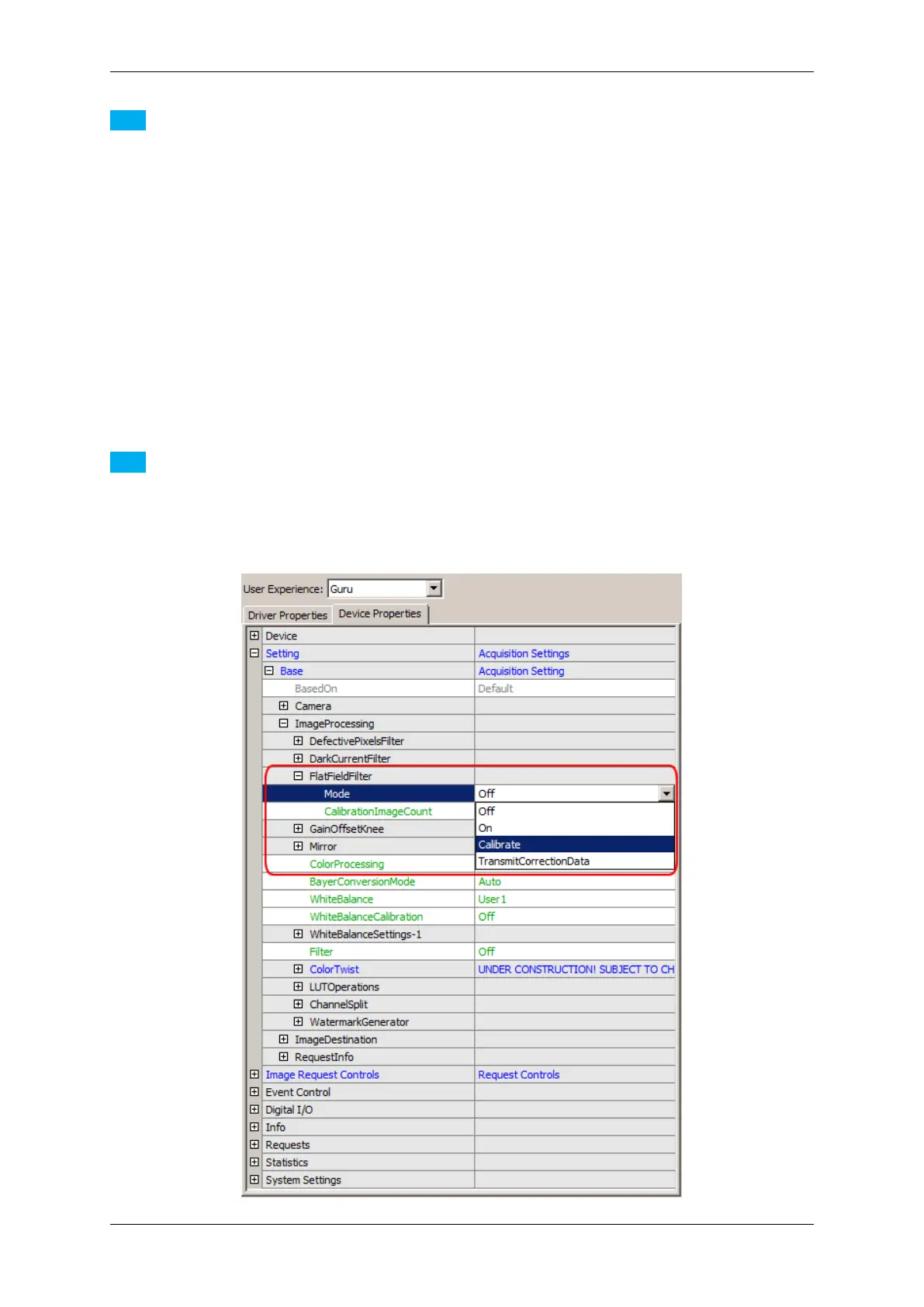
To make a flat field correction following steps are necessary:
1. You need a plain and equally "colored" calibration plate (e.g. white or gray)
2. No single pixel may be saturated - that's why we recommend to set the maximum gray level in the brightest
area to max. 75% of the gray scale (i.e., to gray values below 190 when using 8-bit values)
3. Set the (Filter-) "Mode = Calibrate" (Figure 6)
4. Start a Live snap ("Acquire" with "Acquisition Mode = Continuous")
5. Finally, you have to activate the correction: Set the (Filter-) "Mode = On"
6. Save the settings including the correction data via "Action -> Capture Settings -> Save
Active Device Settings"
(Settings can be saved in the Windows registry or in a file)
Note
After having re-started the camera you have to reload the capture settings vice versa.
The filter snaps a number of images (according to the value of the CalibrationImageCount, e.g. 5) and
averages the flat-field images to one correction image.
MATRIX VISION GmbH



 To Next Page