7.4 Settings behaviour during startup 43
So for the user a setting is the one an only place where all the necessary modifications can be applied to achieve
the desired form of data acquisition.
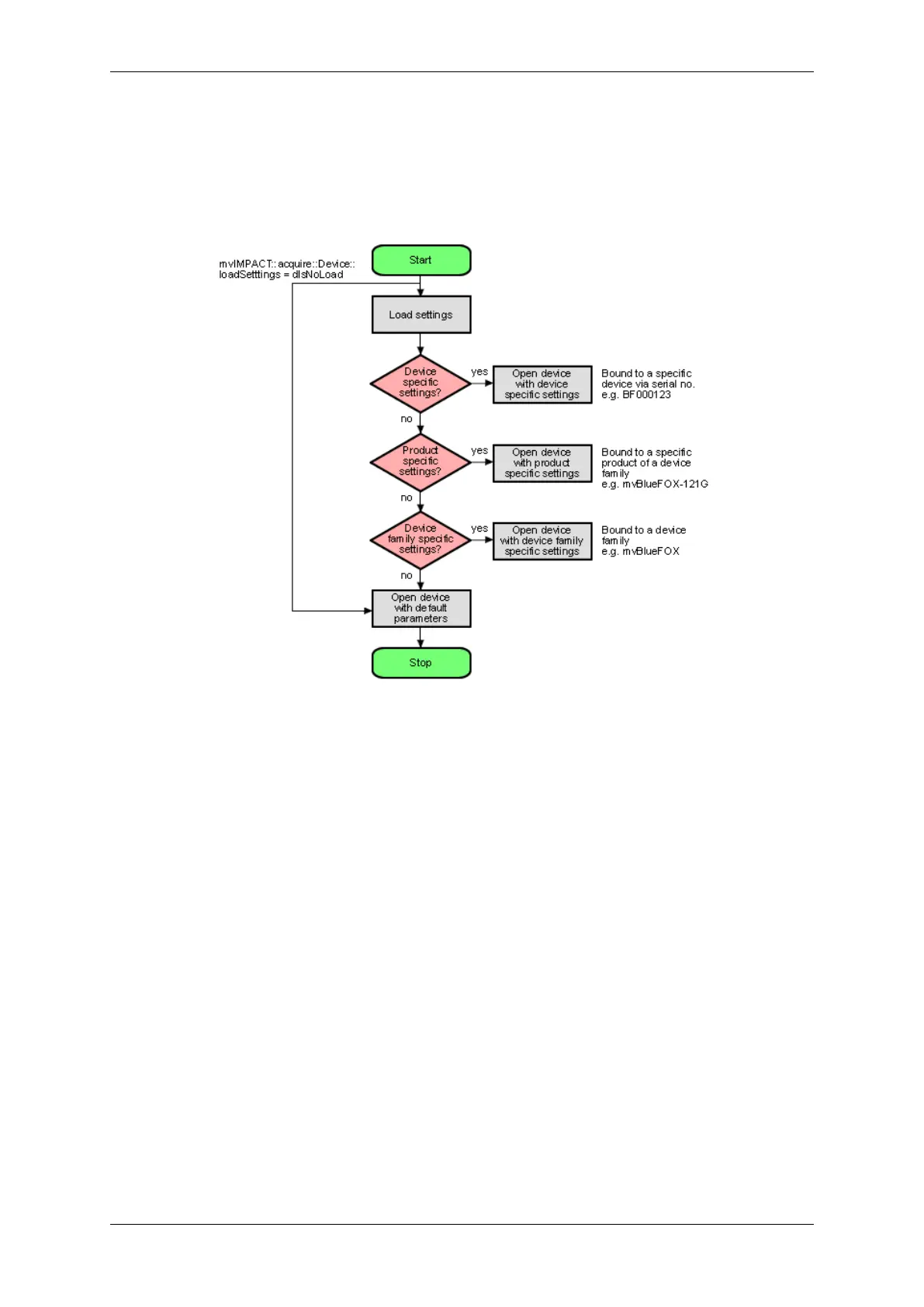
Now, whenever a device is opened, the driver will execute following procedure:
Figure 21: wxPropView - Device setting start procedure
• Please note that each setting location step in the figure from above internally contains two search steps. First
the framework will try to locate a setting with user scope and if this can't be located, the same setting will be
searched with global (system-wide) scope. Under Windows® this e.g. will access either the HKEY_CURR←-
ENT_USER or (in the second step) the HKEY_LOCAL_MACHINE branch in the Registry.
• Whenever storing a product specific setting, the device specific setting of the device used for storing will be
deleted (if existing). E.g. you have a device 'VD000001' which belongs to the product group 'VirtualDevice'
with a setting exclusively for 'VD000001'. As soon as you store a product specific setting, the (device specific)
setting for 'VD000001' will be deleted. Otherwise a product specific setting would never be loaded as a device
specific setting will always be found first.
• The very same thing will also happen when opening a device from any other application! wxPropView (p. 77)
does not behave in a special way but only acts as an arbitrary user application.
• Whenever storing a device family specific setting, the device specific or product specific setting of the device
used for storing will be deleted (if existing). See above to find out why.
• Under Windows® the driver will not look for a matching XML file during start-up automatically as the native
storage location for settings is the Windows® Registry. This must be loaded explicitly by the user by using
the appropriate API function offered by the SDK. However, under Linux XML files are the only setting formats
understood by the driver framework thus here the driver will also look for them at start-up. The device specific
setting will be an XML file with the serial number of the device as the file name, the product specific setting
will be an XML file with the product string as the filename, the device family specific setting will be an XML
file with the device family name as the file name. All other XML files containing settings will be ignored!
MATRIX VISION GmbH



 To Next Page