80 CONTENTS
11.1.1.1.5 Image Display Functions
Quick Setup Wizard allows zooming into the image by right clicking in the image area and unchecking "Fit To
Screen" mode. Use the mouse wheel to zoom in or out. Check "Fit To Screen" mode, if you want the complete
camera image to be sized in the window screen size.
11.1.1.1.6 Known Restrictions
In cases of Tungsten (artificial) light, camera brightness may tend to oscillations if Auto functions are used. This
can be minimized or avoided by setting the frame frequency to an integer divisor of the mains frequency.
• Example:
– Europe: 50 Hz; Set frame rate to 100, 50, 25 12.5 fps or appropriate.
– In countries with 60 Hz use 120, 60, 30 or 15. . . accordingly.
11.1.1.2 First View of wxPropView
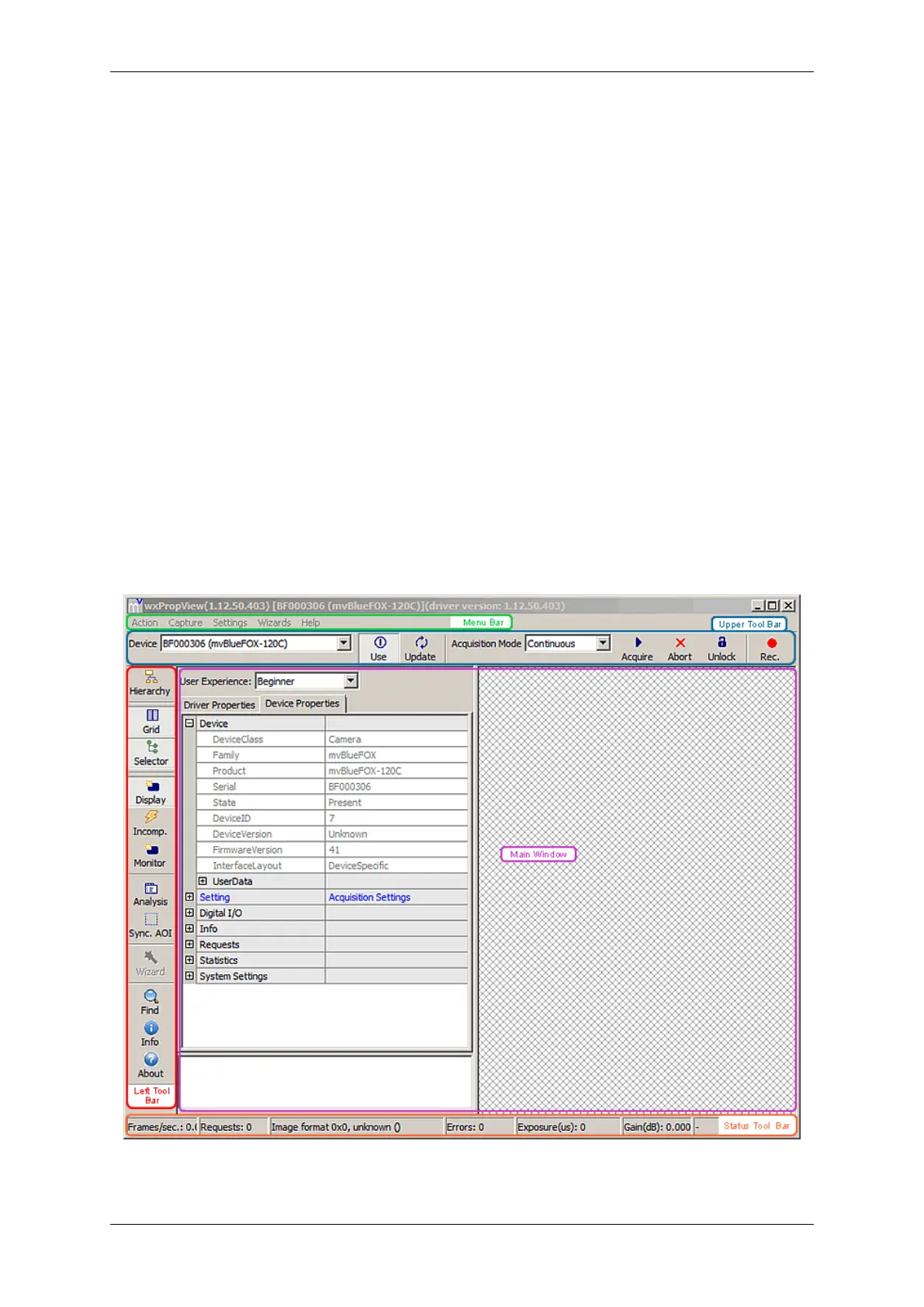
wxPropView (p. 77) consists of several areas:
Figure 2:wxPropView started
MATRIX VISION GmbH



 To Next Page