FOCKE MELER GLUING SOLUTIONS
4-10
MELTER OPERATION
MICRON+ PISTÓN
HMI : S02001101 v1.1.2
TC : S02200100 v1.0.84
IO FM : XXXXXXXXX vx.x.x
150
5
+
-
General Variation
General Set-Point
General Standby General OFF
Temperature State
Area Real Set Point
T: Tank
152 150
D: Distributor
150 150
1.1: Hose 1
49 OFF
1.2: Applicator 1
170 155
2.1: Hose 2
130 145
2.2: Applicator 2
100 100
MICRON+ PISTÓN
HMI : S02001101 v1.1.2
TC : S02200100 v1.0.84
IO FM : XXXXXXXXX vx.x.x
Group OFF
OFF Group: 1
Temperature State
Area Standby OFF
T: Tank
D: Distributor
1.1: Hose 1
1.2: Applicator 1
2.1: Hose 2
2.2: Applicator 2
General Standby General OFF
1
2
3
1
2
3
3
4
5
Programming of temperatures
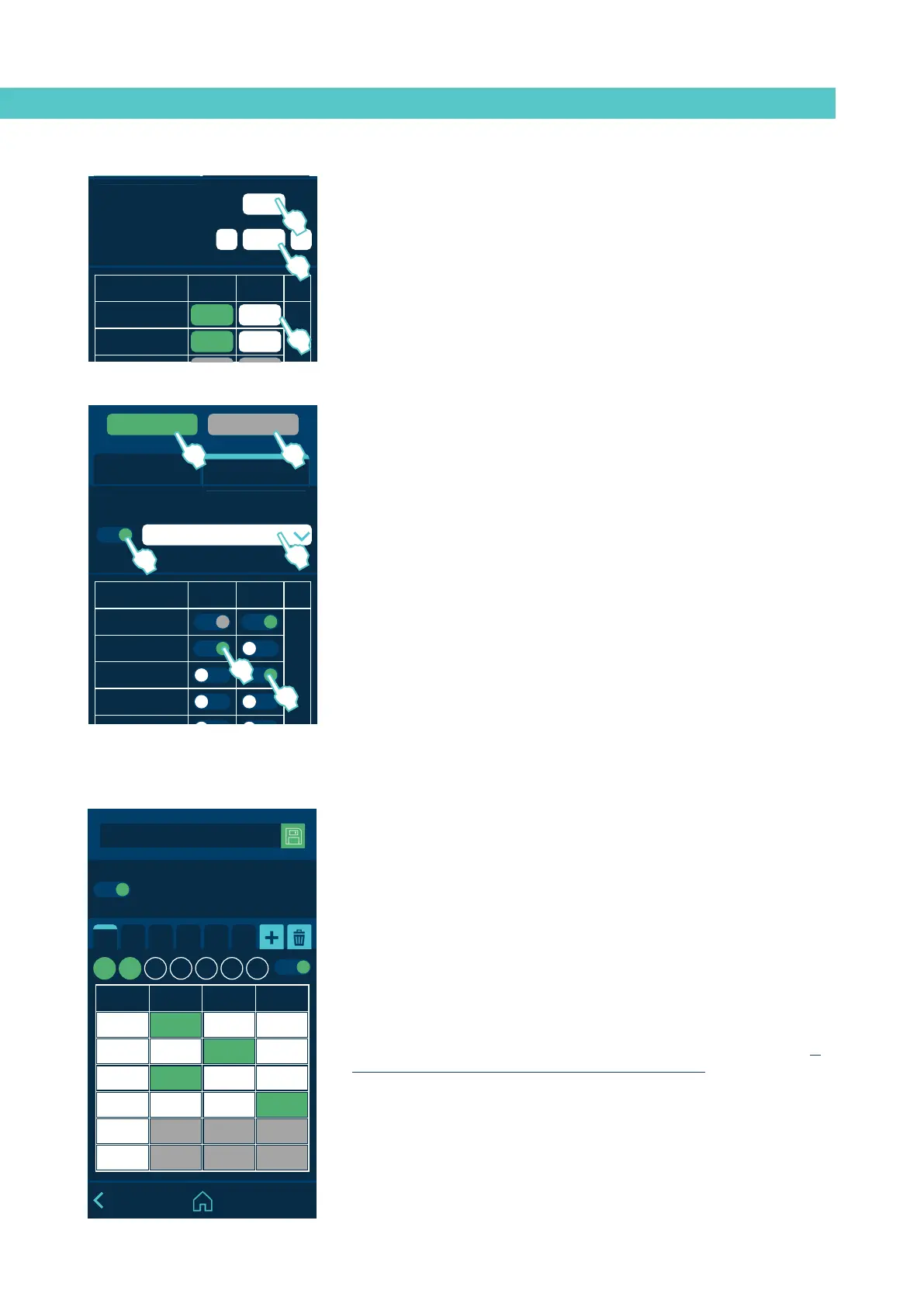
1. Enter a temperature in ‘General set point’ to simultaneously program all
the zones with that temperature value.
2. To make quick adjustments, enter a variation value in ‘General variation’
and add (+) or subtract (-) it from the ‘General set point’ value. The value
is simultaneously added or subtracted in all zones.
3. To program each zone individually, click on the ‘Set point’ value and enter
the new desired temperature value.
Programming of statuses
Press ‘General Standby’ to activate (green) or deactivate (grey) the
Standby mode in all zones.
With the ‘General Standby’ mode activated (Equipment in Standby) it is
not possible to activate each Zone individually.
4. Press ‘General Off’ to activate (green) or deactivate (grey) the Inhibition in
all zones.
With the ‘General Off’ mode activated (Equipment OFF) it is not possible
to activate each Zone individually.
5. To inhibit a group of zones, select the group and activate the inhibition
(green). To define the different groups, see the ‘Inhibitions’ point.
6. Press ‘Standby’ in each zone to individually activate (green) or deactivate
(white) the Standby mode.
7. Press ‘OFF’ in each zone to individually activate (green) or deactivate
(white) the inhibition.
MICRON+ PISTÓN
HMI : S02001101 v1.1.2
TC : S02200100 v1.0.84
IO FM : XXXXXXXXX vx.x.x
C1 C2 C3 C4 C5 C6
Calendar
Hour ON Standby OFF
07:00
11:00
13:15
15:00
00.00
00.00
Enable all the calendars
M T W T F S S
Calendar
This menu allows you to program a calendar with the unit’s status changes.
Once it is activated, the unit changes from one status to another automatically.
When the unit is switched on, it does so in the mode that has been
programmed in the calendar, if the calendar is activated.
You can create up to six calendars (C1, C2, etc.) and up to six status changes
per day, indicating whether the unit will be in ON, Standby or Inhibition (Off).
From the ‘Select all calendars’ option, you can simultaneously activate or
deactivate all the calendars you have created.
You can add different days of the week to each calendar. Keep in mind that a
single day cannot be programmed in two active calendars. Therefore, if a day
of the week is programmed in an active calendar, it can only appear in other
calendars if they are disabled.



 To Next Page