FOCKE MELER GLUING SOLUTIONS
4-20
MELTER OPERATION
MICRON+ PISTÓN
HMI : S02001101 v1.1.2
TC : S02200100 v1.0.84
IO FM : XXXXXXXXX vx.x.x
120 s
ChargeCharge4. Charge
Level alarm
Sound on alarm
‘4. Load’ Menu
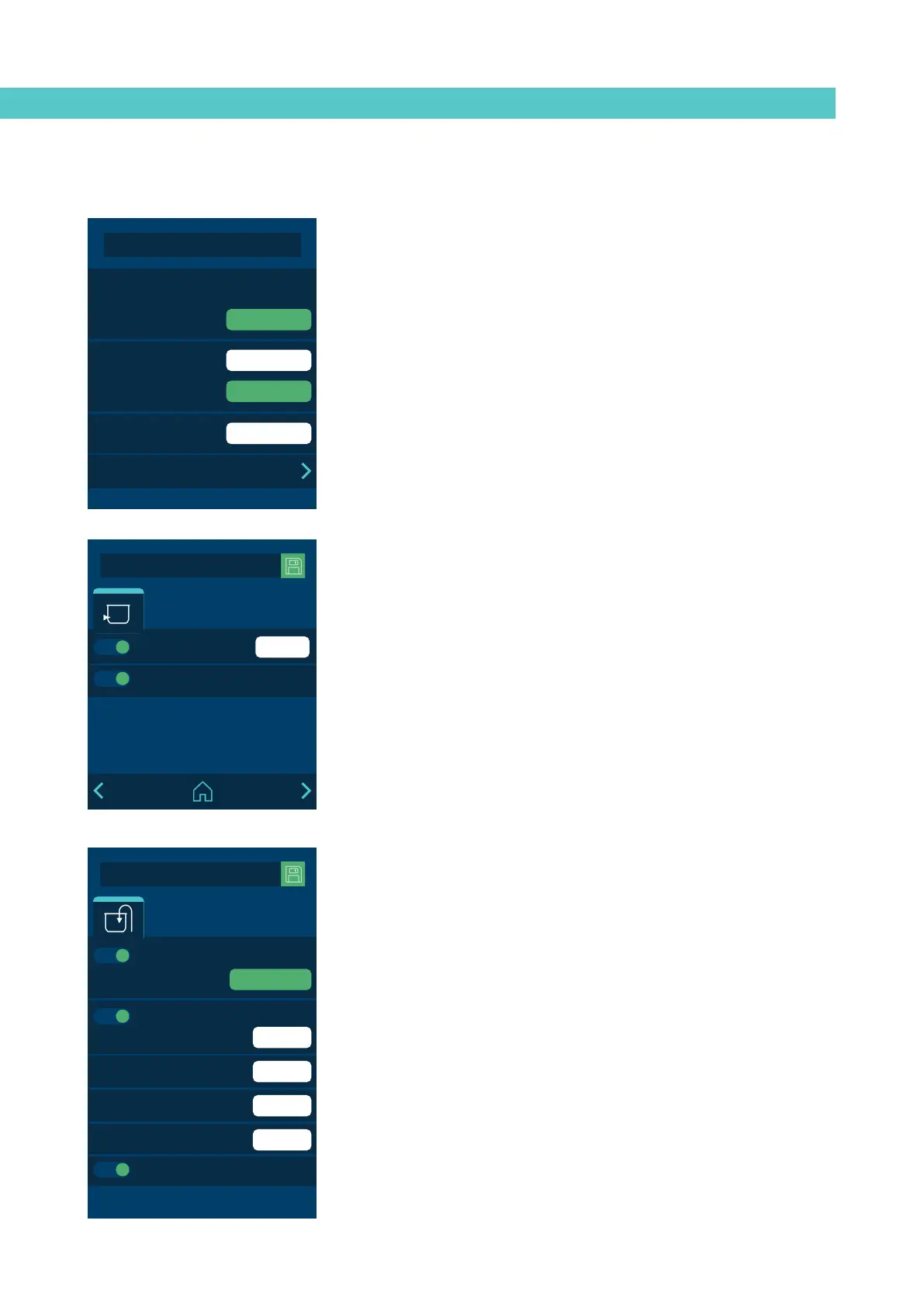
This screen allows you to control the different issues related to adhesive
loading.
Screen 1: Minimum adhesive level sensor
• Level alarm. Time after which the unit stops and activates a low-level
alarm.
• Sound with alarm: Allows you to configure the sensor alarm to emit a
sound.
MICRON+ PISTÓN
HMI : S02001101 v1.1.2
TC : S02200100 v1.0.84
IO FM : XXXXXXXXX vx.x.x
1 s
60 s
90 s
90 s
ChargeCharge4. Charge
Feeder alarm
Sound on alarm
Over charge time
Charge error alarm
Cover opened alarm
Automatic charge
PLAY
Screen 2: Automatic adhesive feeder
• Automatic feeder. Activates or deactivates automatic feeding.
When you press ‘CHARGE’, This lets you activate manual loading. When
pressed, it loads, and when released, the loading stops.
• Feeder alarm. Defines the time that must pass to give an external feed
alarm.
• Overfill time: This lets you configure for how much time the adhesive
will continue to be loaded once the lower level sensor has activated (tank
sufficiently full, but not completely full).
• Loading error alarm: This defines the maximum amount of time for
filling the tank. If this time is exceeded, the unit displays an alarm.
• Open tank lid alarm: An alarm sounds when the tank lid is open and it
stops loading immediately.
• Buzzer: This lets you set whether or not loading alarms emit a sound.
MICRON+ PISTÓN
HMI : S02001101 v1.1.2
TC : S02200100 v1.0.84
IO FM : XXXXXXXXX vx.x.x
1000 h
1 min
3. Statistics
Working hours 4515
2018-05-20 10:45
Filter change
2018-05-20 10:45
RESET
RESET
Datalogger
Statistics Flowmeter
‘3. Statistics’ Menu
This screen displays:
• Hours of operation: This counts all of the hours during which the unit is
in Temperature OK.
To reset the counter to zero, you must press reset.
• Filter change. To program a countdown in hours. When it gets to ‘0’, the
unit gives a warning to change the adhesive particles filter.
Once the filter has been changed, press reset to return the counter to the
set value.
• Data logger. Time interval for logging the unit’s programming and
operating data.
You can back up this data using the application for PCs.
MICRON+ PISTÓN
HMI : S02001101 v1.1.2
TC : S02200100 v1.0.84
IO FM : XXXXXXXXX vx.x.x
120 s
ChargeCharge4. Charge
Level alarm
Sound on alarm



 To Next Page