FOCKE MELER GLUING SOLUTIONS
5-2
MAINTENANCE
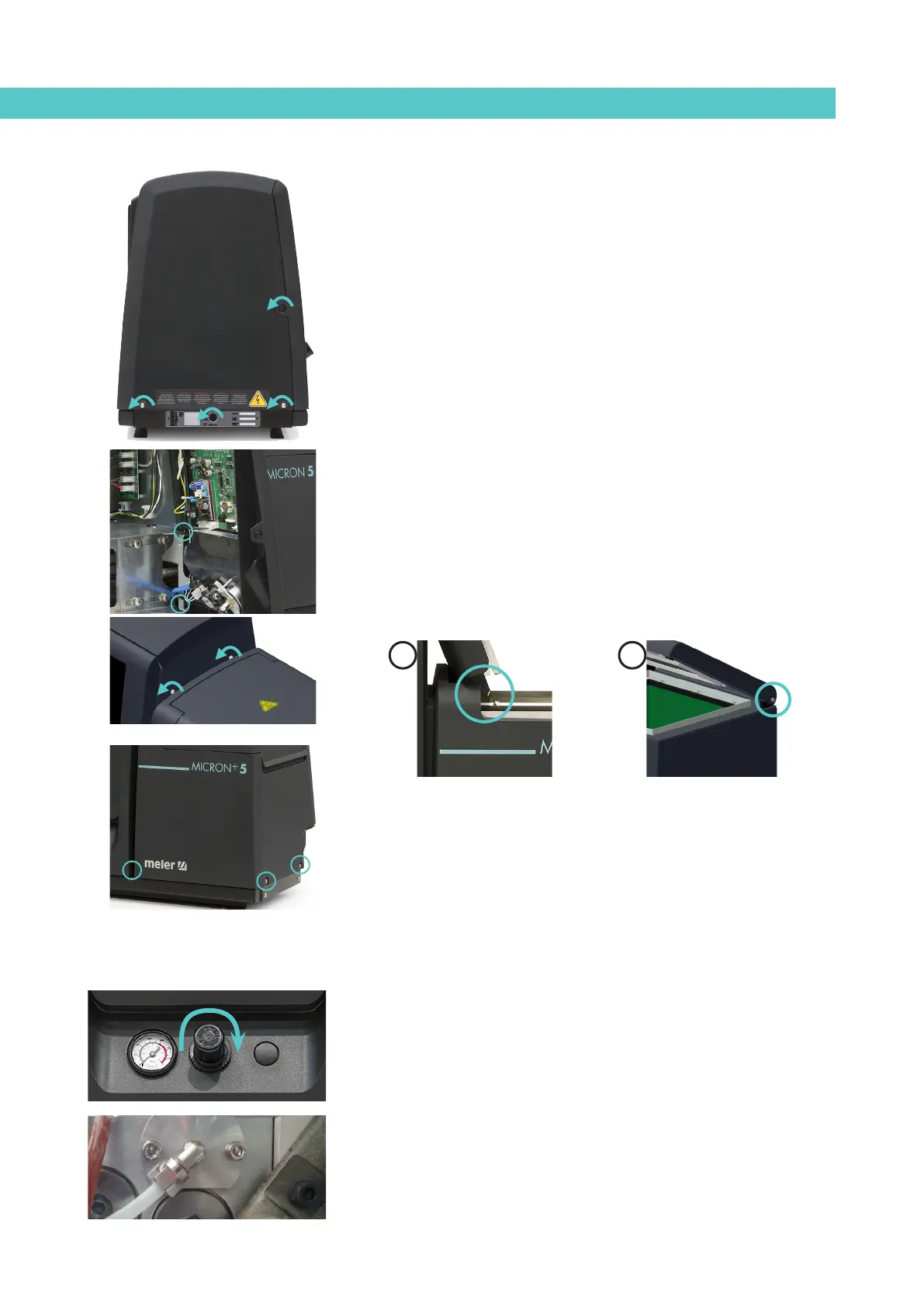
Removing and changing exterior panels:
1. Turn off the melter.
2. Disconnect the compressed air from the machine intake.
3. To remove the casing from the machine, first you have to separate the
electrical cabinet from the tank. To do this, slacken the 1/4 turn screw
as indicated (A) and slide it along the guides.
4. To remove the electrical cabinet door, open the door by turning the
1/4 turn screw as indicated (B), lift the door, turn it and remove the
screws (C).
5. To remove the electrical cabinet casing, slacken the screws (D) that
hold it to the base of the machine and the screws (E) that hold it to the
structure of the electrical cabinet.
6. To remove the tank casing, remove screws F and G that hold this casing
to the base of the equipment. The lid and the casing are removed from
the tank at the same time.
7. The tank lid of MICRON+ 5 and 10 is removed once the tank casing has
been dismantled. It is simply a matter of sliding the shafts at the ends
along the grooves in the casing. (See diagram 1).
The tank lid of MICRON+ 20 and 35 is removed loosening the side lid
screws (See diagram 2).
8. To assemble the casing, follow the instructions in reverse order.
System depressurisation
‘MICRON+’ series melters are equipped with a safety valve that allows you
to depressurize the system whenever the equipment is pneumatically or
electrically disconnected.
Before disconnecting any hydraulic component or opening any distributor
output, it is necessary to follow these steps:
1. Turn off the machine switch on the door of the electrical cabinet next to
the pressure regulator.
The depressurization valve releases the pressure from the hydraulic
circuit, returning the adhesive to the tank.
2. Purge all applicators that have been used either manually or with
the corresponding program command.
1 2
C
G
F
E
D
D
A
B



 To Next Page