12.09.05 rev 1.0
14
16. Display on Gantry M1 or M2 software
Touch Pads Controls And Displays
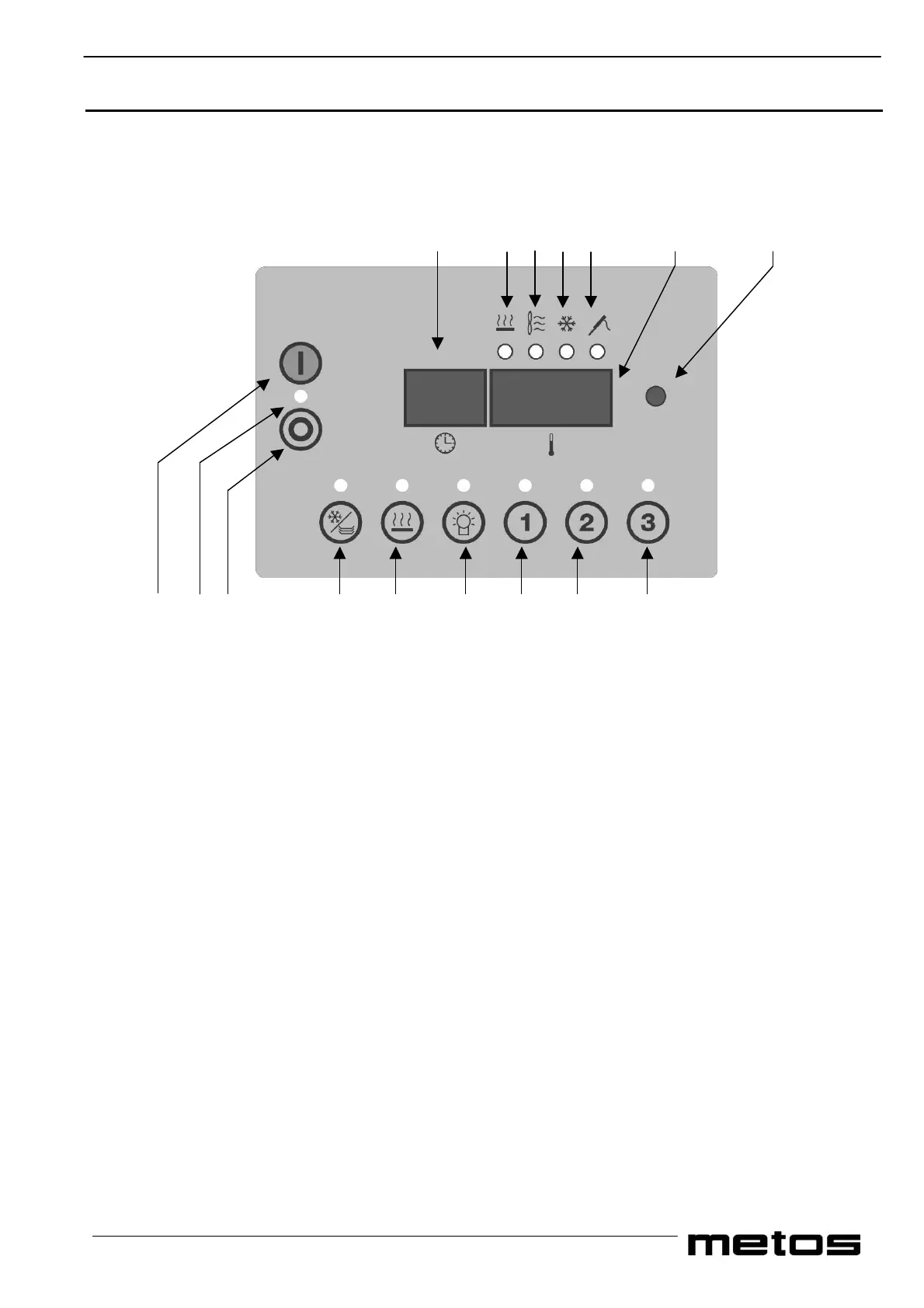
The Multigen I, Multigen II and Minigen, may have the control panel on gantry shown in the following Figure 15.2
Some of the functions are optional and may not be available or operational on your trolley. In this case the relative functions
and touch pads are disabled.
10 13 14 12 15 11 16
9 7 8 4 5 6 1 2 3
Key
Figure 15-2 Control Panel on Gantry
1. Start/Stop Pad for regeneration cycle 1
2. Start/Stop Pad for regeneration cycle 2
3. Start/Stop Pad for regeneration cycle 3
3 Start/Stop Pad for maintaining cycle (press and hold for 5 seconds)*
4. On /Off Pad for Plate warmer or Refrigeration
5. On /Off Pad for Heated top plate (press once all of the top plate press twice for half top plate)*
6. On /Off Pad for cold Lights
7. Mains power indicator LED
8. Display Off Pad
9. Display On Pad
10. Display 1 indicating cycle time or error/fault messages
11. Display 2 indicating temperatures of programmed functions
12. LED indicating that the temperature of Plate warmer or Refrigerated compartment is currently being displayed
13. LED indicating that the temperature of Heated top plate is currently being displayed *
14. LED indicating that the temperature of Oven is currently being displayed.
15. LED indicating that the temperature of External food probe is currently being displayed
16. Hit system data download LED
Split Plate Warmer with refrigeration Models have a separate switch to the side of the controls to operate the Plate
Warmer section.* Refer to special features


 To Next Page