12.09.05 rev 1.0
15
17. Programming
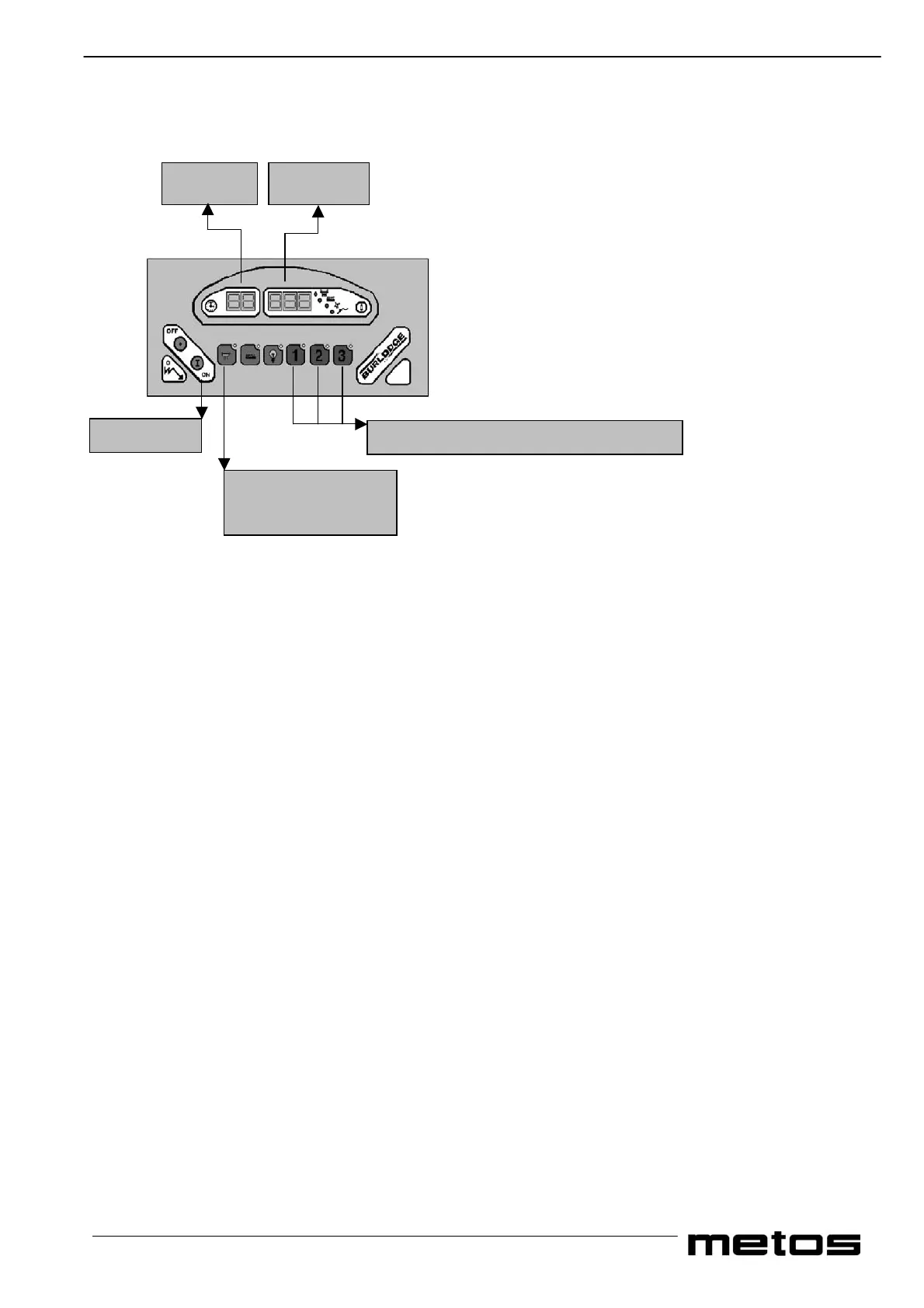
Control Panel Functions when in Programming Mode
Special Touch Pad Functions and Displays in Programming Mode.
When in programming mode the touch pads on the control panel take on different functions compared to normal use.
• Display 1 indicates a two-digit number; the first digit refers to the group and the second to the sub group
• Display 2 indicates the value of the parameter which is being modified or entered.
• Cycle 1 touch pad reduces the set value of the parameter.
• Cycle 2 touch pad increases the set value of the parameter.
• Cycle 3 touch pad confirms the set value of the parameter and advances to the next parameter.
• Refrigeration/Plate Warmer pad this must be kept pressed to enter the set up under parameter O
Access to Programming Mode
• Apply the brakes on the castors.
• Connect the trolley to the power supply. The green LED will illuminate.
• Simultaneously firmly press cycle 1 and cycles 2 and 3 touch pads, press the “ON” touch pad and “P” appears on window 1.
Release cycle 1, 2 and 3 and immediately (within 5 seconds) enter the programming code
• Pressing cycle 3 and cycle 2 then cycle 1 in quick succession for set up and oven cycle programming.
• Pressing cycle 1 and cycle 2 then cycle 3 in quick succession for auto start timer programming.
• If any errors have been made in the above procedure, the panel will revert to its normal operating mode. If these instructions
have been carried out correctly “0” will appear on display 1.
Special Touch Pad Functions and Displays in Programming Mode.
When in programming mode the touch pads on the control panel take on different functions compared to normal use.
• Cycle 1 touch pad reduces the set value of the parameter.
• Cycle 2 touch pad increases the set value of the parameter.
• Cycle 3 touch pad confirms the set value of the parameter and advances to the next parameter.
When programming mode is accessed, display 1 indicates a two-digit number; the first digit refers to the group and the second
to the parameter. Display 2 indicates the parameter which is being modified or entered and represents the time in minutes or
the temperature in degrees centigrade.
Display 1 Display 2
On/Off pad
Oven-cycle pads One Two and Three
Refrigeration –
Plate Warmer pad


 To Next Page