EasyManua.ls Logo

METREL MI3115 - General Settings Menu

METREL MI3115
77 pages
Print Icon
To Next Page IconTo Next Page
To Previous Page IconTo Previous Page
Loading...
MI 3115 PV Analyser
Instrument operation
21
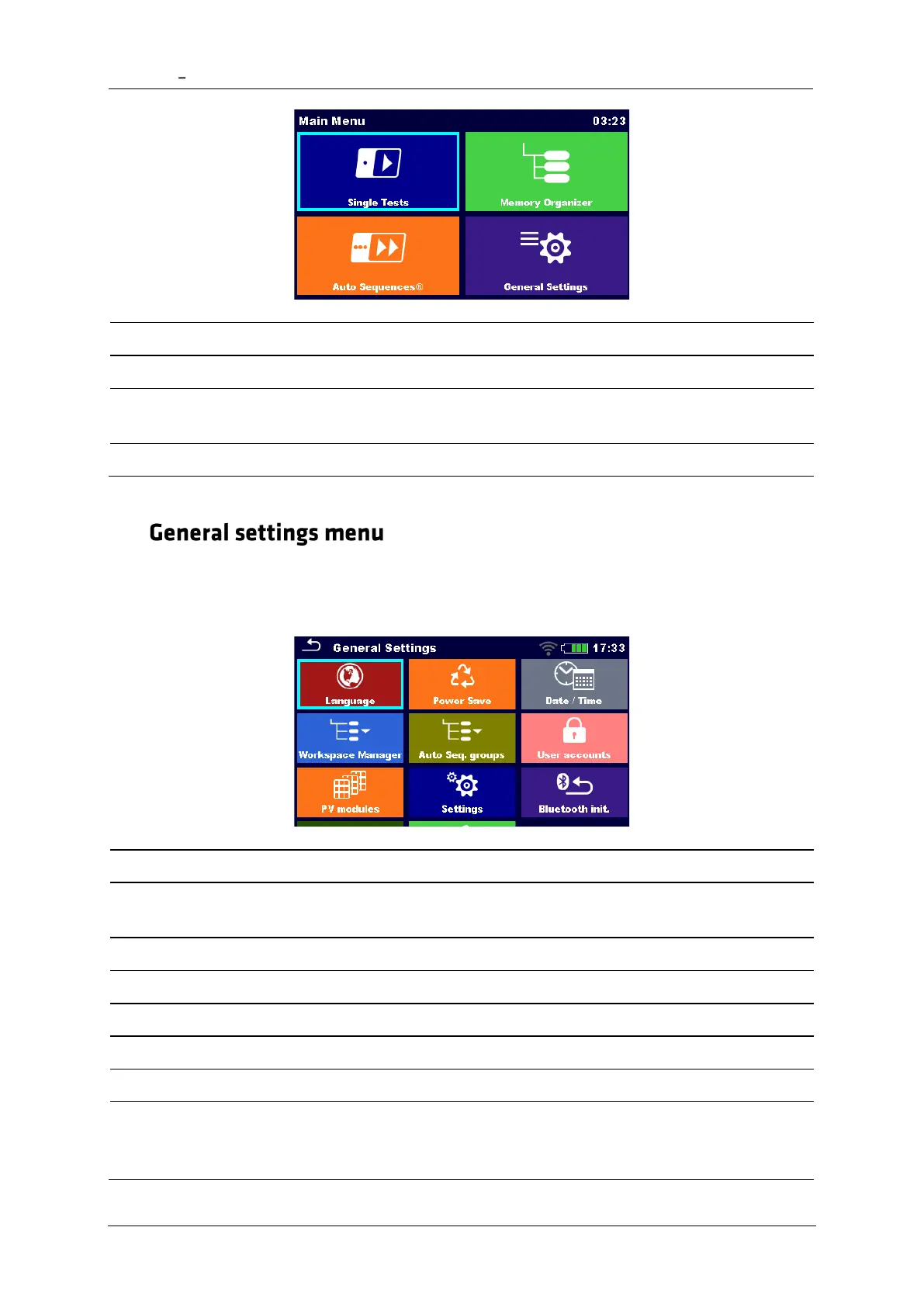
Single Test
Menu for selecting single tests
Auto Sequences®
Menu for selecting Auto sequences
Memory Organizer
Menu for working with structured test objects
and measurements
General Settings
Menu for setup of the instrument
4.6
In the General Settings menu general parameters and settings of the instrument can be
viewed or set.
Language
Language selection
Power Save
Brightness of LCD, LCD off timer,
enabling/disabling Bluetooth communication
Date / Time
Setting date and time
Workspace Manager
Managing project files
Auto Sequence® groups
Managing lists of Auto Sequences®
User accounts
Managing user accounts
PV modules
Managing PV modules
Profiles
Instrument profiles
(This setting is visible only if more than one
profile is available.)

Table of Contents

Related product manuals