57
7.1.1 Organization of Auto Sequences® in Auto Sequences® menu
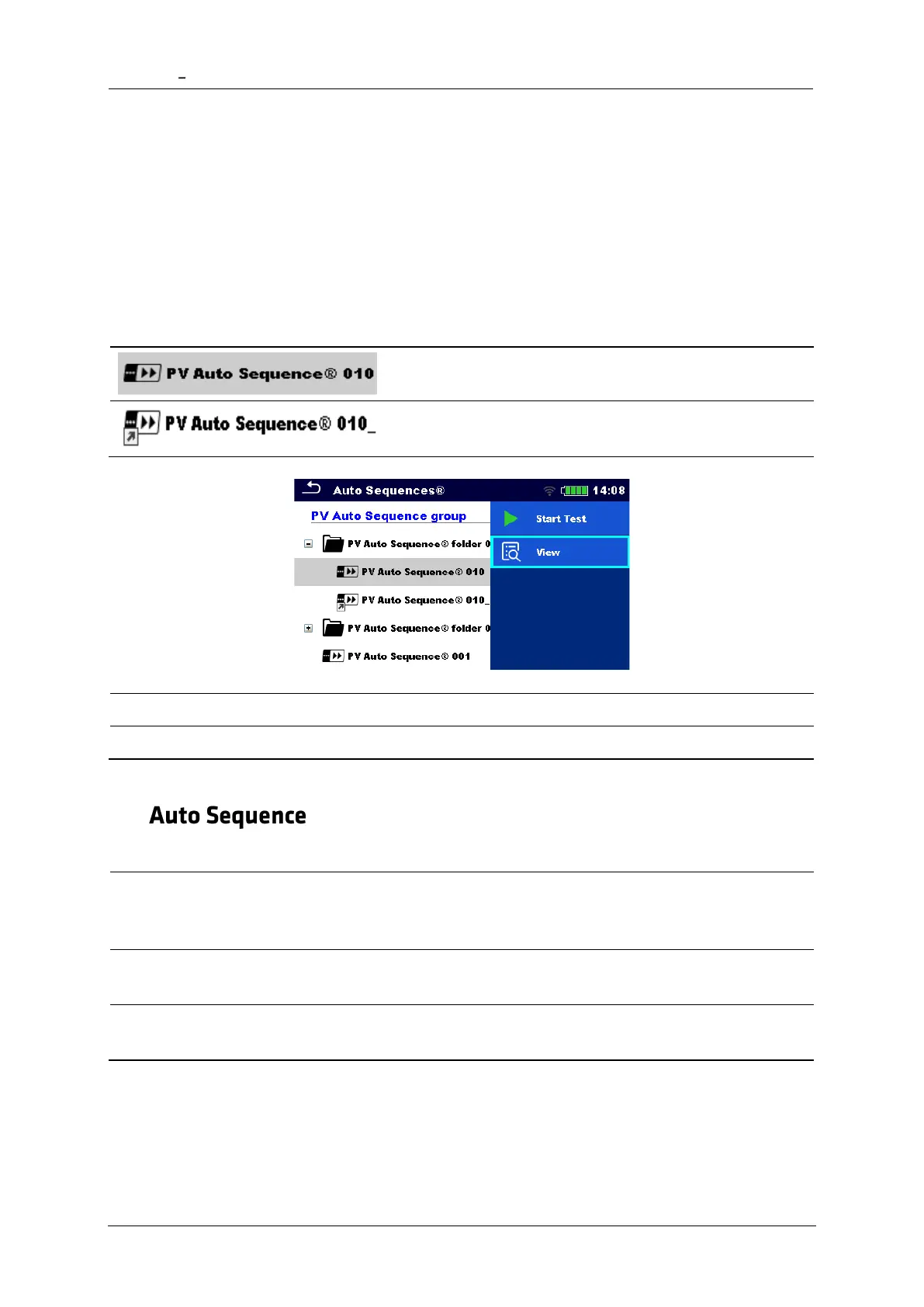
The Auto Sequence® menu can be organized in a structural manner with folders, sub-folders
and Auto Sequences. Auto Sequence in the structure can be the original Auto Sequence or a
shortcut to the original Auto Sequence.
Originals and shortcuts
Auto Sequences marked as shortcuts and the original Auto Sequences are coupled. Changing
of parameters or limits in any of the coupled Auto Sequences will influence on the original
Auto Sequence and all its shortcuts.
The original Auto Sequence®.
A shortcut to the original Auto Sequence®.
Detailed view of Auto Sequence
7.2
Carrying out Auto Sequences step by step
Before starting, the Auto Sequence view menu is shown, (unless it was started directly from
the Main Auto Sequences® menu). Before the test, parameters and limits of individual
measurements can be edited.
During the execution phase of an Auto Sequence, pre-programmed single tests are carried
out. The sequence of single tests is controlled by pre-programmed flow commands.
After the test sequence is finished the Auto Sequence result menu is shown. Details of
individual tests can be viewed and the results can be saved to Memory organizer.














 To Next Page