■■■■■■■■■■■■■■■■■■■■■■
3 Installation
858 Professional Sample Processor
■■■■■■■■
25
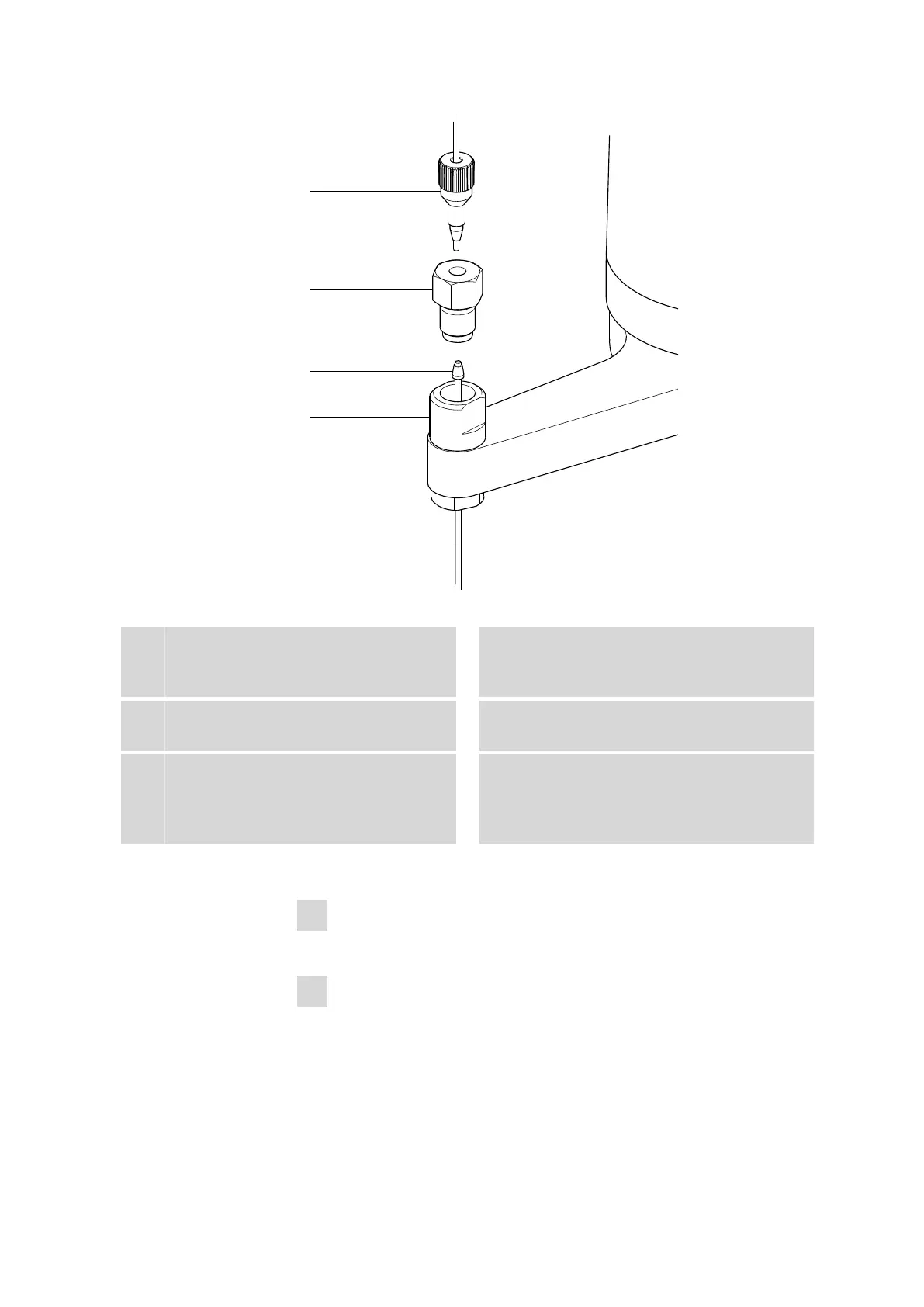
Figure 21 Installing the needle
1
PTFE capillary
6.1803.070 or 6.1831.050 / 6.1831.060 /
6.1831.080
2
PEEK pressure screw
6.2744.010
3
Nut
4.766.4320 (or 6.2833.020 + 6.2744.080)
4
Ferrule
5
Needle holder
6
Sample needle
6.2846.000 (zirconium oxide) or
6.1835.020 / 6.1835.040 / 6.1835.050
(made of PEEK)
This is how you install the needle and the capillary:
1
Removing the PEEK pressure screw
Loosen and remove the nut (21-3) screwed onto the needle holder.
2
Inserting the needle
■ Insert the needle from above partway into the opening of the
needle holder (21-5).
■ Slide the PEEK ferrule (21-4) over the needle from above. The nar-
row side of the seal must face upwards.











 To Next Page