Installation, Programming and Maintenance Microdos Pooltec
Rev. 1.0 EN
15
4. PROGRAMMING THE CONTROL UNIT
4.1. HOME PAGE: REAL-TIME INFORMATION
Connect MICRODOS POOLTEC to a mains socket, wait until the screen starts up
(IT MAY SOMETIMES BE NECESSARY TO WAIT A FEW
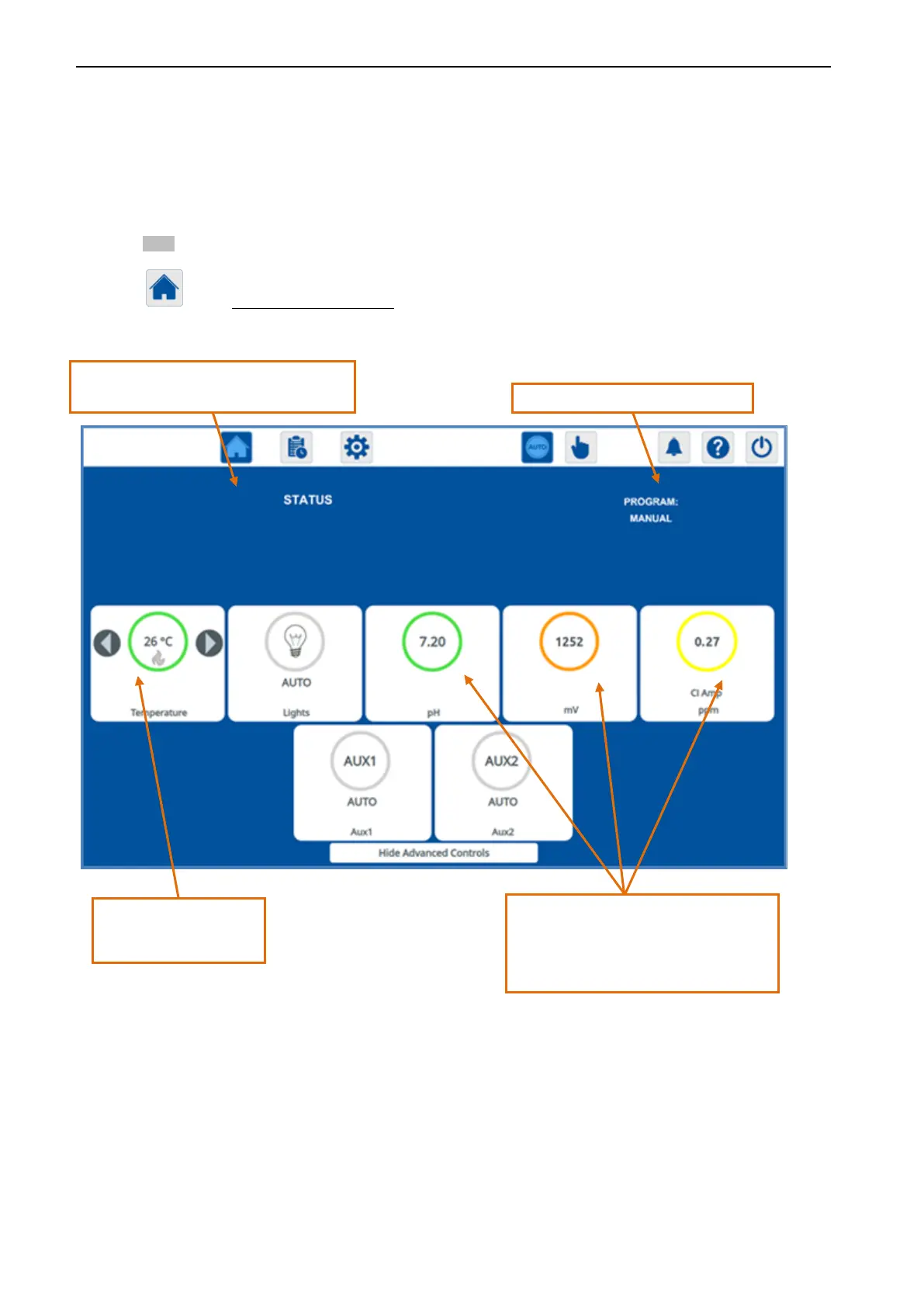
MINUTES). Once the system has started up, the first thing you will see is HOME PAGE, from which you can operate the touch-screen’s
buttons
. The system is pre-programmed at the factory. However, if you do not need to do any additional programming, you need merely
to press the AUTO key, and Microdos Pooltec will function using the programs as set (defaults, see DEFAULT CONFIGURATION page 49).
By using the button, from navigation at any time, you will access the HOME page.
- Temperature
System status. The system will tell you if all is well,
or if there is any error.
Information on pump programming.
pH, Redox, Chlorine.
- GREEN: EXCELLENT VALUE
- YELLOW: GOOD VALUE
- ORANGE: VALUE TO BE MONITORED


 To Next Page