Installation, Programming and Maintenance Microdos Pooltec
Rev. 1.0 EN
35
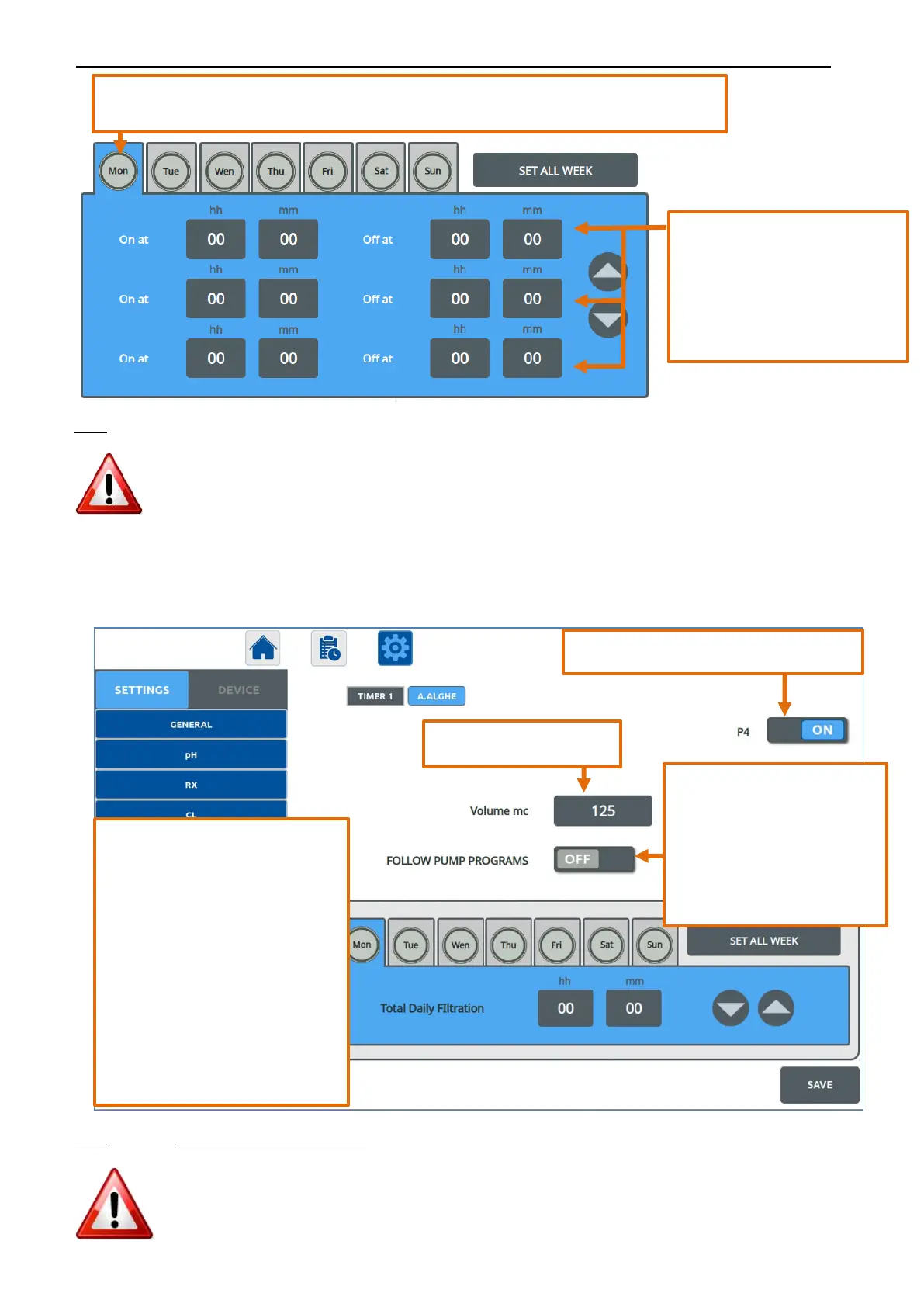
NOTE:
1. Weekdays colour:
a. BLUE: the timer is active on the day.
b. GREY: the timer is not active on the day
2. Always press SAVE to make the modification effective.
3. Values of On at “00:00” and Off at “00:00” → no programming
4.5.3.6.2. MICRODOSE TYPE
A dosage is performed at the beginning of each hour of filtration.
The dosing time is automatically calculated based on the pool volume and the filtering hours of the day.
NOTE: when the “Follow Pump Program” is in OFF mode:
1. Weekdays colour:
a. BLUE: the dosage is active on the day.
b. GREY: the dosage is not active on the day.
2. Always press SAVE to make the modification effective.
Activates/deactivates the OUTPUT function.
•
ON: the chemical dosing
follows the operating times
of the PUMP PROGRAM
selected in Programs.
•
OFF: the chemical dosing
follows the water flow
detected by FLOW SENSOR.
If “Follow Pump Programs” is OFF, you
need to set the Total Daily Filtering
Period for every weekday.
With a short press on the day, you
access in the settings for the selected
day.
With a second short press on the day,
the dosage is active on that day (blue
colour).
Set the Total Filtration day Time value
using the ▲ ▼ arrows.
If you wish to use the daily program
already set, copy it for the entire week by
pressing SET ALL WEEK
Pool volume in cubic meters.
With a short press on the day, you access in the settings for the selected day.
With a second short press on the day, the timer you activate the timer on that day (blue colour).
With a short press on the box hh:mm
you can modify the On/Off time
(hours and minutes) using the ▲ ▼
arrows.
If you wish to use the daily program
already set, copy it for the entire week
by pressing SET ALL WEEK


 To Next Page