Installation, Programming and Maintenance Microdos Pooltec
Rev. 1.0 EN
44
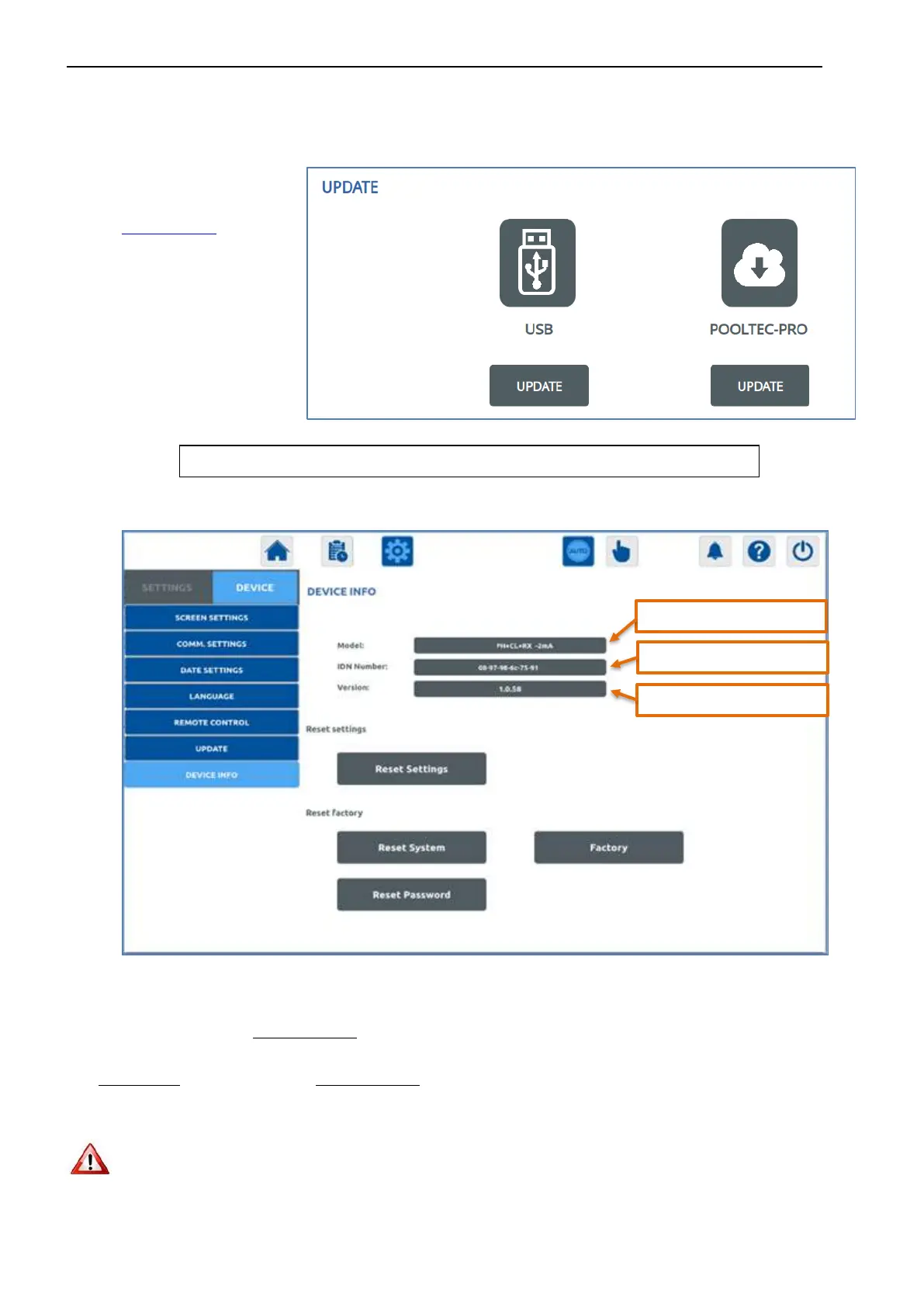
4.5.4.6. UPDATE SOFTWARE (DOWNLOAD)
Download and install system updates.
For the correct installation of the software:
- Choose if you want to
DOWNLOAD the update
from USB or from the
pooltec-pro.com server.
- The corresponding
UPDATE button will
appear.
- Press
UPDATE.
4.5.4.7. DEVICE INFO: SYSTEM MODEL AND SERIAL NUMBER: SOFTWARE VERSION
Inside this page is also possible to perform 3 different Resets:
RESET SETTINGS: press to reset all parameters to default values (see page 50). Probe calibrations, all modification done in CONFIG
page and measurement history will not be erased.
RESET SYSTEM: press to reset the system to the initial factory configuration (Probe calibration and all modification done in CONFIG
page will be erased, measurement history will not be erased).
PASSWORD RESET: press to reset the installer password to the factory value. To do this you will need a Passepartout: please contact
the customer care service.
AFTER A RESET, THE SYSTEM WILL REBOOT
There is also the FACTORY configuration, only accessible from the manufacturer.
The system will reboot with the updated version of the software.
Installed software version


 To Next Page