Installation, Programming and Maintenance Microdos Pooltec
Rev. 1.0 EN
42
Wi-Fi CONNECTION
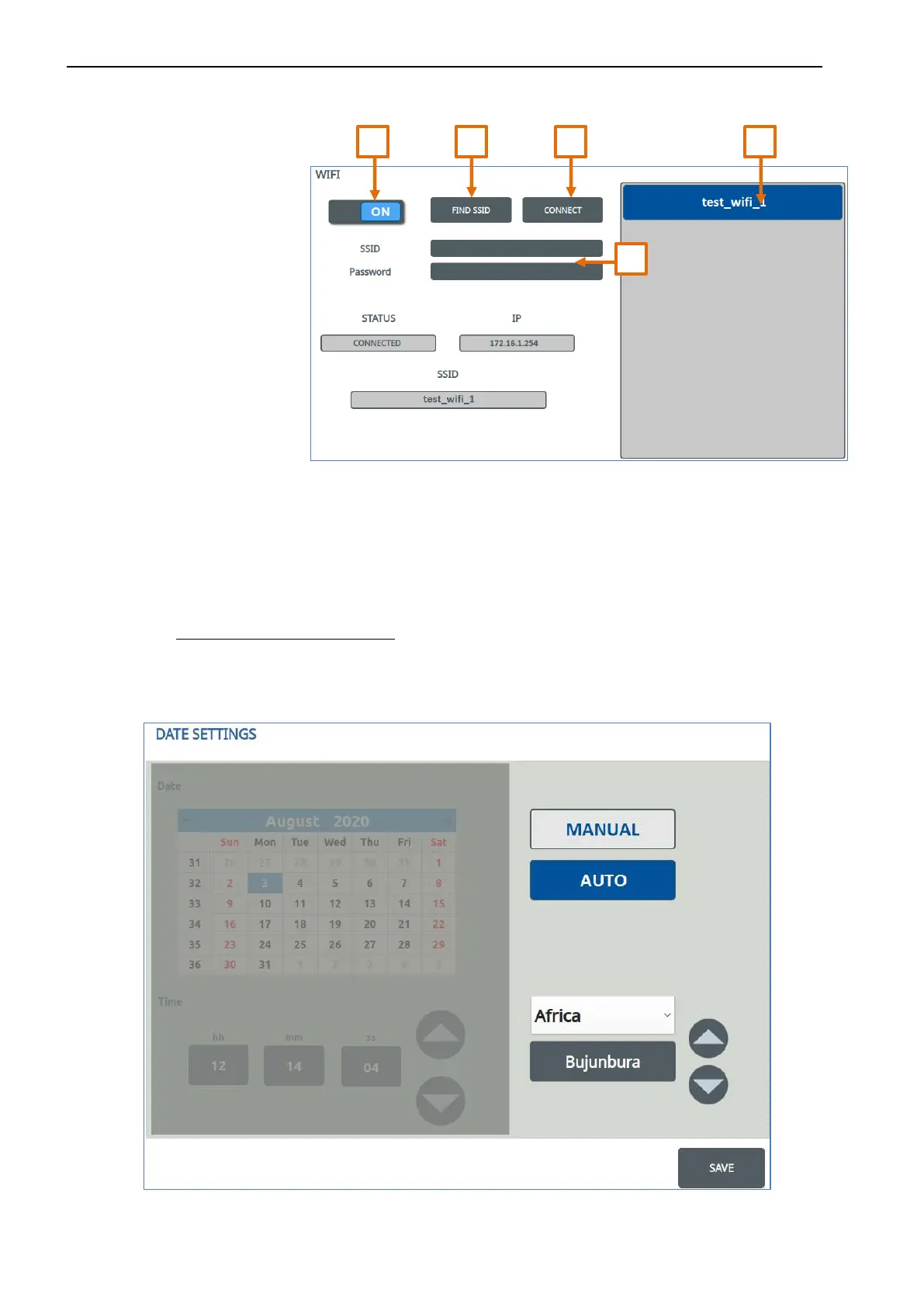
To establish the internet connection via Wi-Fi:
1. Turn on the Wi-Fi
2. Press the “FIND SSID” button
A list of Wi-Fi networks available
for connection will appear in the
side box.
3. Select the desired Wi-Fi network
from the list
4. Enter the password (if requested)
5. Press CONNECT
Once connected to the network via Wi-Fi, STATUS displays the status of the connection, IP the address and SSID the name of the
network to which you are connected.
4.5.4.3. DATE AND TIME
To configure the date/time you can choose between two possible options:
-
AUTO: If the system is connected to internet, you can choose the AUTO MODE.
Press the AUTO button and set the time zone.
The system will automatically set the date and time accordingly.
Press SAVE to make the modification effective.


 To Next Page