Installation, Programming and Maintenance Microdos Pooltec
Rev. 1.0 EN
37
4.5.3.6.4. DRY AUXILIARY OUTPUTS
Inside this menu you can set up the functioning of Lights and D1/D2 configurable Dry Outputs.
IMPORTANT: DRY CONTACTS ARE FREE OF POTENTIAL (RELAYS) WITH A PROTECTION OF 5 AMPERES.
DO NOT EXCEED THIS ELECTRICAL INTENSITY.
4.5.3.6.5. LIGHTS
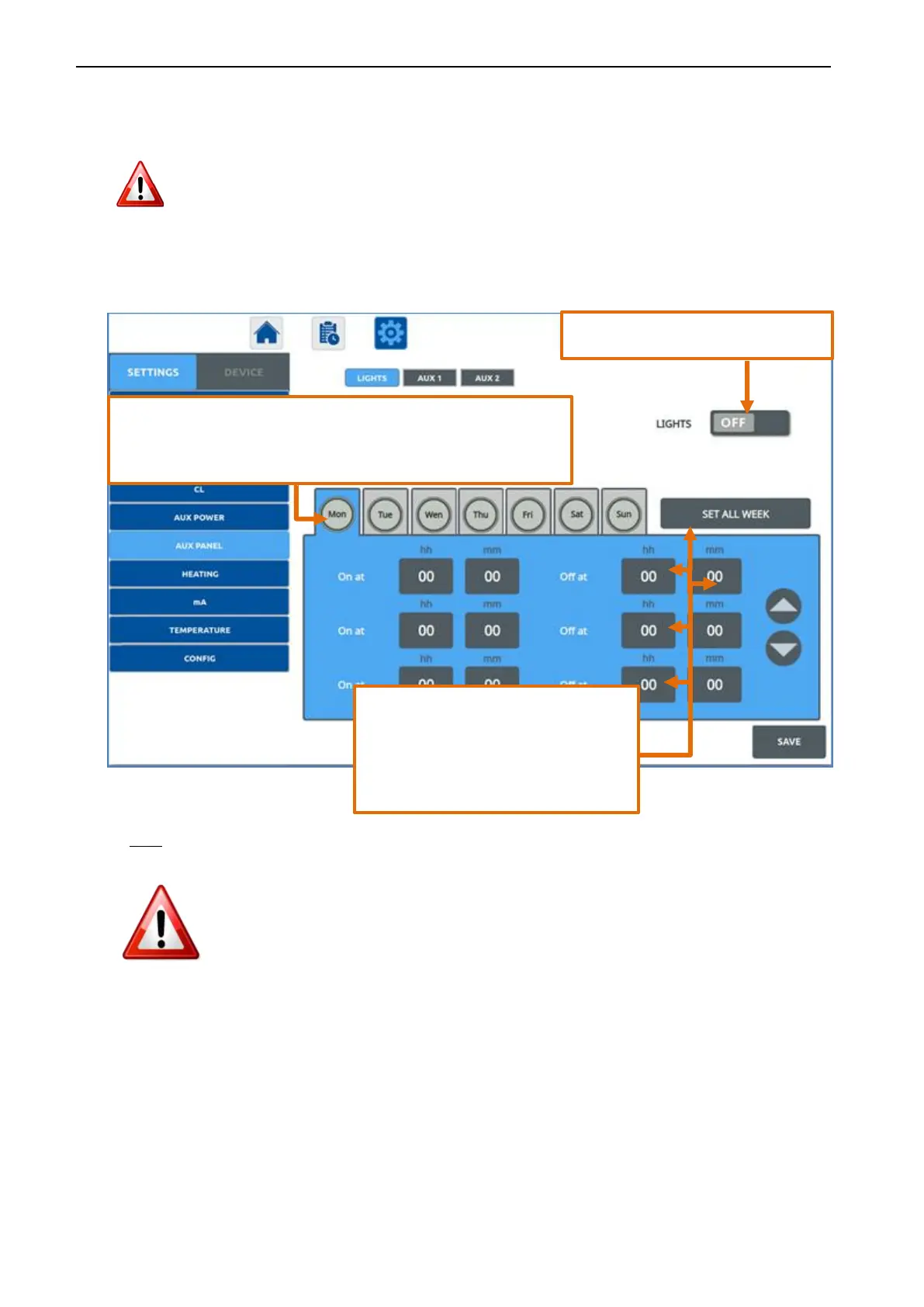
Configure up to 3 daily timers to program the activation of lights.
NOTE:
1. Weekdays colour:
a. BLUE: the timer is active on the day.
b. GREY: the timer is not active on the day.
2. Always press SAVE to make the modification effective.
3. Values of On at “00:00” and Off at “00:00” → no programming
Activates/deactivates the LIGHTS Output.
With a short press on the day, you access in the settings for the selected
day.
With a second short press on the day, the timer you activate the timer on
that day (blue colour).
With a short press on the box hh and mm
you can modify the On/Off time (hour and
minutes) using the ▲ ▼ arrows
If you wish to use the daily program already
set, copy it for the entire week by pressing SET
ALL WEEK


 To Next Page