Installation, Programming and Maintenance Microdos Pooltec
Rev. 1.0 EN
38
4.5.3.6.6. HEATING FUNCTION
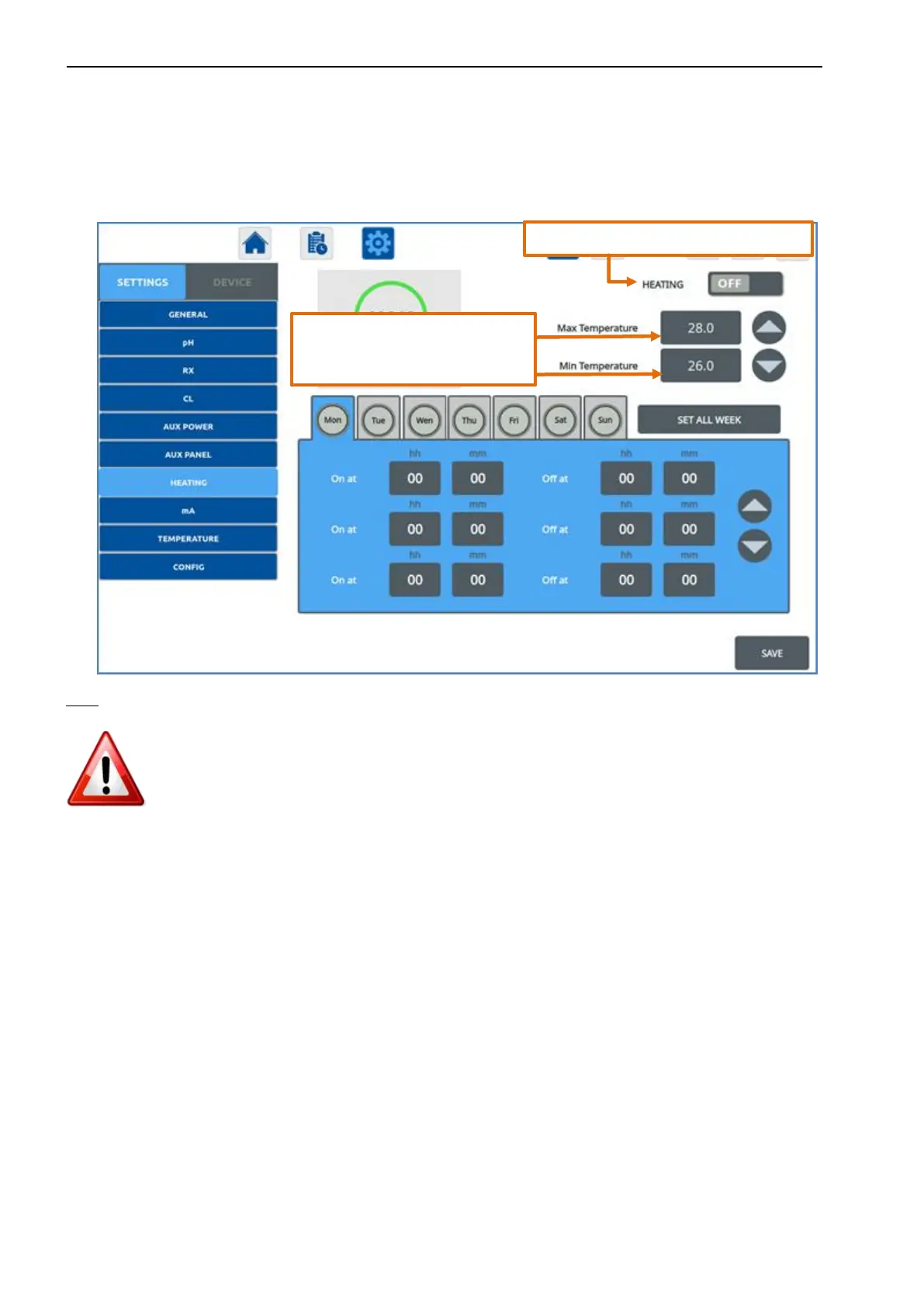
1) Program the daily activation of the HEATING program.
2) Enter the values of MIN and MAX temperature thresholds required to start up and shut down the heater. Once the
temperature reaches the value of the maximum temperature, heater will shut down and, when it falls to the minimum, it will
start up again.
NOTE:
• To activate the heat control:
-
With a short press on the day, you access in the settings for the selected day.
- With a second short press on the day, the heat control is activated on that day (blue colour).
-
Set the desired time values using the ▲ ▼ arrows.
- If you wish to use the daily program already set, copy it for the entire week by pressing SET ALL WEEK.
•
Weekdays colour:
a. BLUE: the heat control is active on the day.
b. GREY: the heat control is not active on the day.
•
Always press SAVE to make the modification effective.
•
Values of On at “00:00” and Off at “00:00” → no programming
Activates/deactivates the HEATING output.
Shut-down and start-up temperature
of the heater during its hours of


 To Next Page