74 Microtek ScanWizard Pro for Windows
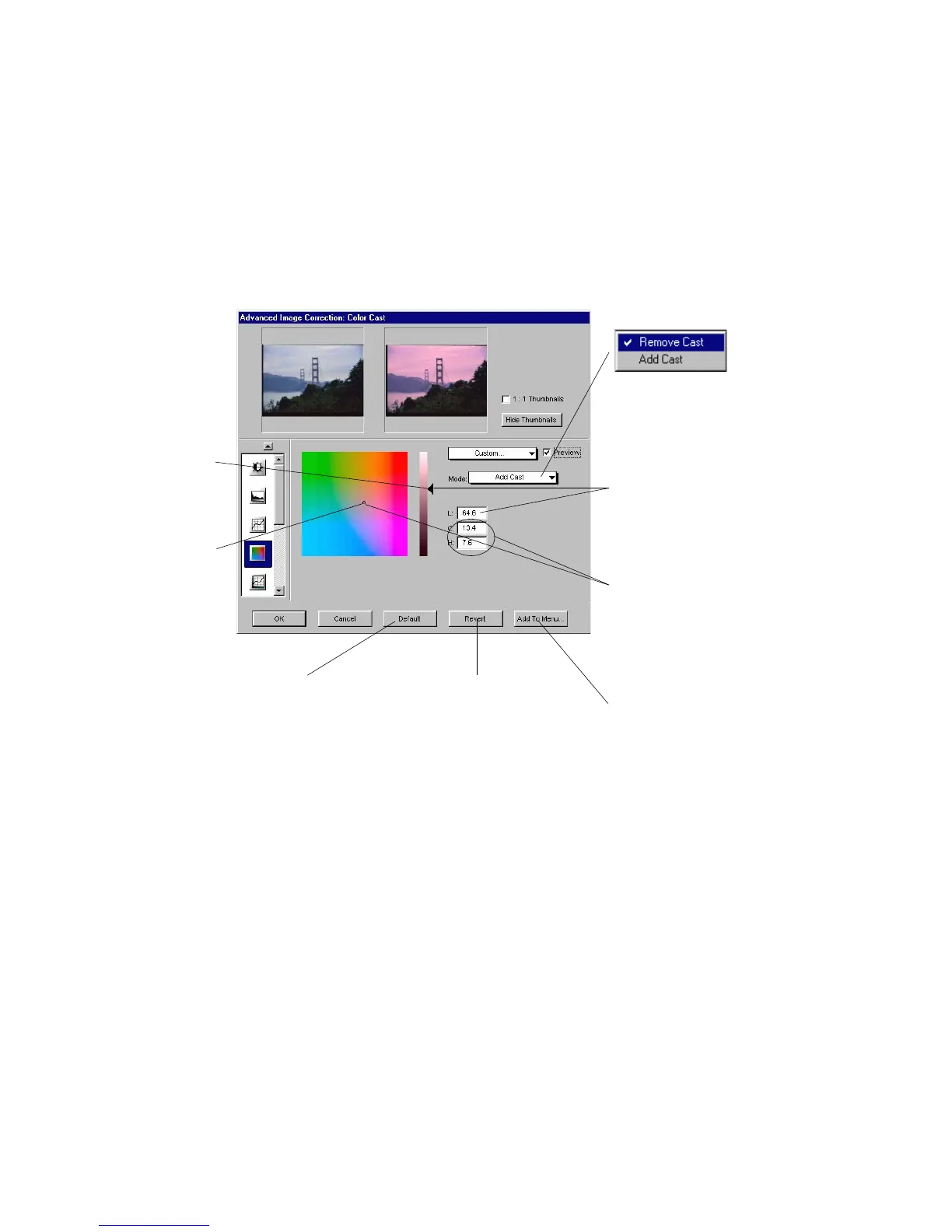
Color Cast tool (LCH Mode Only)
The
Color Cast Color Cast
Color Cast Color Cast
Color Cast tool is most useful in eliminating unwanted color cast and
adding color cast where proper color cast is lacking to maintain the neutral and
gray balance of an image. You must initially select mode before color casting.
The Color Cast dialog box
Define Lightness by adjusting "L"
Handle and observe corres-
ponding "L" value in the edit box.
You can also enter "L" value
directly in the box
Select desired color to add or
remove by dragging the Chroma &
Hue Handle toward desired color
cast; and observe corresponding
"C&H" values on the edit boxes.
You can also directly enter "C&H"
values in their respective edit
boxes
Click to save current custom
(curve) parameters in Color
Cast preset settings
Click to revert to the
custom setting defined
right after current start
up
Click to revert to the
default "C&H"
Handle position
Chroma and
Hue Handle
Lightness
Handle
Select Color Cast mode
"Remove Cast"
is the default



 To Next Page