English - 27
003-2707-99
© Midmark Corporation 2015 TP202 20-42-FO-00014 Rev A1 C2169
NOTE:
PressingtheSTOPbuttonduringthisprocedurewillabortthechanges,andreverttotheoriginalsettings.
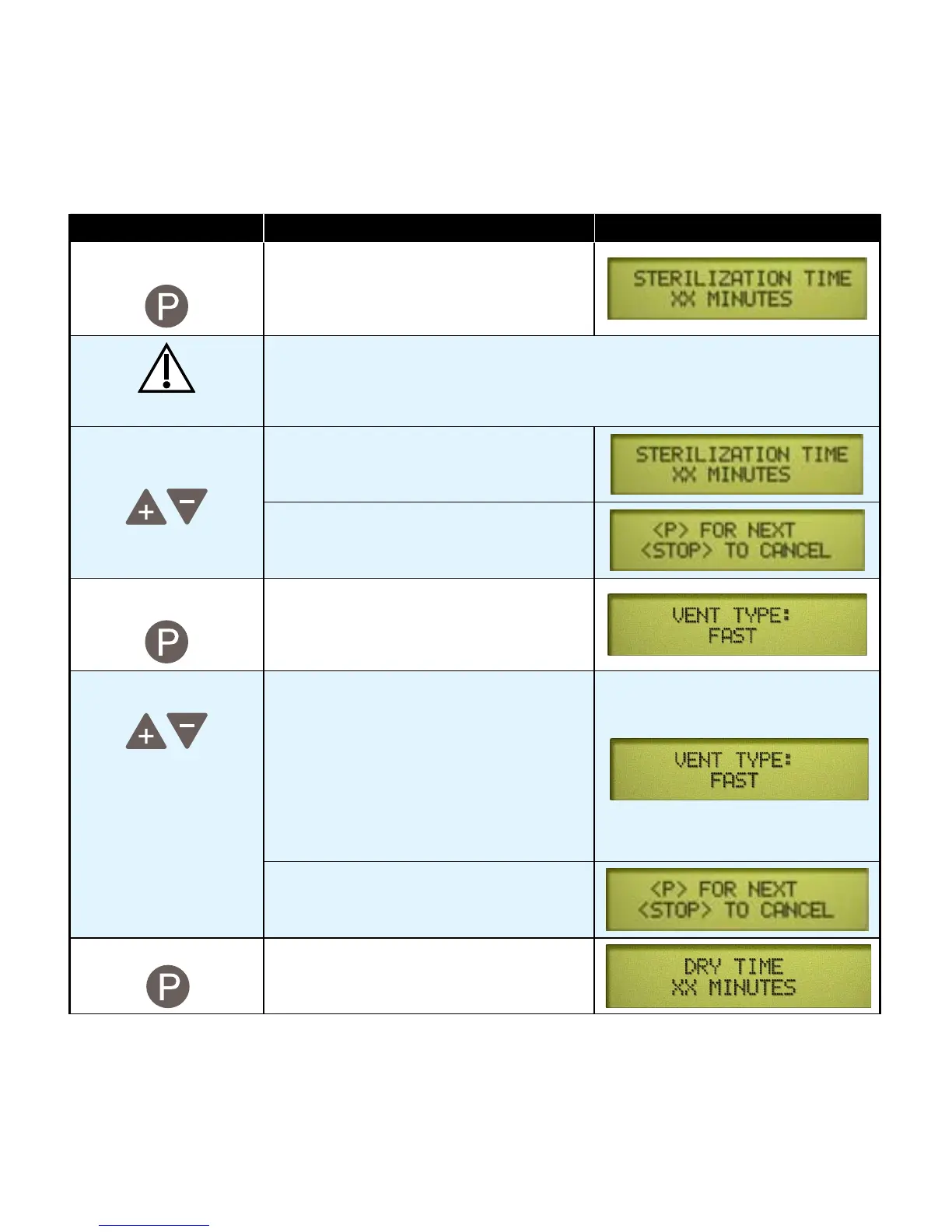
Action Description Display
Press To store the temperature. This brings up
the sterilization time programing display
showing the current value.
Caution
Sterilization time can be adjusted from a minimum of 3 minutes to a maximum
of 90 minutes. It is important to properly coordinate the cycle time with the
sterilization temperature.
Adjust Sterilization
Time
The“+”and“-”buttonsadjustthe
time by 1 minute increments.
When the desired time appears on the
display...
Press To store the sterilization time. This brings
up the vent speed programing display and
the current value.
Adjust Vent Speed InFASTvent,thevalvefullyopensand
vents the chamber.
InSLOWvent,thevalveopensfora
fraction of a second (once per minute)
to slowly vent the chamber.
Pressing“+”setsitto:FAST
Pressing“-”setsitto:SLOW
When the desired setting appears on the
display...
Press To store the setting and bring up the dry
time programing display and the current
value.
This chart continues on the following page...
Programmable Cycle Buttons - continued



 To Next Page