English - 26
003-2707-99
© Midmark Corporation 2015 TP202 20-42-FO-00014 Rev A1 C2169
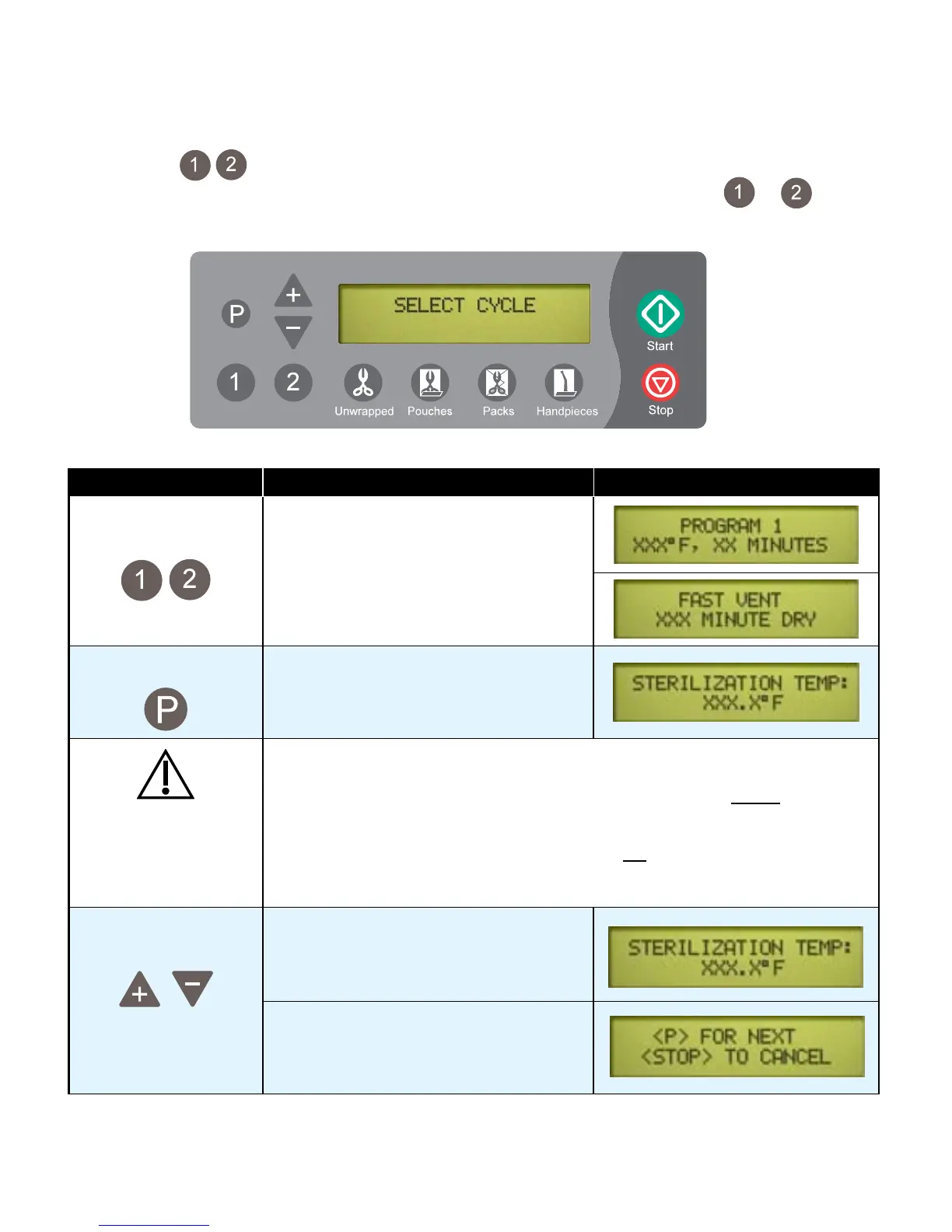
Programmable Cycle Buttons
Cycle buttons can be used for custom applications that are not covered by standard cycle
programs.Onceacustomprogramhasbeenstored,itcanbeusedjustbypushingtheorbutton.
Use the instructions in the chart below to set time / temperature parameters for these buttons.
(If you wish to change the settings, these buttons may be reprogrammed at any time).
NOTE:
PressingtheSTOPbuttonduringthisprocedurewillabortthechanges,andreverttotheoriginalsettings.
Action Description Display
Press desired
button
This selects the button that will be
programmed.
Press This brings up the sterilization
temperature programing display.
Caution
Sterilization temperature can be adjusted from a minimum of 230°F (110°C) to a
maximum of 275°F (135°C). Permitted temperature range for proper sterilization
is 250° to 275°F (121° to 135°C).
Temperatures set below 250°F (121°C) should not be used for sterilization,
unless otherwise required by the device manufacturer. Temperatures below
250°F (121°C) are provided for disinfection only.
Adjust Sterilization
Temperature
The“+”and“-”buttonsadjustthe
temperature by 1° increments.
When the desired temperature appears
on the display...
This chart continues on the following page...



 To Next Page