English - 38
003-2707-99
© Midmark Corporation 2015 TP202 20-42-FO-00014 Rev A1 C2169
MA46500-1i
EJECT
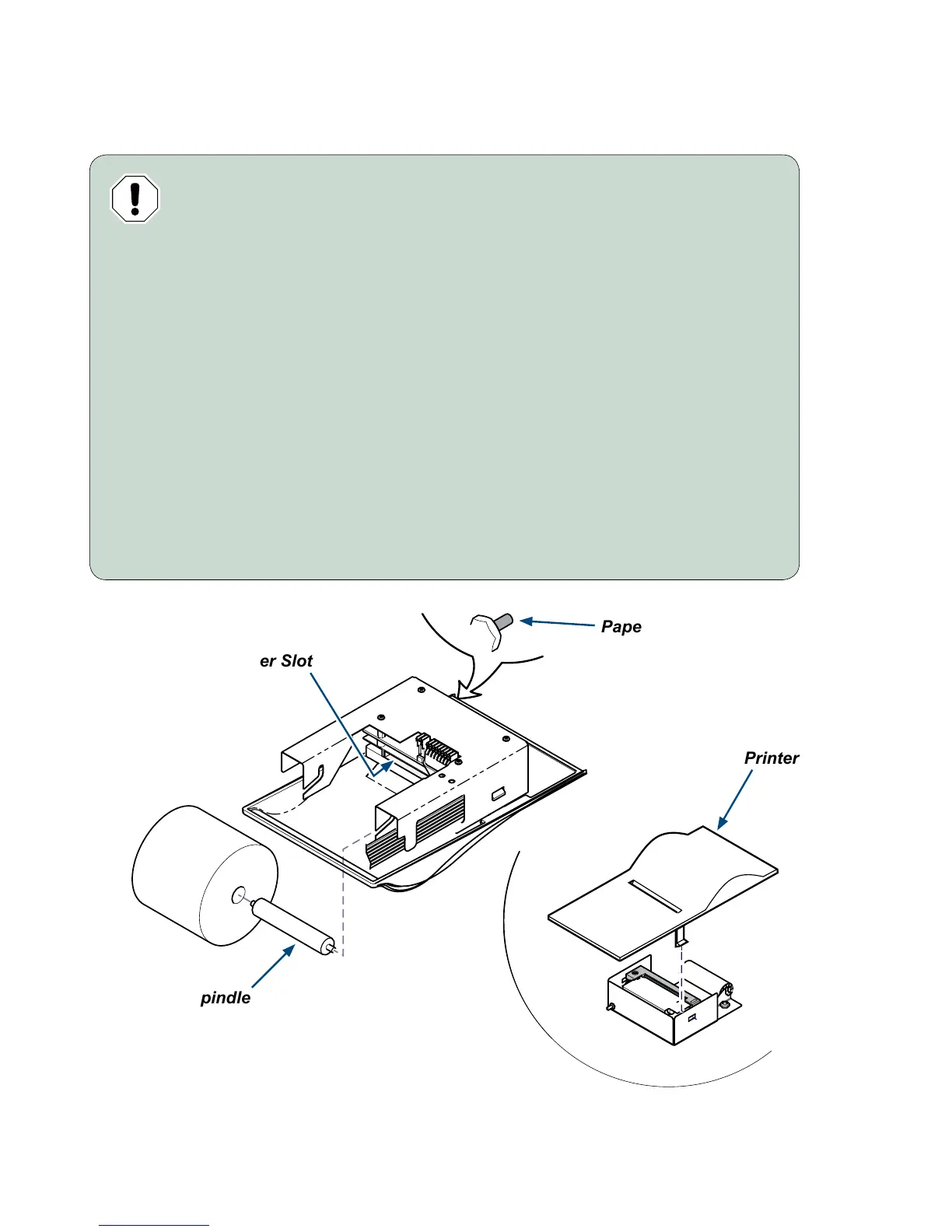
Paper Roll Installation
Spindle
Printer Slot
Printer Cover
Paper Feed Button
Equipment Alert
Using paper rolls larger than 1.97” (50 mm) in diameter, may cause the paper
feed mechanism to slip and / or damage the printer.
To install the paper roll...
A) Turn printer onto its back.
B) Insert spindle into new paper roll.
C) Unroll 2” to 3” (5 to 7.5 cm) of paper.
D) If necessary, cut a straight edge on the paper to feed into the printer slot.
E) Feed approx. 1/4” (6.4 mm) of paper into the printer slot.
F) While holding paper in place, press/hold “PAPER FEED” button until
1” (2.5 cm) paper comes thru slot in printer cover, then release button*.
G) Pull 2” to 3” (5 to 7.5 cm) of paper thru printer cover.
H) Insert paper roll / spindle into slots of spindle holder as shown.
I) Turn the paper roll to remove slack in the paper feeding to the printer.
J) Install the printer assembly back into the printer cavity.
*Note: If necessary, remove the printer cover and manually feed the paper thru the slot in the cover.



 To Next Page