Technical Information
126
G1000 / G2000 Dishwashers
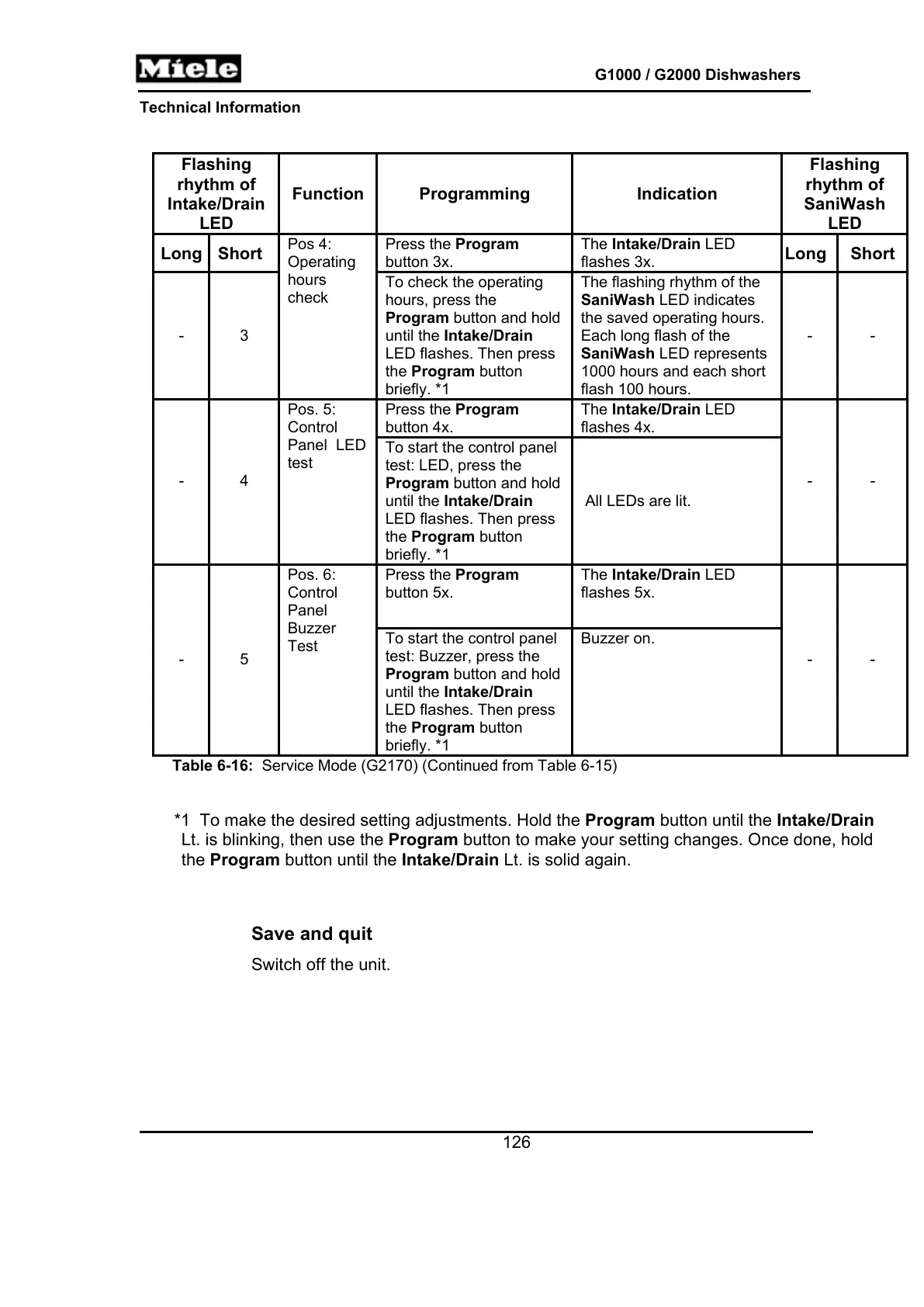
Flashing
rhythm of
Intake/Drain
LED
Function Programming Indication
Flashing
rhythm of
SaniWash
LED
Long Short
Press the Program
button 3x.
The Intake/Drain LED
flashes 3x.
Long Short
- 3
Pos 4:
Operating
hours
check
To check the operating
hours, press the
Program button and hold
until the Intake/Drain
LED flashes. Then press
the Program button
briefly. *1
The flashing rhythm of the
SaniWash LED indicates
the saved operating hours.
Each long flash of the
SaniWash LED represents
1000 hours and each short
flash 100 hours.
- -
Press the Program
button 4x.
The Intake/Drain LED
flashes 4x.
- 4
Pos. 5:
Control
Panel LED
test
To start the control panel
test: LED, press the
Program button and hold
until the Intake/Drain
LED flashes. Then press
the Program button
briefly. *1
All LEDs are lit.
- -
Press the Program
button 5x.
The Intake/Drain LED
flashes 5x.
- 5
Pos. 6:
Control
Panel
Buzzer
Test
To start the control panel
test: Buzzer, press the
Program button and hold
until the Intake/Drain
LED flashes. Then press
the Program button
briefly. *1
Buzzer on.
- -
Table 6-16: Service Mode (G2170) (Continued from Table 6-15)
*1 To make the desired setting adjustments. Hold the Program button until the Intake/Drain
Lt. is blinking, then use the Program button to make your setting changes. Once done, hold
the Program button until the Intake/Drain Lt. is solid again.
Save and quit
Switch off the unit.



 To Next Page