Technical Information
144
G1000 / G2000 Dishwashers
Flashing
Rhythm of
Intake/Drain
Lt.
Function Programming Indication
Flashing Rhythm of
SaniWash LED
Long Short Long Short Display
Pos. 26:
Add second
interim rinse
Press the Program
button 26x.
- - P0
To change the
setting, press the
Program button
and hold it until the
Intake/Drain LED
flashes. Then press
the Program button
to enter the desired
setting changes. *2
The Intake/Drain
LED flashes 2x
long and 6x briefly
intermittently.
The SaniWash
LED is off =
program cycle per
factory setting; The
SaniWash LED
flashes = second
interim rinse is
added.
2 6
- 1 P1
Long Short Long Short Display
- - P0
2 7
Pos. 27:
Extended
drying time
Press the Program
button 27x
To change the
setting, press the
Program button
and hold it until the
Intake/Drain LED
flashes. Then press
the Program button
to enter the desired
setting changes. *2
The Intake/Drain
LED flashes 2x
long and 7x briefly
intermittently.
The SaniWash
LED if off = normal
drying (factory
setting); the
SaniWash LED
flashes = enhanced
drying.
- 1 P1
Long Short Long Short Display
- - P0
Pos. 36:
Machine
height
setting *1
Press the Program
button 36x.
To change the
setting, press the
Program button
and hold it until the
Intake/Drain LED
flashes. Then press
the Program button
to enter the desired
setting changes. *2
The Intake/Drain
LED flashes 3x
long and 6x briefly
intermittently.
The SaniWash
LED is off = normal
machine height
(G1xxx). The
SaniWash LED
flashes = XXL units
(G2xxx).
3 6
- 1 P1
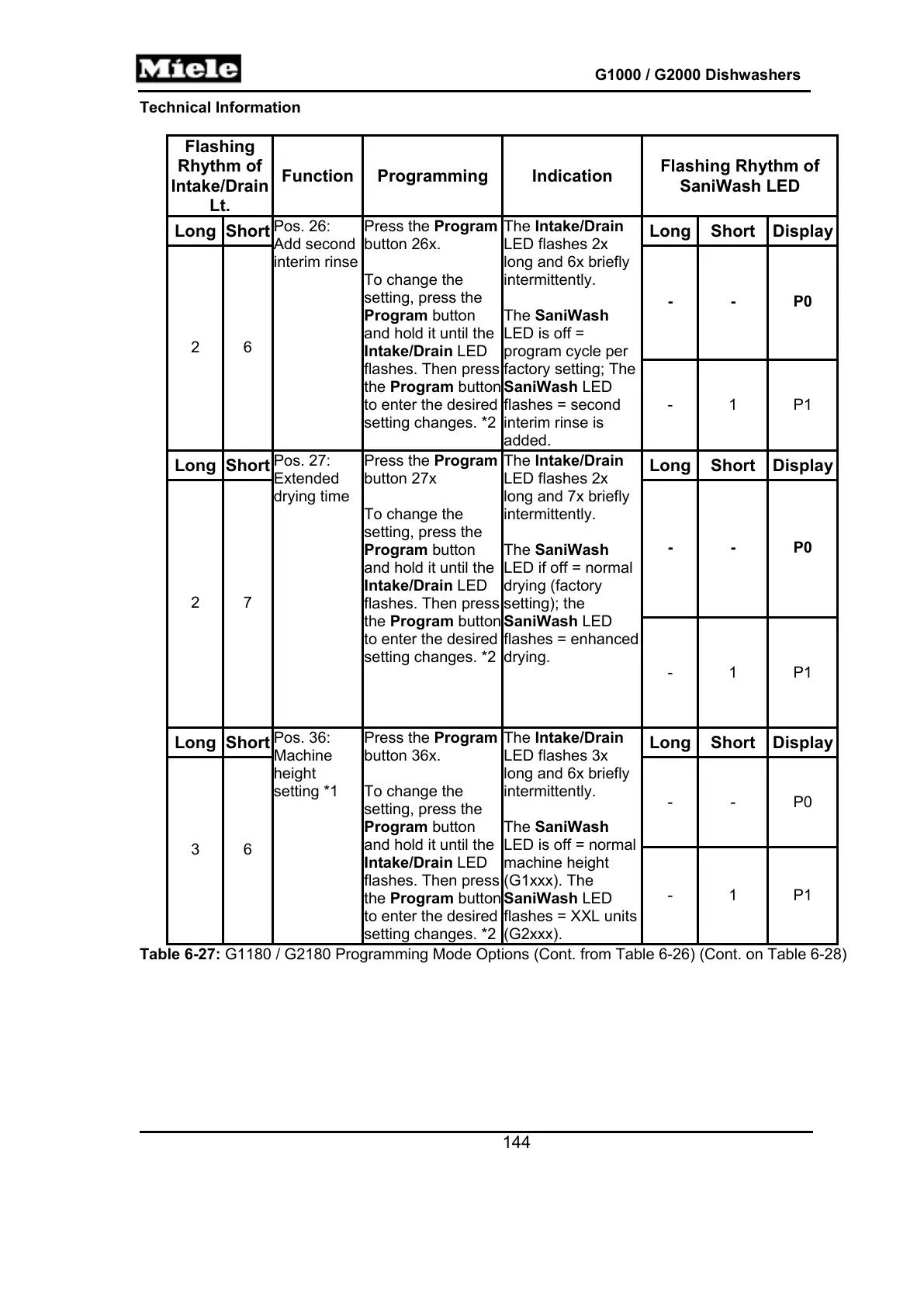
Table 6-27: G1180 / G2180 Programming Mode Options (Cont. from Table 6-26) (Cont. on Table 6-28)



 To Next Page