Technical Information
152
G1000 / G2000 Dishwashers
Flashing
Rhythm of
Delay Start
LED
Flashing Rhythm of
Rinse LED
Function Programming Display
Long Short Long Short Display
- -
Pos. 0:
Software
version ID
check
Do not press the
Delay start button.
The Delay start
LED is off.
The Rinse LED is
off or flashes. The
display shows the
software version ID
No., e.g. –769.
- - ID No.
Long Short Long Short Display
- - P0
Pos. 1:
Reset
Press the Delay
start button once.
The Delay start
LED flashes once
rapidly
intermittently. Press
the Start/Stop
button to reset all
standard settings.
The Rinse LED is
off or flashes. This
programmable
function can be
used to reset all
modifiable
parameters to the
standard settings.
The display shows
P and a digit
alternately: P0 =
Non-standard
settings have been
made; P1 = All
settings reset to
standard settings or
no modifications
have been made.
- 1
- 1 P1
Long Short Long Short Display
- - P0
- 1 P1
- 2 P2
- 3 P3
- 4 P4
- 2
Pos.2:
Sensor
softener
activation/
Water
hardness
setting*1
Press the Delay
start button 2 times.
The Delay start
LED flashes 2
times rapidly
intermittently. Press
the Start/Stop
button as
appropriate to
make the desired
setting.
The Rinse LED is
off or flashes. The
display shows P
and the set value
alternately. Setting
range: P0 = Sensor
softener active.P1 –
P4 = Softener off.
P5 to P70 = Water
hardness, see
Table 6-2.
1 9 P19
Long Short Long Short Display
- - P0 (0ml)
- 1 P1 (1ml)
- 2 P2 (2ml)
- 3 P3 (3ml)
- 4 P4 (4ml)
- 5 P5 (5ml)
- 3
Pos 3:
Dispensed
rinse aid
quantity
setting
Press the Delay
start button 3 times.
The Delay start
LED flashes 3
times rapidly
intermittently. Press
the Start/Stop
button as
appropriate to
make the desired
setting.
The Rinse LED is
off or flashes. The
display shows P
and a digit
alternately: e.g. P3
(standard setting)
indicates a
dispensed quantity
of 3 ml. Setting
range: 0 ml – 6 ml.
- 6 P6 (ml)
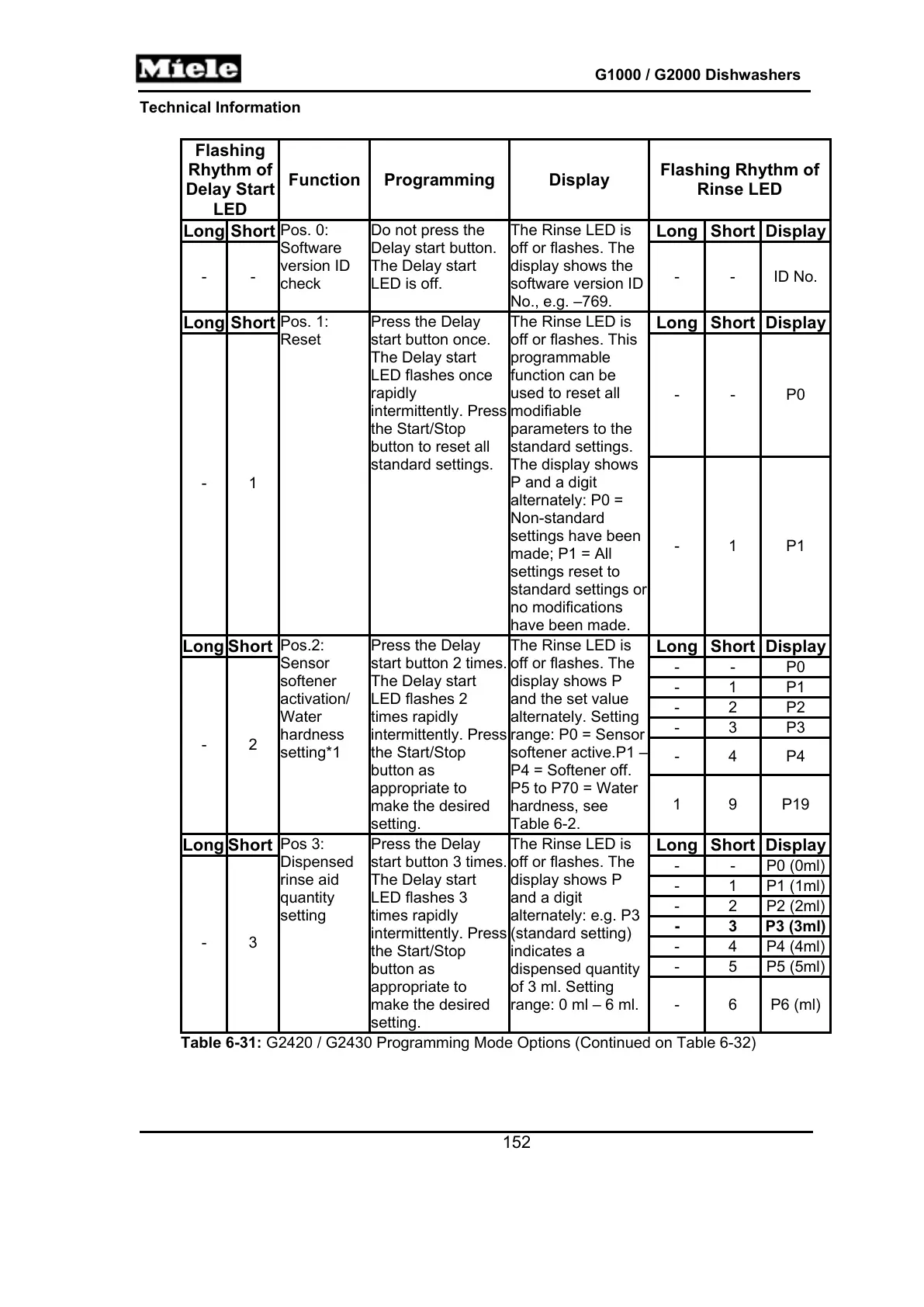
Table 6-31: G2420 / G2430 Programming Mode Options (Continued on Table 6-32)



 To Next Page