Technical Information
14
T 980x/T 982x
4.2 Removing the Front Panel
1. Disconnect the machine from the power supply.
2. Remove the dryer lid; refer to Section 010-4.1.
3. Remove the fascia, the electronic, and the electronic's support panel; refer
to Section 090-4.4.
4. Open the door.
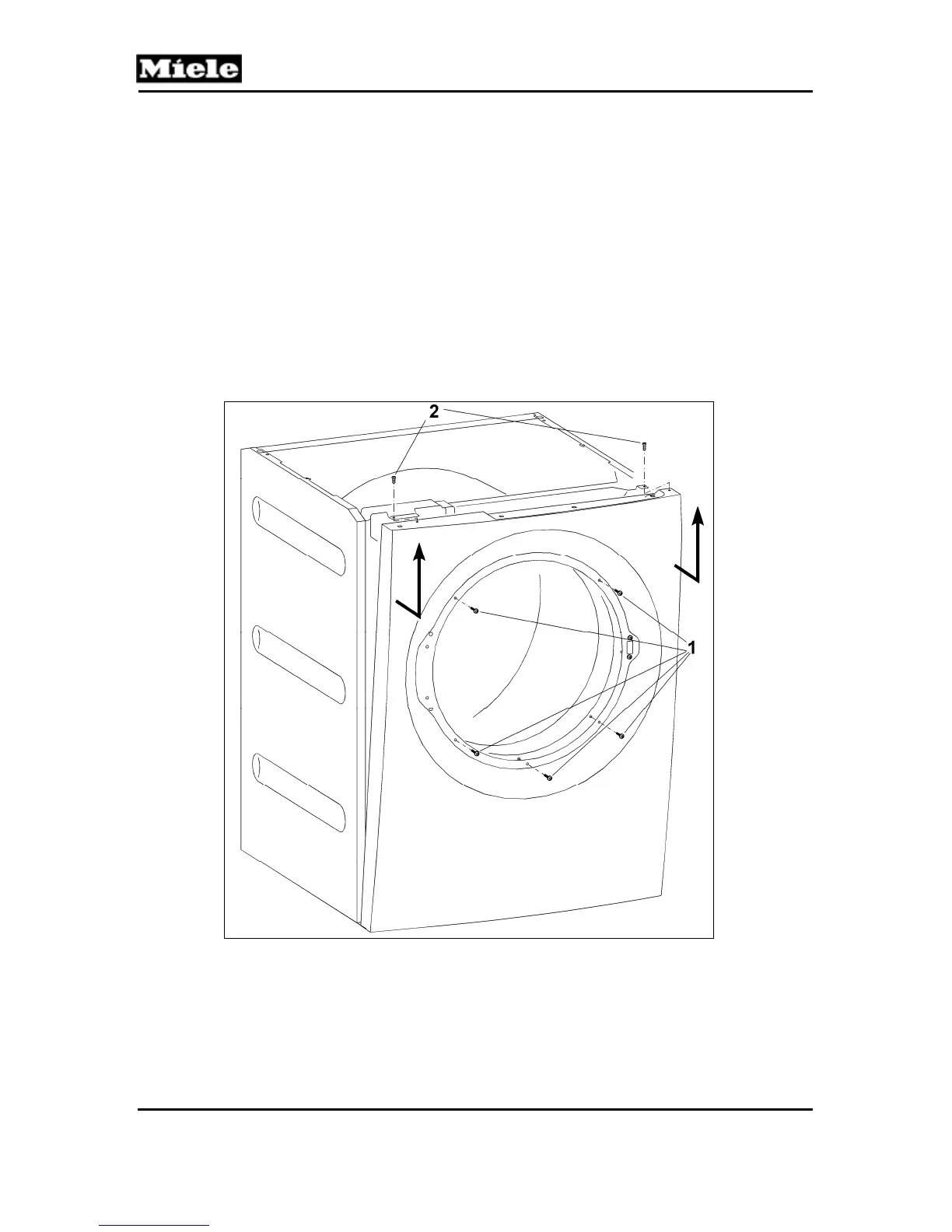
5. Remove the five T20 screws securing the front of the front panel. See
Figure 010-2, Item 1.
6. Close the door.
7. Remove the two T20 screws securing the top of the front panel. See
Figure 010-2, Item 2.
8. Disconnect the door lock Molex connection.
9. Pull the front panel upwards to remove.
Figure 010-2: Front Panel Removal
4.3 Side Panel Removal
1. Disconnect the machine from the power supply.
2. Remove the lid; refer to Section 010-4.1.
3. Remove the front panel; refer to Section 010-4.2.



 To Next Page