26
2.7.1 License activation
Launch the MacroPATH software following the instructions provided in chapter 3.1. Then click
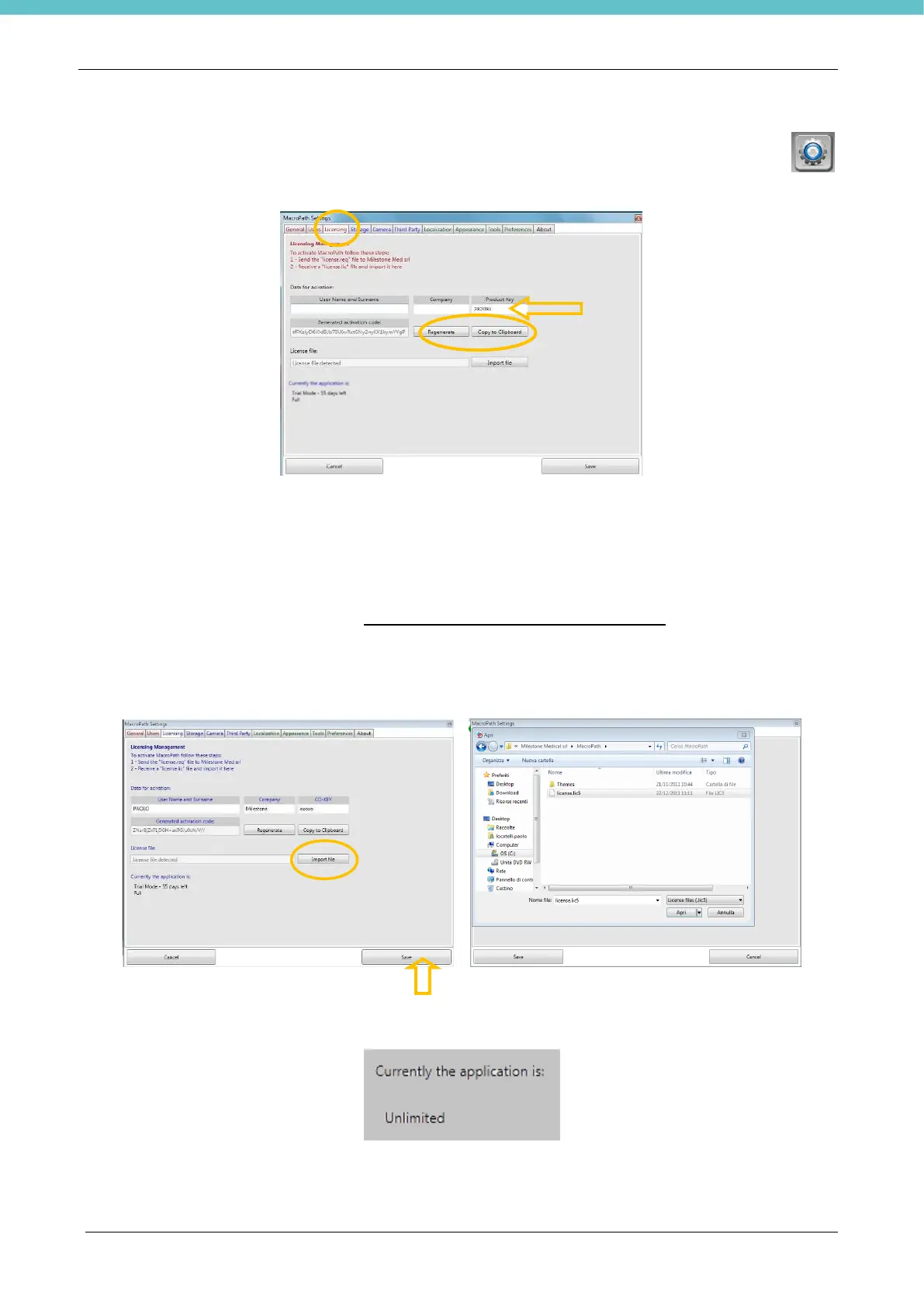
“Settings – Licensing” and enter the data required to activate the license, as explained below.
• Enter the Product key printed on the key containing the MacroPATH software (in the space marked by the
arrow in the figure above).
• Then click “Regenerate” (circled in the figure above).
• Click “Copy to Clipboard” to copy the machine’s ID (circled in the figure above).
• Paste into a text file or directly in the body of an e-mail.
• Describe the reason why a new license is required.
• Send an e-mail to customer support customersupport@milestonemedsrl.com also providing the serial
number of the camera and the software version.
• When you get the reply, save the file you receive from customer support.
• Click “Import file” (circled in the figure below) and select the saved “license.req5” file.
• Click “Save” at the bottom right of the Settings page (marked by the arrow in the figure below).
• Restart the MacroPATH software (it is not necessary to completely reboot the PC) and check that the
license status on the Settings page is “Unlimited” as shown below.



 To Next Page