MacroPATH and MacroPATH Basic QX Series
MM161-001 – Operator Manual
64
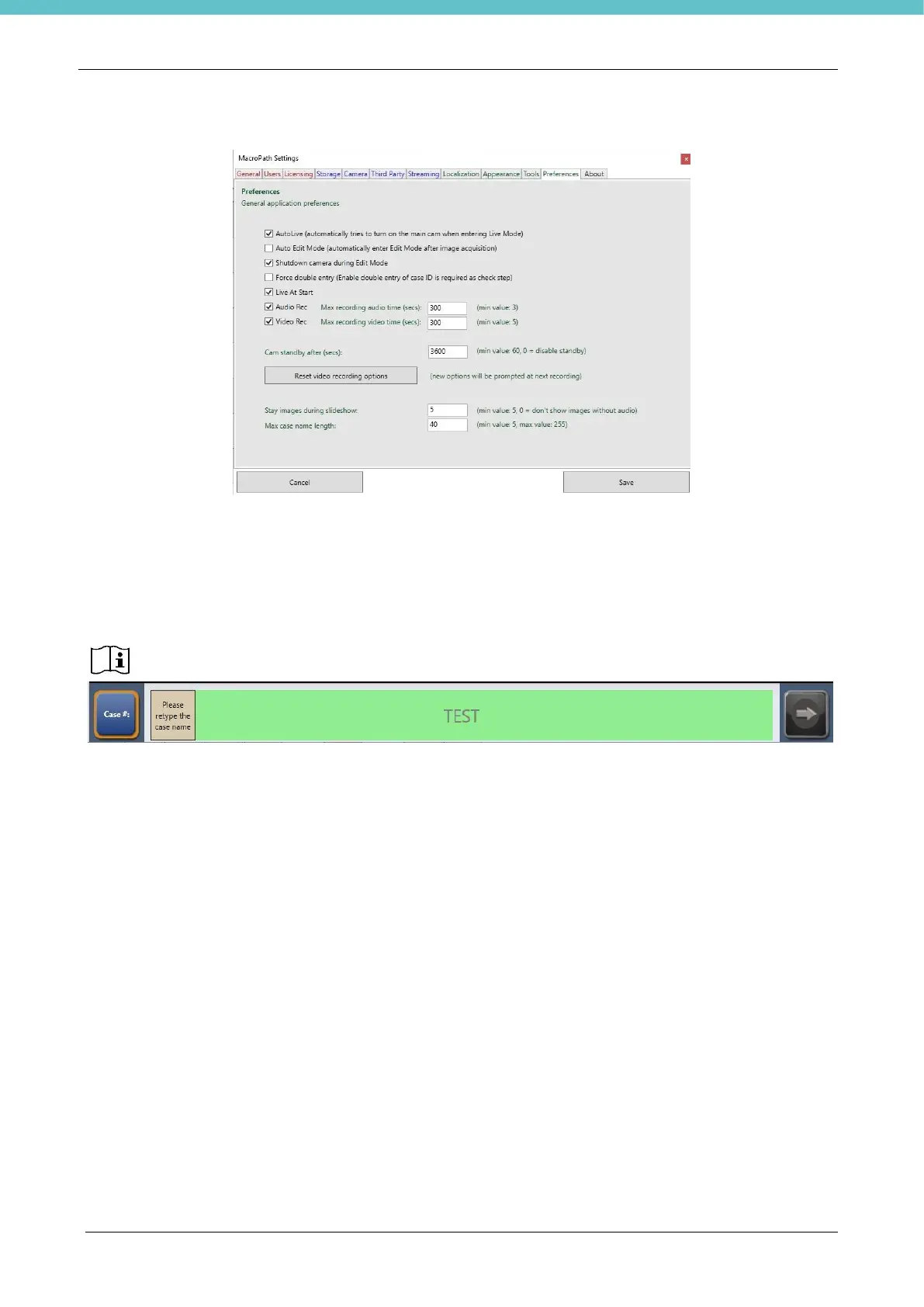
3.6.11. Preferences settings
AutoLive. Select the checkbox to go back to LIVE mode when an image has been acquired and
saved.
Auto Edit Mode. When you wish to automatically enter the Edit area after image acquisition.
Shutdown camera entering Edit mode. This stops the camera during image editing operations. This
function increases the camera’s lifetime. This is the default setting, please do not change it.
Force double entry. By checking this checkbox, every time you create a patient case, you will be
required to enter the case name twice, thereby preventing errors.
IT IS NOT POSSIBLE TO CHANGE THE CASE NUMBER AFTER ITS CREATION.
Live at start. Enable this option to go directly to LIVE when launching the software.
Audio rec. Maximum audio recording time.
Video rec. Maximum video recording time
Cam standby after. Set the time (in seconds) after which the camera goes to standby mode. This
function increases the camera’s lifetime. The initial setting is at 1h.
Delay for image during Present. Set the delay time between images during a presentation.
Max case name length. Please do not change this.
Reset recording video options. Press this button to delete the saved video settings. The next time a
video is acquired, the user will be asked to set the quality (see chap. 3.4.6)



 To Next Page