56
3.6.7. Third-party settings
It is possible to create shortcut buttons to launch external software (up to 3 different external applications,
not included):
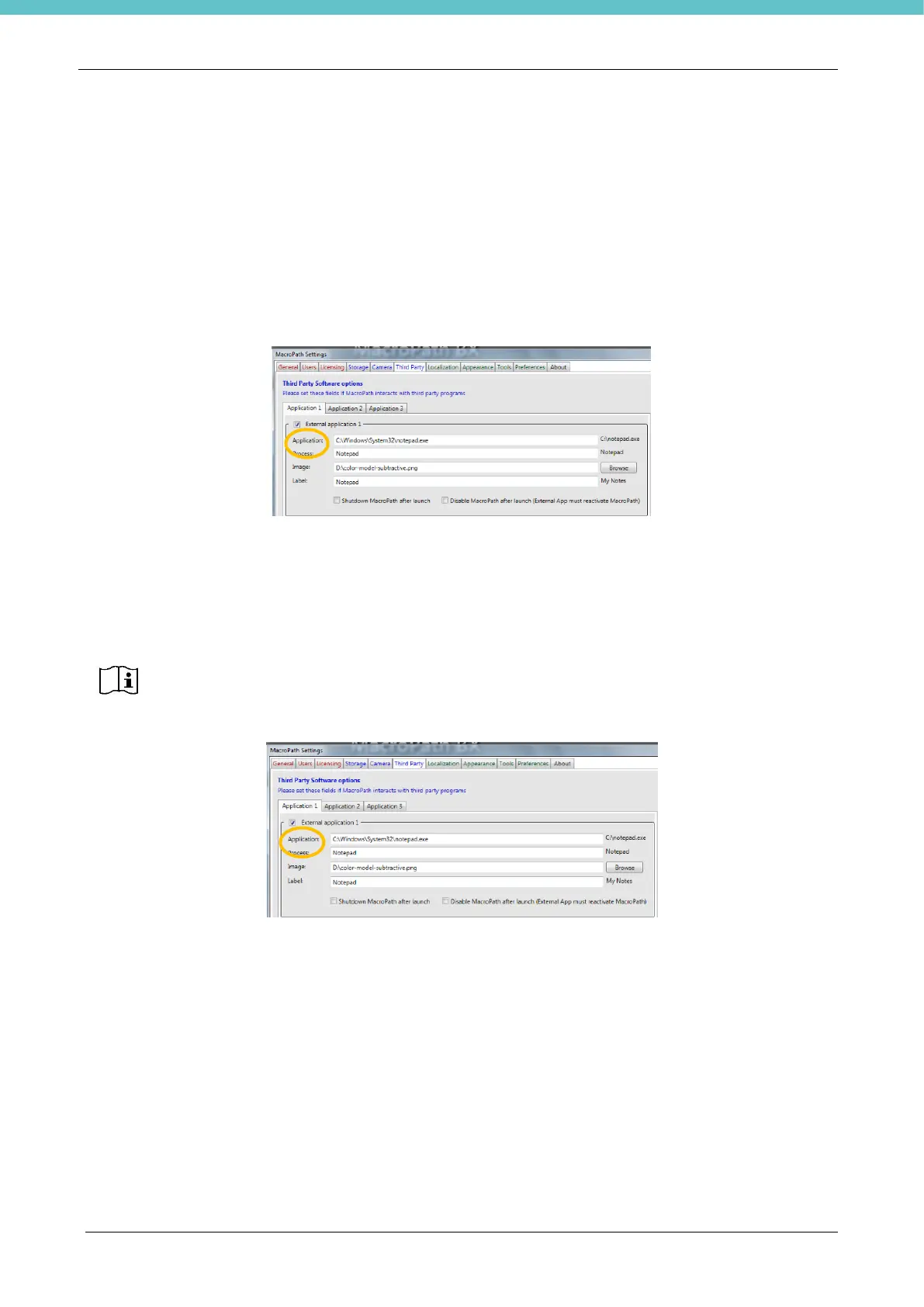
Select the “External application” checkbox, as shown below. The image shows launching the “Notepad”
application as an example. To do this, fill the fields under “External application1”:
- “Application”: this is the address, in this case “C:\Windows\System32\notepad.exe”
- “Process”: this is the name of the application, in this case “Notepad”
- “Image”: it is the icon that will be displayed when the application is opened, it is required to select a “png”
image
- Label: in this case “Notepad” (which appears on the icon created).
Shutdown MacroPATH after launch: if selected, when the external application opens, MacroPATH closes.
Disable MacroPATH after launch: if selected, when the external application opens, MacroPATH is
disabled.
When all the fields described above have been filled in press “Save”. The icon referring to the application is
displayed under “Files”. In the example below, a “Notepad” icon appears.
When the “Disable MacroPATH after launch” box is selected, a specific program (not
included, to be set by the user) must be installed to let the user go back to MacroPATH.
Otherwise, going back to MacroPATH is not possible and the user will need to restart the
MacroPATH application by means of Windows’ red “CLOSE” cross.
DO NOT select when in doubt



 To Next Page