. A complete Parts List is available at www.MillerWelds.com
OM-261726 Page 24
150A
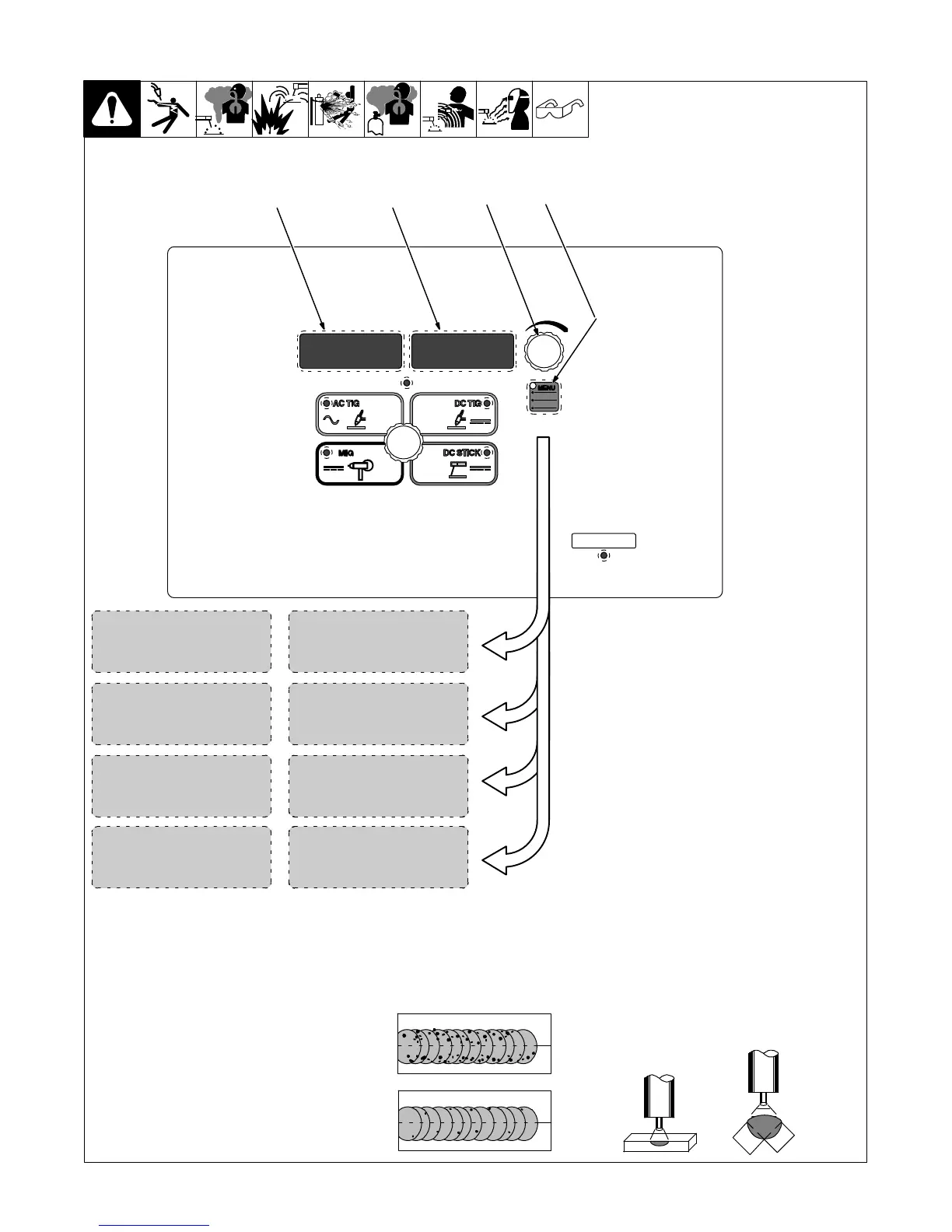
6-2. Accessing Control Panel Menu: AC TIG
268890-B
1 Menu Button
Press Menu button to cycle through
parameters that can be set.
2 Parameter Display
3 Setting Display
4 Encoder
Rotate Encoder to adjust parameter
setting.
1
OFF
75%BAL
234
[BAL] Balance Control:* (% EN)
Controls Oxide Cleaning
Increasing setting reduces oxide cleaning. Range is
60 to 80%. (See tips below)
[PULS] Pulse Control:
Reduces heat input to minimize distortion and in-
crease travel speed. Set PPS (pulses per second).
The range is OFF−50 PPS. The background amper-
age and peak amperage are not adjustable. Back-
ground amperage equals 25% of peak amperage.
Peak amperage time equals 40%.
Amperage Control:
Controls the average AC welding amperage output.
Limits the maximum output of a remote amperage
device.
150A
AC.AV
PPS
120HFREQ
[FREQ] Frequency Control:*
Increasing setting narrows arc width range 60 to 150
Hertz. (See tips below)
*PRO−SET provides PROfessionally de-
veloped SETtings for the weld process.
To use PRO−SET, press the menu button
to display the parameter and adjust the
encoder until PRO−SET flashes on the
display. PRO−SET flashes one time and
reveals the professional setting for the
parameter.
TIP: AC Balance controls the cleaning
action. If floating black spots appear in the
puddle, the balance setting is too high.
Turn the balance down until puddle be-
comes clear.
TIP: AC Frequency controls the width of
the arc cone. For thin fillet welds (less
than 1/4 in.) set the frequency to 120 Hz.
This frequency setting provides a focused
stable arc and produces a narrow weld.
For outside corner or groove welds on
heavy material, a wide weld may be re-
quired. Lower the frequency to between
70 and100 Hz. This frequency setting pro-
duces a wider weld.










 To Next Page