. A complete Parts List is available at www.MillerWelds.com
OM-261726 Page 30
SECTION 7 − ADVANCED MENU FUNCTIONS
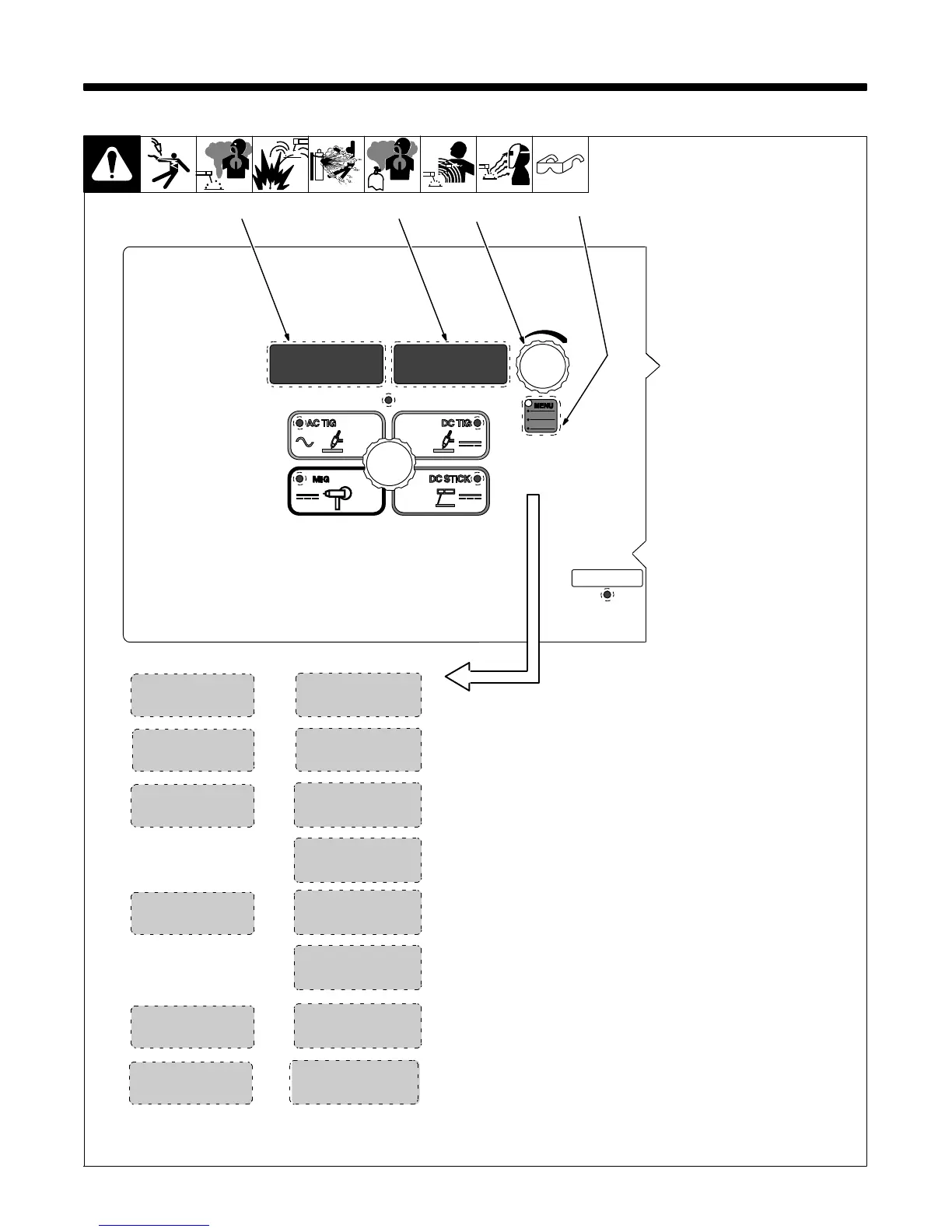
7-1. Accessing Tech Menu
1 Menu Button
Press and hold Menu button for ap-
proximately 4 seconds to scroll
past User Menu to Tech Menu. Use
Menu button to cycle through para-
meters that can be set.
2 Parameter Display
3 Setting Display
4 Encoder
Rotate Encoder to adjust paramet-
er setting.
To exit user menu, press and hold
menu button approximately one
second, or turn power off.
. Settings in the Tech Menu are
global, meaning they may per-
tain to all or some of the pro-
cess.
1
2
4
T/CY
ARC
RSETMACH
NUM
SOFT
[ARC] [T/CY] Arc Timer: Monitors hours, minutes, and cycles of valid arc
on. To view, rotate encoder. To reset, rotate encoder until [RESET] [YES] is
displayed. Press Menu button to display [RESET] [Done]. Displays turn to
[000] [000].
[MACH] [Reset] Machine Reset:: Resets all machine values back to
factory defaults. To reset, turn encoder to [RESET] [YES]. Then press
Menu button. [RESET] [DONE] will be displayed when the reset is com-
plete and factory defaults have been restored.
[SOFT] [NUM] Software Number: Use encoder to select desired board
to read software version and number.
NUM
SERL
[SERL] [NUM] / [NA] Serial Number: This feature has not been imple-
mented.
3
LOW
CAL
0.0
HIGH
CAL
0.0
[CAL] [LOW] Calibrate Low: Calibrates low drive roll speed to provide
consistent wire feed speed between various spools of wire and spool
guns. To calibrate, press and hold the trigger, allowing the wire to feed until
it stops. Then measure the wire, and subtract from 24 (24−wire length =
Cal Low.
. The Wire Feed Speed does not adjust in the Tech Menu, but does adjust
in the Weld Process.
[CAL] [HIGH] Calibrate High: Calibrates high drive roll speed to provide
consistent wire feed speed between various spools of wire and spool
guns. To calibrate, press and hold the trigger, allowing the wire to feed until
it stops. Then measure the wire, and subtract from 24 (24−wire length =
Cal High.
. The Wire Feed Speed does not adjust in the Tech Menu, but does adjust
in the Weld Process.
MENU
TECH
268890-B










 To Next Page