. A complete Parts List is available at www.MillerWelds.com
OM-261726 Page 27
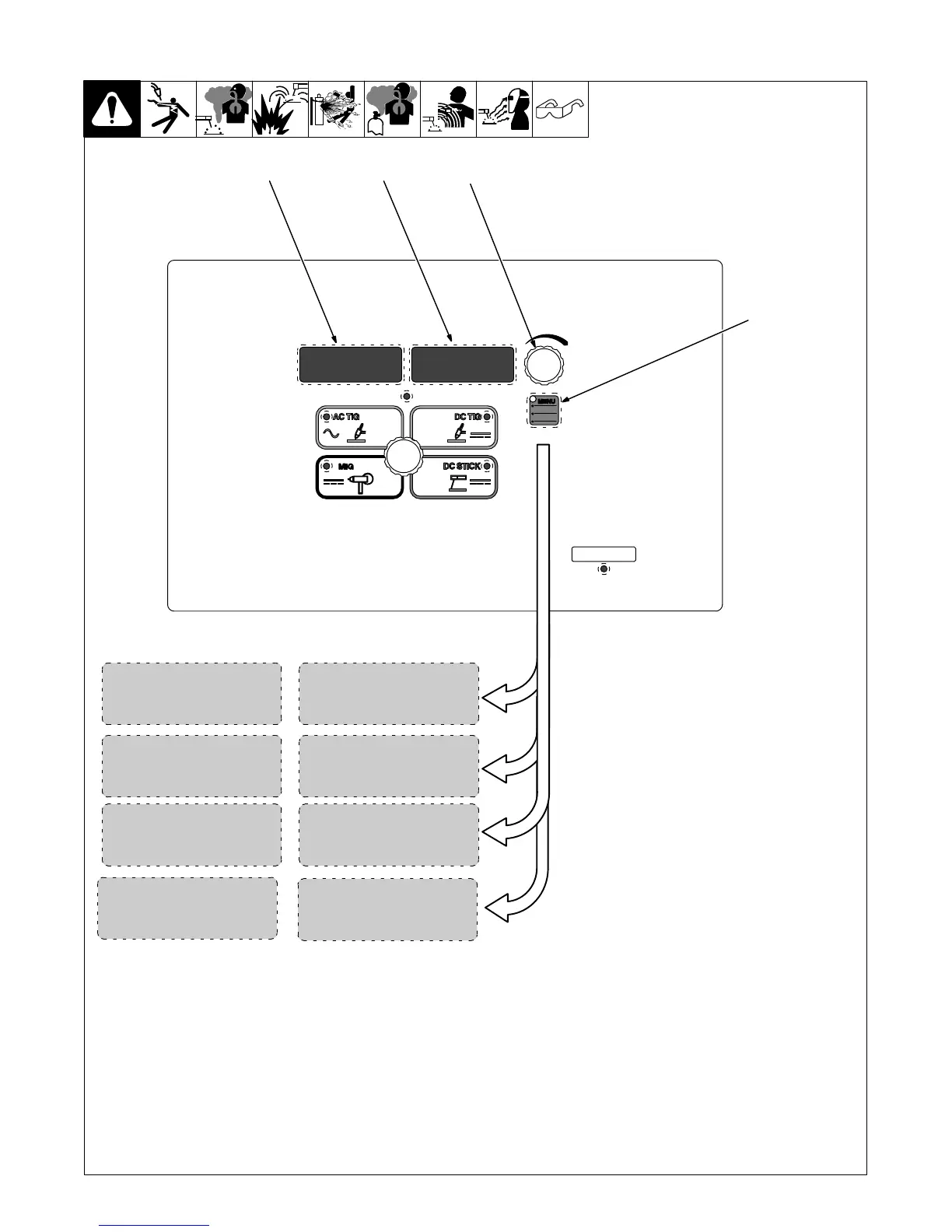
6-6. Accessing User Setup Menu: AC And DC TIG
1 Menu Button
Press and hold Menu button for approxim-
ately two seconds to access machine config-
uration menus. Use Menu button to cycle
through parameters that can be set.
2 Parameter Display
3 Setting Display
4 Encoder
Rotate Encoder to adjust parameter setting.
1
STDRMT
2
3
4
Remote Starting Method Selection:
Remote Starting Options for Lift Arc.
[RMT] [STD]
Standard Remote Control.
[Out] [On]
Output On.
Tungsten Diameter Selection:
Each tungsten size has preset starting
parameters specific to that diameter for op-
timized starting. Range is 0.040 in. to (1/8
in.) and 0.5 mm−3.2 mm.
Post Flow Control Selection:
[POST] [AUTO]
Controls the length of time gas flows after
welding stops. Range is AUTO, OFF − 50T
(seconds). AUTO calculates the time
based on the maximum amperage of each
welding cycle. The minimum time is 8
seconds. Auto = maximum amperage/10.
Arc Starting Method Selection:
[STRT] [HF]
Is a non-contact starting method.
[STRT] [Lift]
Is a contact starting method.
HF
STRT
268890-B
AUTO
POST
MENU
USER
3/32TUNG










 To Next Page