. A complete Parts List is available at www.MillerWelds.com
OM-261726 Page 29
150A
150A
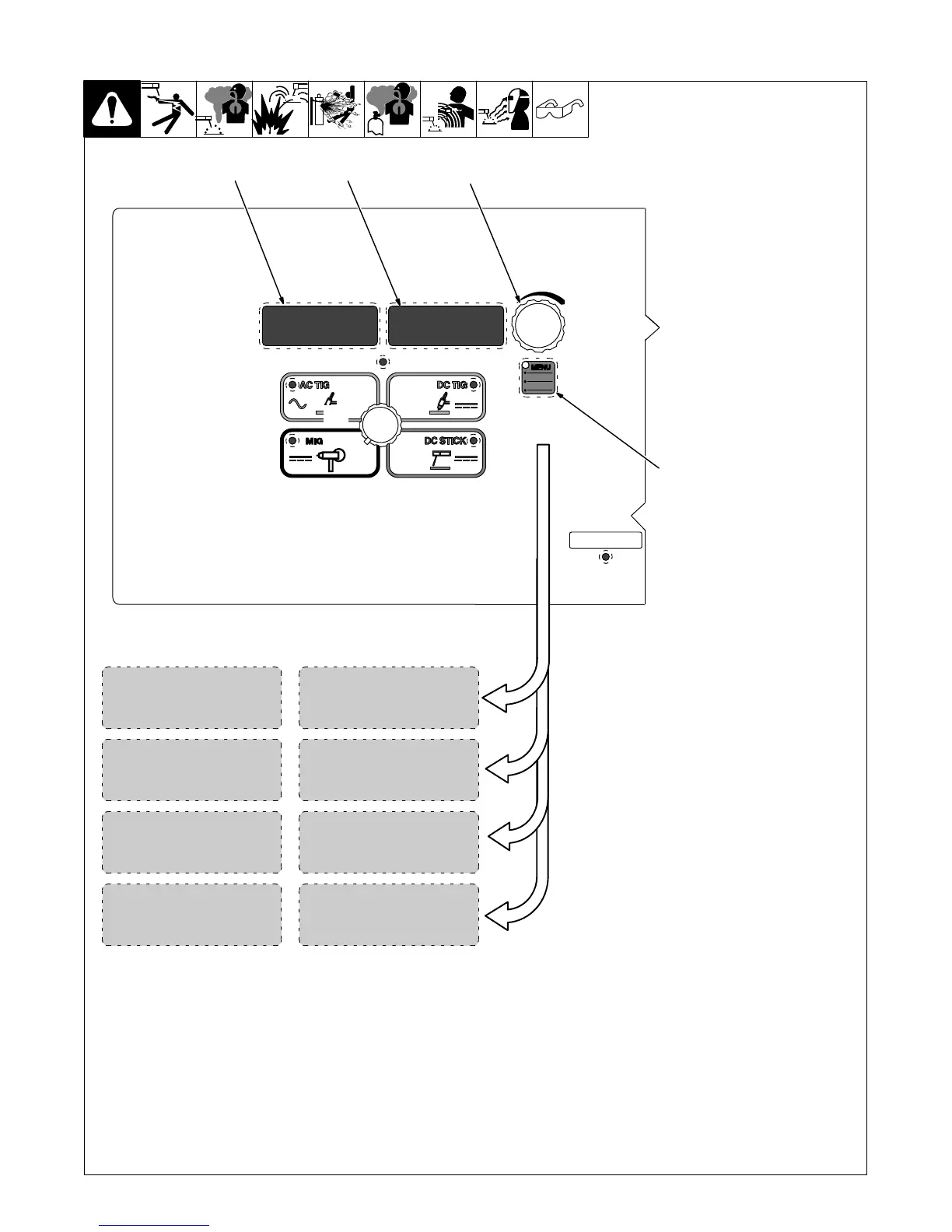
6-8. Accessing User Spool Gun Setup Menu
1 Menu Button
Press and hold Menu button for ap-
proximately two seconds to access
machine configuration menus. Use
Menu button to cycle through para-
meters that can be set.
2 Parameter Display
3 Setting Display
4 Encoder
Rotate Encoder to adjust paramet-
er setting.
1
18 GAMAT
2
3
4
Spool Gun Material Thickness
Selection:
[MAT] [24GA] / [22GA] / [20GA]
[MAT] [18GA] / [16GA] / [14GA]
[MAT] [1/8] / [3/16] / [1/4] [5/16]
[MAT] [3/8]
Spool Gun Process Selection:
[PROC] [FLUX]
[PROC] [TRI]
[PROC] [C25]
[PROC] [C100]
[PROC] [4043]
[PROC] [5356]
Spool Gun Wire Diameter
Selection:
[Wire] [0.024]
[Wire] [0.030]
[Wire] [0.035]
0.030
WIRE
268890-B
C25PROC
MENU
USER
S150
GUN
Spool Gun Selection:
[Gun] [S100]
[Gun] [S150]










 To Next Page