OM-363 Page 24
1
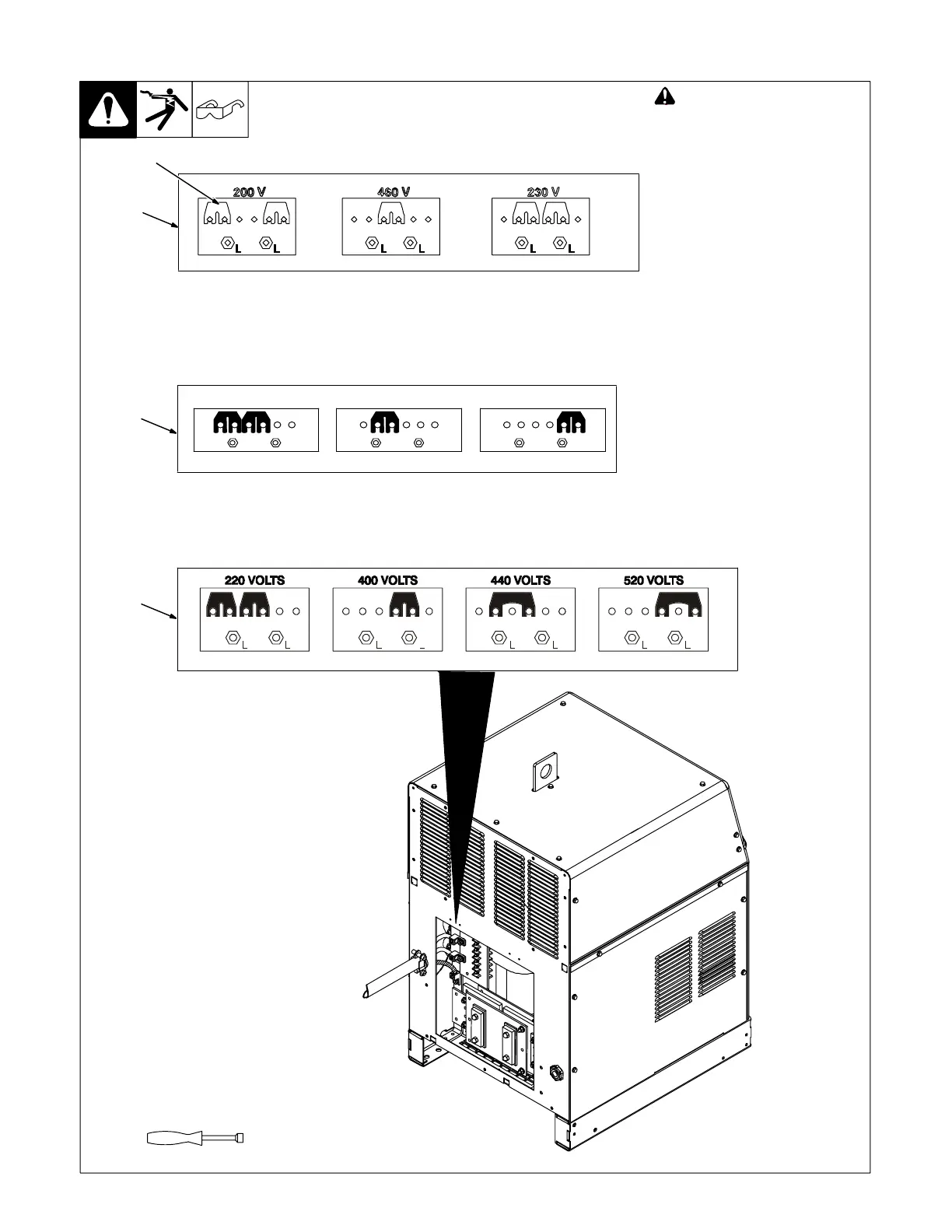
3-20. Placing Jumper Links
Ref. 803 585-C
! Disconnect and lockout/tag-
out input power before
installing or moving jumper
links.
Check input voltage available at
site.
1 Jumper Link Label
Check label − only one label is on
unit.
2 Jumper Links
Move jumper links to match input
voltage.
Close and secure access door, or
go on to Section 3-21.
3/8 in
Tools Needed:
230 VOLTS
LL
460 VOLTS
LL
010 587-D
575 VOLTS
LL
Or
1
1
2
Label found on 350 LX models with the following stock numbers:
907198, 907198-011, 907198-021, and 907198-031
Or
Label found on 350 LX models with the following stock numbers:
907199, 907199-021, and 907199-031
Label found on 350 LX models with stock number 907200
Label found on 250 DX models with the following stock numbers:
907194, 907194-021 and, 907194-031
Label found on 250 DX models with the following stock numbers:
907195, 907195-021 and, 907195-031
Label found on 250 DX models with stock number 907197
191 440-A
083 566-F









 To Next Page