OM-363 Page 34
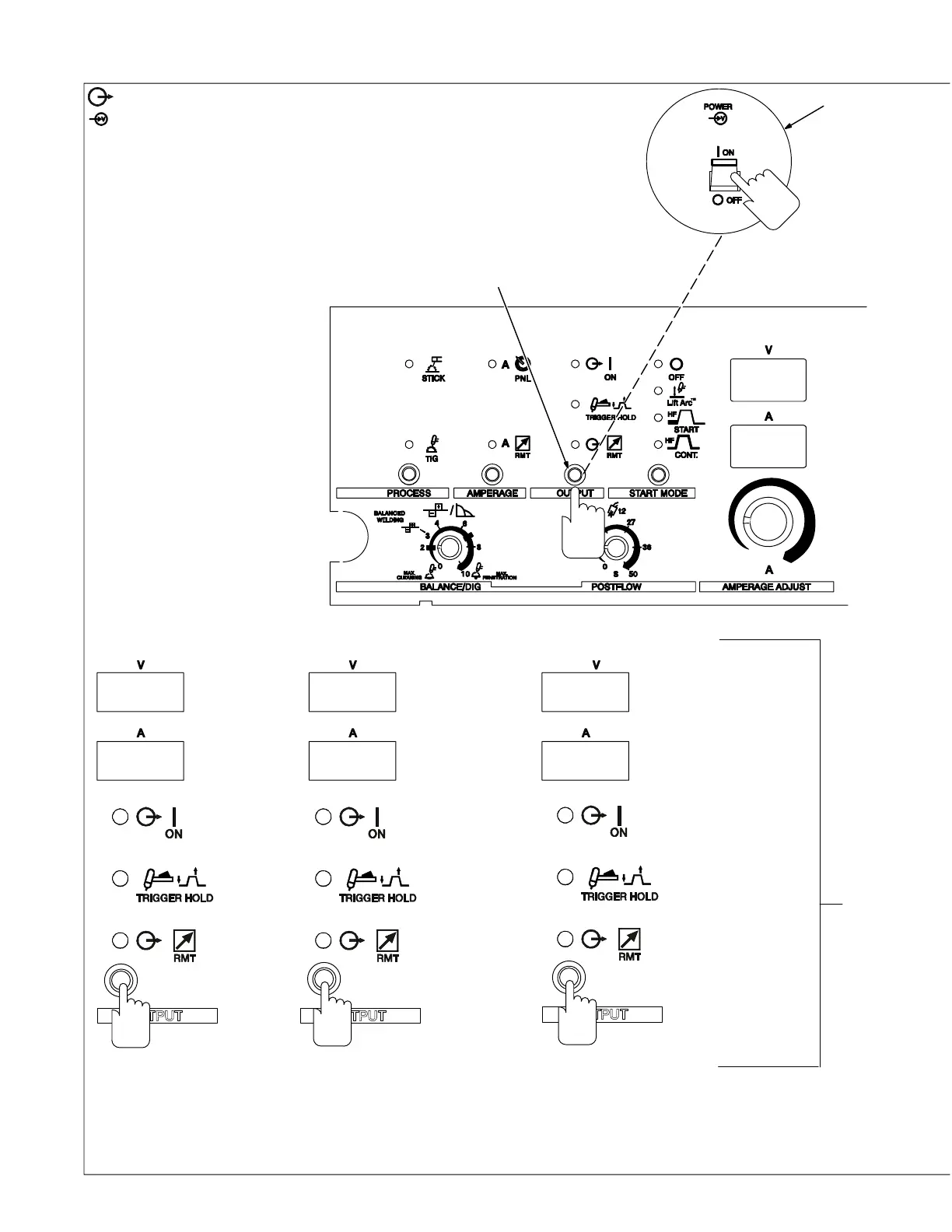
4-7. Reconfiguring Trigger Hold For 4T And Mini Logic Control
1 Output Control
2 Power Switch
To reconfigure Trigger Hold, turn Off
power, push and hold Output control
button and turn On power switch.
Hold button for approximately 7 sec-
onds (or until software version num-
ber _ _ _ _ _ _-_clears, and meters
display [SEL] [H−2].
Press Output control button to
change functions. Active function will
be displayed on amperage (bottom)
meter.
3 Meter Displays
Meter displays for the different func-
tions will be as shown.
Press torch trigger or turn power Off
to save setting.
Proceed to Section 4-6 for 4T Opera-
tion.
Proceed to Section 4-6 for Mini Logic
operation.
Proceed to Section 4-6 for 4T Mo-
mentary operation.
NOTE: These features are only
available when optional Sequencer
is installed.
Front Panel
2
1
SEL
H-2
3
H‐4E
SEL
H4L
=
4T Momentary
(See Section 4-6)
SEL
=
4T (See Section 4-6)
H-4
SEL
=
Mini Logic (See Section 4-6)









 To Next Page