OM-363 Page 36
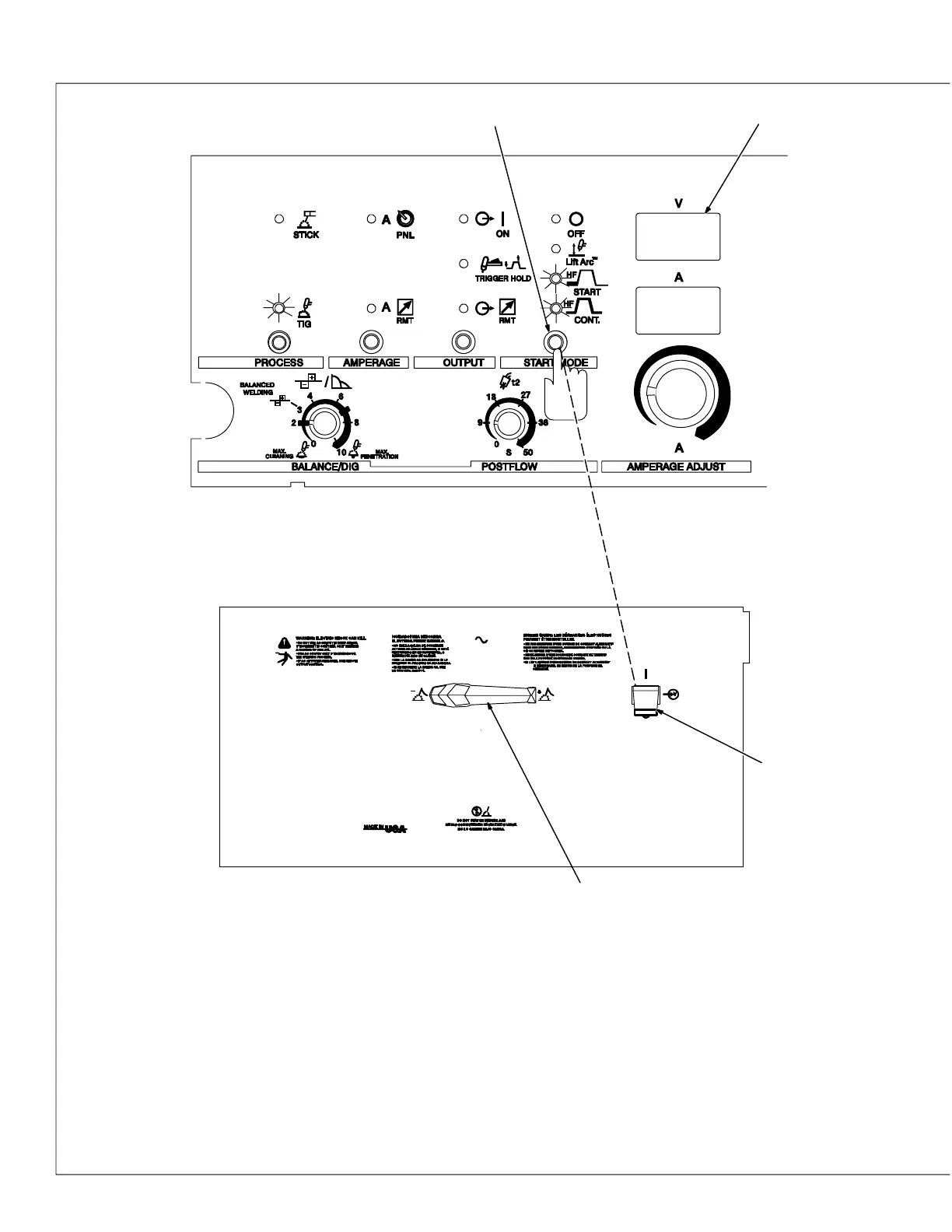
4-8. Selecting TIG Starting Characteristics Using Syncro-Startt Technology
E-
-2-
1
2
Use this function to select desired TIG start-
ing characteristics.
1 Start Mode
2 Power Switch
3 Output Selector Switch
4 Meters
To select or change TIG starting characteris-
tics, proceed as follows: turn Off power.
Place Output Selector switch in desired posi-
tion (each position, DCEN, AC, or DCEP has
three applicable start characteristics op-
tions). Push and hold Start Mode button and
turn On power. Hold button for approximately
7 seconds (or until software version number_
_ _ _ _ _-_ clears meters).
The TIG LED and all both HF LEDs will light,
and the meters will display [E-] [-2-], [AC] [-2-],
or [EP] [-2-], depending on position of Polarity
switch.
Press Start Mode button again to step
through the three start characteristics
choices. Amperage (bottom) meter displays
active choice 1= light start, 2=medium/normal
start, 3=high/hot start.
Press torch trigger or turn Off power to save
setting.
Application:
Select 1 (light/soft start) − when welding at
low amperages on thin gauge material.
Select 2 (medium/normal start) − factory de-
fault setting used for most welding applica-
tions.
Select 3 (high/hot start) − when welding at
high amperages on thick materials with a
large diameter tungsten.
3
4




 To Next Page