OM-363 Page 40
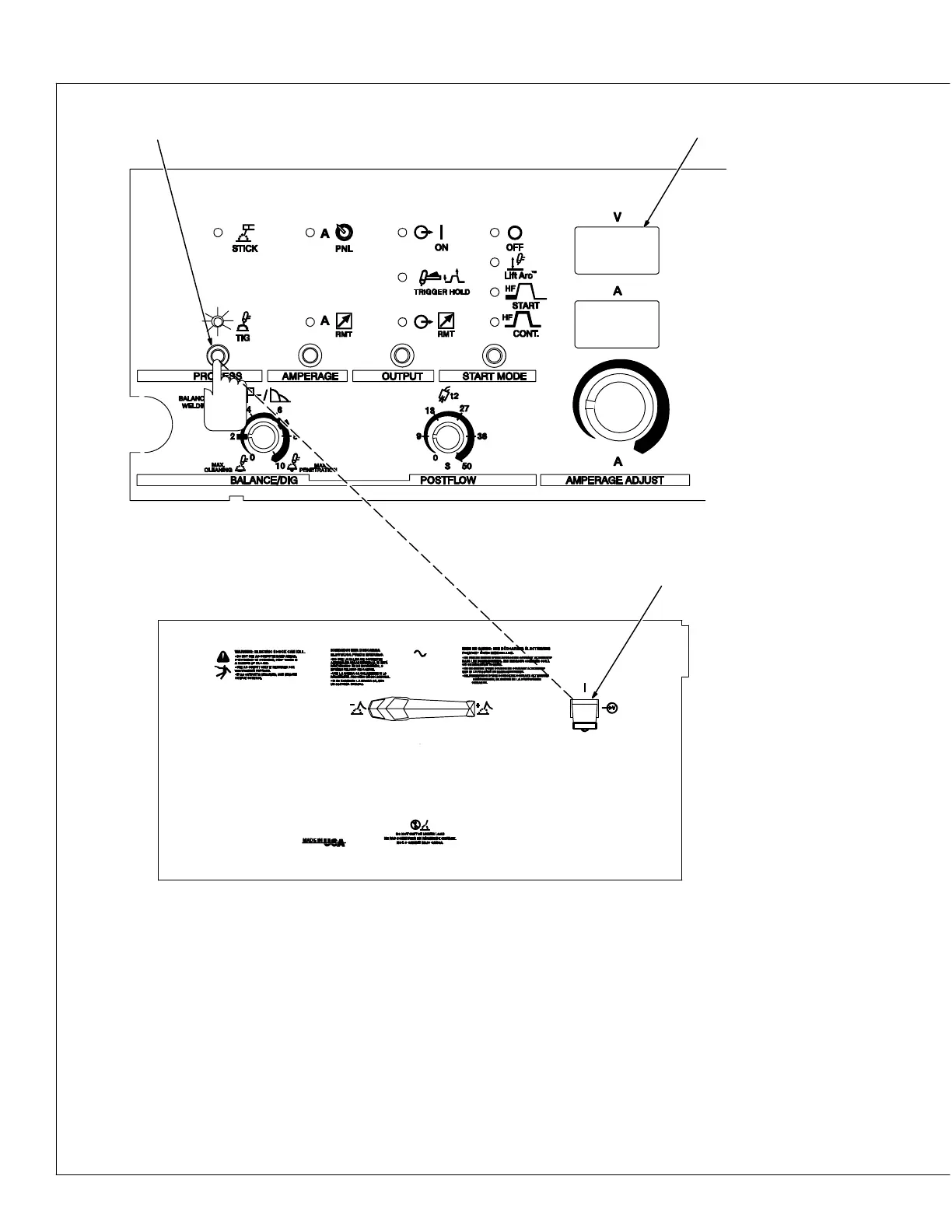
4-11. Preflow Time Control
Use control to set length of time (0.2, 0.4, 0.6,
0.8, 1.0, 1.5, 2.0, 2.5, 3.0, 3.5, 4.0, 4.5, 5.0
seconds) gas flows before welding starts.
1 Process Control
2 Power Switch
3 Meters
To change preflow time, proceed as follows:
Turn power off. Push and hold Process Con-
trol button and turn On power. Hold button for
approximately 7 seconds (or until software
version number_ _ _ _ _ _-_ clears meters).
The TIG LED will light and the meters will dis-
play [o.4] [SEL]. The factory preflow default
setting is 0.4 seconds. To change preflow
time, press and release Process Control but-
ton until desired time is displayed on meters.
Application:
Preflow is used to purge the immediate weld
area of atmosphere. Preflow also aids in con-
sistent arc starting.
00.4
SEL
1
2
4









 To Next Page