ENGLISH
OM-363 Page 31
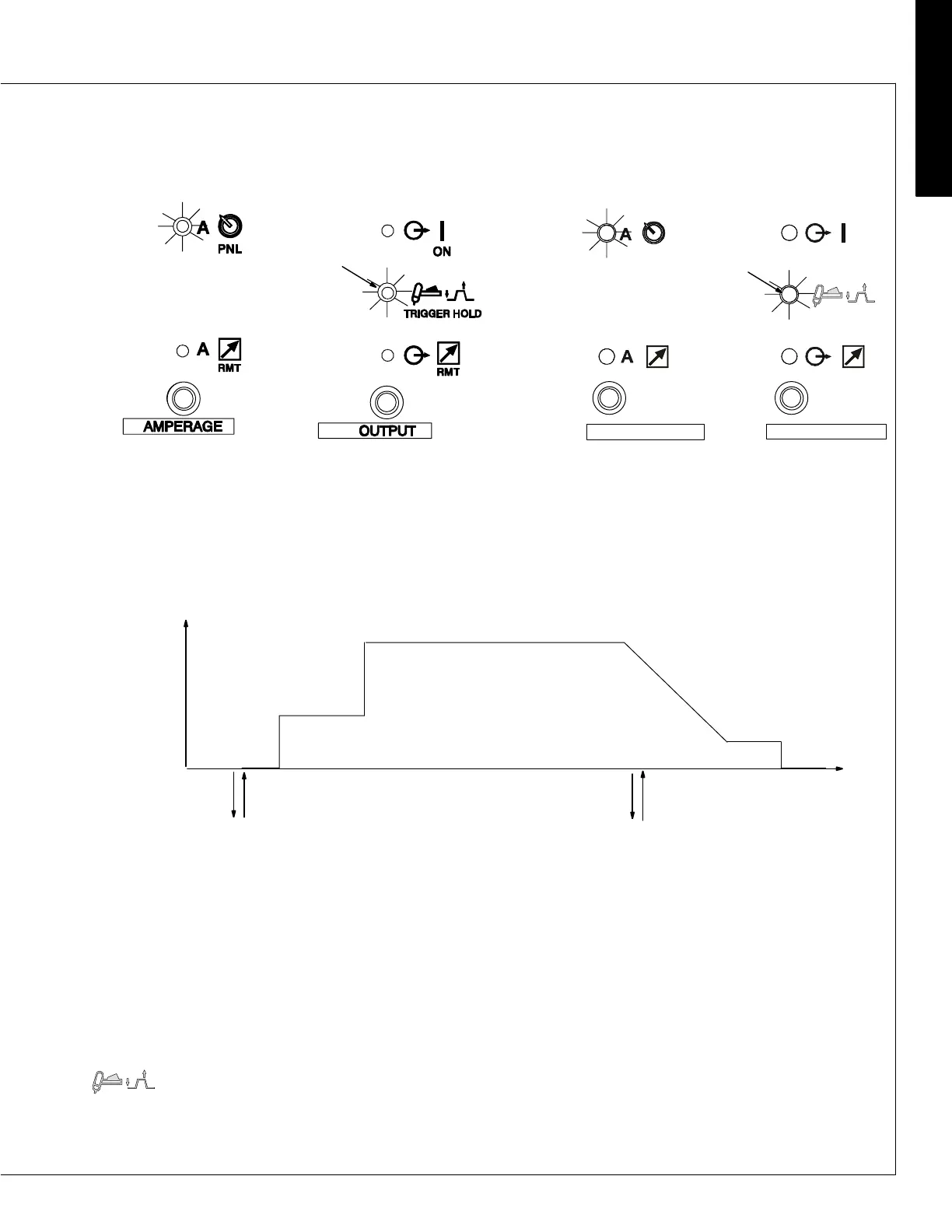
Trigger Hold (2T)
NOTE: If torch trigger is held more than 3 seconds, operation reverts to Remote Trigger (Standard) mode (see previous
page).
If arc is broken and trigger is depressed, HLP-10 will be displayed (see Section 6-1).
Current (A)
Preflow
Initial Amps
Final Slope
Postflow
Push & Release Trigger
In Less Than 3/4 Sec.
Weld Amps
Final Amps
2T Torch Trigger Operation
Push & Release Trigger
In Less Than 3/4 Sec.
3 Trigger Hold
For trigger hold operation, press button to
toggle LED to Trigger Hold position.
Torch trigger operation is as shown.
NOTE: When a foot or finger remote con-
trol is connected to the welding power
source, only trigger input is functional, as
amperage is controlled by the welding
power source.
Application: Trigger Hold (2T) can help
to reduce operator fatigue when long ex-
tended welds are made.
3
(CE Nameplate)
3









 To Next Page