INSTALLATION
- 8 -
4-2 CONNECTING AND FILLING THE TANK
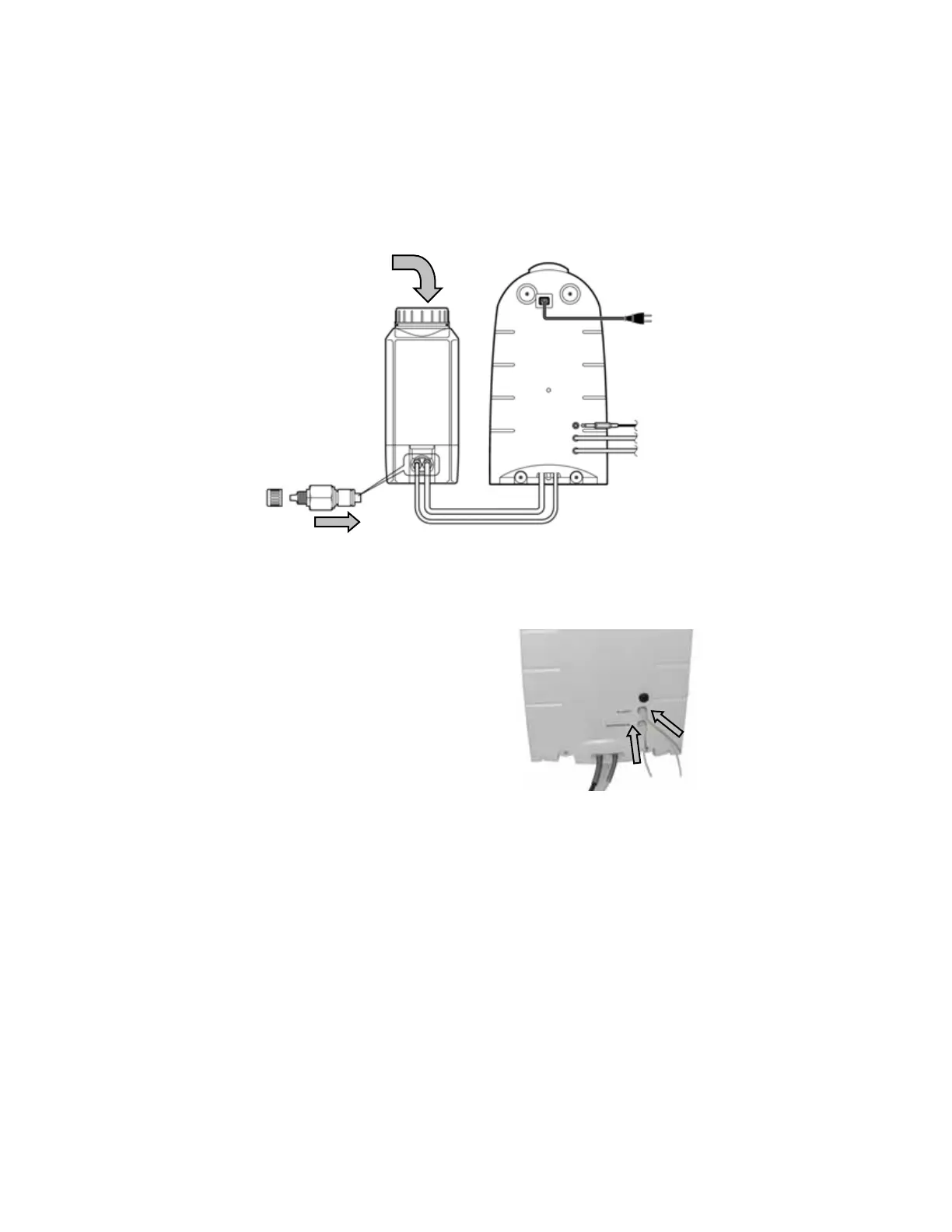
Rotate the ICW-3000 System so you can see the back of the system.
Locate the 2 tubing exiting from the bottom of the system (A). Remove tie-wraps and connect a male
CPC connector to the end of each tubing (there are 2 different sizes of tubing and connector).
Insert the male CPC connector into the female connector of the tank until you hear a click (B) and then
securely fasten the 2 connectors together. If the connectors do not fit at first, press down the plate of the
female connector. The tank may be connected from either the left or right side.
Open the tank cover and fill it with pure water such as Elix or distilled water (C).
4-3 CONNECTIONS TO THE ION CHROMATOGRAPHY SYSTEM
Connect 1/8" Teflon® tubing to the appropriate port on the back of the system. Hand tighten the nut
and then tighten it further 1/4 turn using a
wrench. Do not overtighten. (A).
A
Insert into tank this way
Coupler
Pure water inlet
Eluent
Suppressor
(A)
(B)
(C)










 To Next Page